
Mods / FontSettings

Tags:
Utility Other
Author:
MystiVaid
Side:
Client
Created:
Oct 2nd 2024 at 6:41 AM
Last modified:
May 10th at 5:27 AM
Downloads:
970
Follow Unfollow 23
Recommended download (for Vintage Story 1.22.2):
fontsettings_1.2.1.zip  1-click install

字体设置

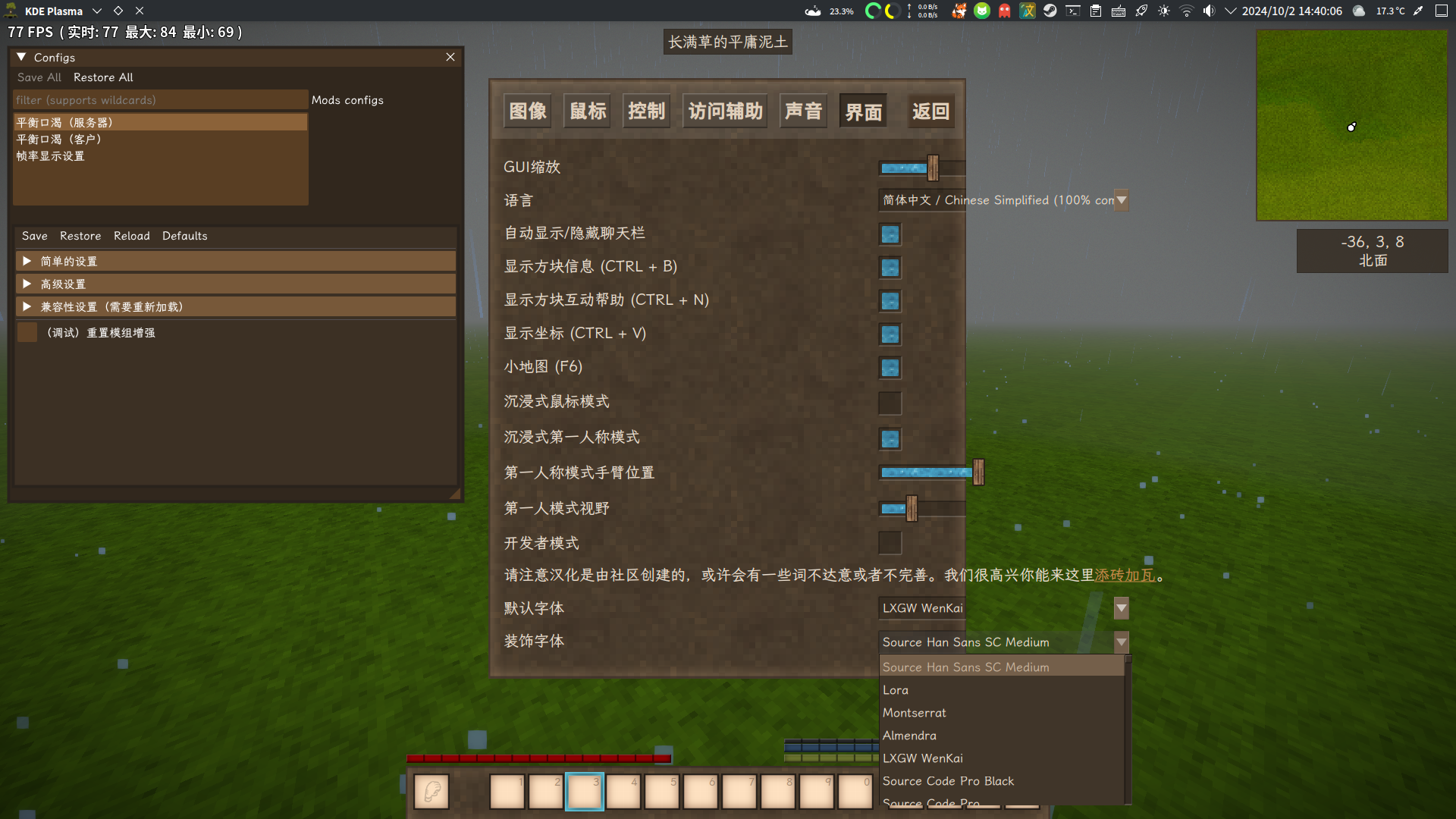
允许在游戏设置界面实时更改默认字体与装饰字体,兼容imgui,会同步设置`imgui`的字体为默认字体


Font Settings

Allows real-time changing of the Default Font and Decorative Font in the game settings interface. It is compatible with ImGui and will synchronously set the font of ImGui as the default font.


Mod Version Mod IdentifierFor Game version Downloads Released Changelog Download 1-click mod install*
1.2.1 fontsettings 35 May 10th at 5:27 AM fontsettings_1.2.1.zip 1-click install

避免对xSkills Gilded强依赖


Avoid over-reliance on xSkills Gilded

1.2.0 fontsettings 16 May 7th at 4:08 PM fontsettings_1.2.0.zip 1-click install

代码重构,添加xSkills Gilded兼容


Code refactoring, adding xSkills Gilded compatibility

1.1.1 fontsettings
1.20.0 - 1.20.3 1.20.5 - 1.20.7
436 Apr 21st 2025 at 11:21 AM fontsettings_1.1.1.zip 1-click install

兼容VSImGui 1.1.8

Compatible with VSImGui 1.1.8

1.1.0 fontsettings
1.20.0 - 1.20.3
112 Mar 20th 2025 at 5:22 AM fontsettings_1.1.0.zip 1-click install
1.0.0 fontsettings
1.19.8 - 1.20.0-pre.0
371 Oct 2nd 2024 at 6:42 AM fontsettings_1.0.0.zip 1-click install

首个版本


16 Comments (oldest first | newest first) (threaded | flat)

YangWenLi, Nov 27th 2025 at 9:18 PM

This, and probably a mod that adds fallback fonts should be vanilla, I dislike how CKJ players can't communicate with me because the default font does not have any of the characters. Great work.

bobaonline, Jun 1st 2025 at 2:36 AM

The same "black box" issue is occuring on MacOS, as well.

MystiVaid , May 25th 2025 at 7:04 PM

YourLocalMedic The issue might be due to an excessive number of system fonts, surpassing the rendering limit of the game's list UI.

YourLocalMedic, May 25th 2025 at 4:35 PM

I get the same issue mentioned by the Manjaro user where nothing renders properly on Gentoo with Hyprland

MystiVaid , Apr 6th 2025 at 1:48 PM

valrossenOliver

It looks like this isn't a problem I can solve...

valrossenOliver, Apr 4th 2025 at 8:48 PM

Hey! I got it working by playing around in the code a bit. Not sure of the underlying reason but I believe it has to do with the object reference. Add me on discord and I could show you how to get it working.

Same username as here. :)


Edit: So, almost instantly after writing this above, I started another installation and it seems that it is directly related to the amount of fonts in the array that is passed into the GuiElementDropDown. Running FontNameArray.Take(20).ToArray() makes it work while just running FontNameArray gives the black box instead. Most likely the framework that cannot handle hundreds of fonts... :P

MystiVaid , Apr 4th 2025 at 4:55 PM

valrossenOliver ImGui is an optional dependency, what a strange issue.

valrossenOliver, Apr 4th 2025 at 4:07 PM

Running pure vanilla 1.20.7 with only this mod, not with ImGui. Is ImGui a dependency?

MystiVaid , Apr 4th 2025 at 11:18 AM

valrossenOliver I'm using Arch Linux + KDE Wayland and can't reproduce the issue. Does the problem occur when using this mod alone? What about when combined with the imgui mod?


我正在使用Arch Linux + KDE Wayland,无法重现该问题。单独使用此mod时,问题是否发生?与IMGUI MOD结合使用时呢?


valrossenOliver, Apr 3rd 2025 at 8:17 PM

Nothing else really. No error logs or anything. It just seems that the rendered dropdown is completely black. I can still click the "black box" and hope that I hit the correct font but that's a bit too extreme for my taste. :P

Other dropdown boxes work perfectly in the UI so seems to be only the UI-elements created by this mod that's causing it.


To change font I opened the JSON file and input the font name manually to get it to work.


I run Wayland on GNOME, Manjaro Linux if that helps with anything.

MystiVaid , Apr 3rd 2025 at 5:53 PM

valrossenOliver Is there any more information? It's working perfectly fine on my end.

valrossenOliver, Apr 2nd 2025 at 11:19 PM

All options are shown as black boxes linux Manjaro. Both fullscreen and non-fullscreen.


imgur image of black bars instead of options


https://imgur.com/a/uKEMdDU

MystiVaid , Nov 13th 2024 at 11:21 PM

Aledark Thanks for your kindness, but I don't plan to change the description in modinfo.json to English unless it supports multi-language descriptions.

Aledark, Nov 13th 2024 at 4:24 PM

https://github.com/scgm0/FontSettings/blob/master/FontSettings/modinfo.json

{
    "type": "code",
    "modid": "fontsettings",
    "name": "FontSettings",
    "authors": [
        "MystiVaid"
    ],
    "description": "Allows real-time changing of the Default Font and Decorative Font in the game settings interface. Compatible with ImGui for Real time scyn.",
    "side": "client",
    "version": "1.0.0",
    "dependencies": {
        "game": "1.19.8"
    }
}
MystiVaid
MystiVaid , Oct 4th 2024 at 9:43 AM

Cl0ckwork_M1nd Thanks!

Cl0ckwork_M1nd, Oct 4th 2024 at 2:21 AM
Description English Translation:
# Font Settings
Allows real-time changing of the Default Font and Decorative Font in the game settings interface. It is compatible with ImGui and will synchronously set the font of ImGui as the default font.