
Mods / ImGui
- Tags:
- Author:
- Maltiez
- Side:
- Both
- Created:
- Nov 30th 2023 at 7:09 PM
- Last modified:
- May 7th at 5:41 PM
- Downloads:
- 529481
- Follow Unfollow 3820
-
Latest release (for Vintage Story 1.22.0-pre.1 - 1.22.2, potentially outdated):
vsimgui_1.2.5.zip 1-click install
You can support me on Patreon: 
Description
This is a library that brings Dear ImGui to Vintage Story
To increase/decrease font size (and GUI size as a result), use hotkeys (CTRL + - and CTRL + = by default)
From Dear ImGui git repository:
Dear ImGui is designed to enable fast iterations and to empower programmers to create content creation tools and visualization / debug tools (as opposed to UI for the average end-user). It favors simplicity and productivity toward this goal and lacks certain features commonly found in more high-level libraries.
Wrapper for ImGui.NET which in it self is wrapper for Dear ImGui - graphical user interface library. In order to use this wrapper you just need to add reference on ImGui.NET (1.89.7.1) and the mod dll itself (like with other mods dependencies, both are in this mod's archive), and add your methods for constructing ImGui windows to VSImGuiModSystem.SetUpImGuiWindows event. Another example: github.com/maltiez2/vsmod_configlib/blob/master/configlib/src/GUI/ConfigWindow.cs
Supports also Not actually (working on it, it seems I need to follow this procedure, if somebody will provide this binaries I'll inculde them in mod):
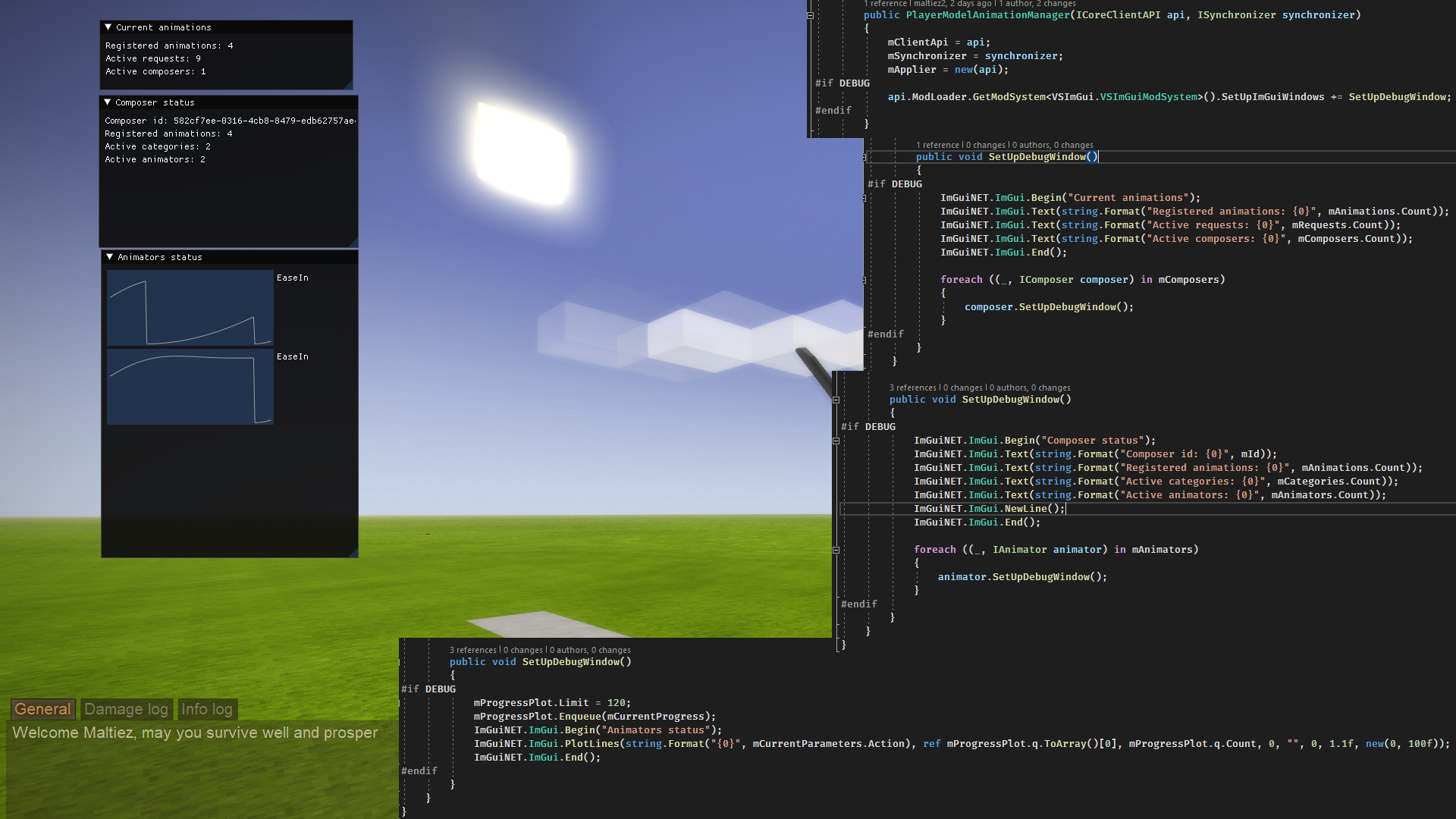
This mod will allow you to make development tools like tfedit or simple throw away debug/visualisation tools for working on your mod. It would not require your mod to depend on this library if you need it only for debugging. Just wrapp all the code you dont want to ship in #if DEBUG #endif . Bulding such tools is as easy as adding logs.
You might want to take a look at: ToastLib for additional functionality
Features
- Quick and easy small debug tools - you can display and edit in real time any value in any part of your code no matter how deep it is with just a one line (static methods of
DebugWindowclass fromVSImGuinamespace) - No dependencies required for debug tools - just wrap all the ImGui and VSImGui methods calls you add in '
#if DEBUG #endif' - Easy to build debug tools - add more sophisticated dev tools specific to your mod to speed up development and ease debugging (for example, Animation Manager library has in-game animation editor in its dev build)
- Easy and quick to layout GUI with docking and a lot of built-in functionality like color pickers
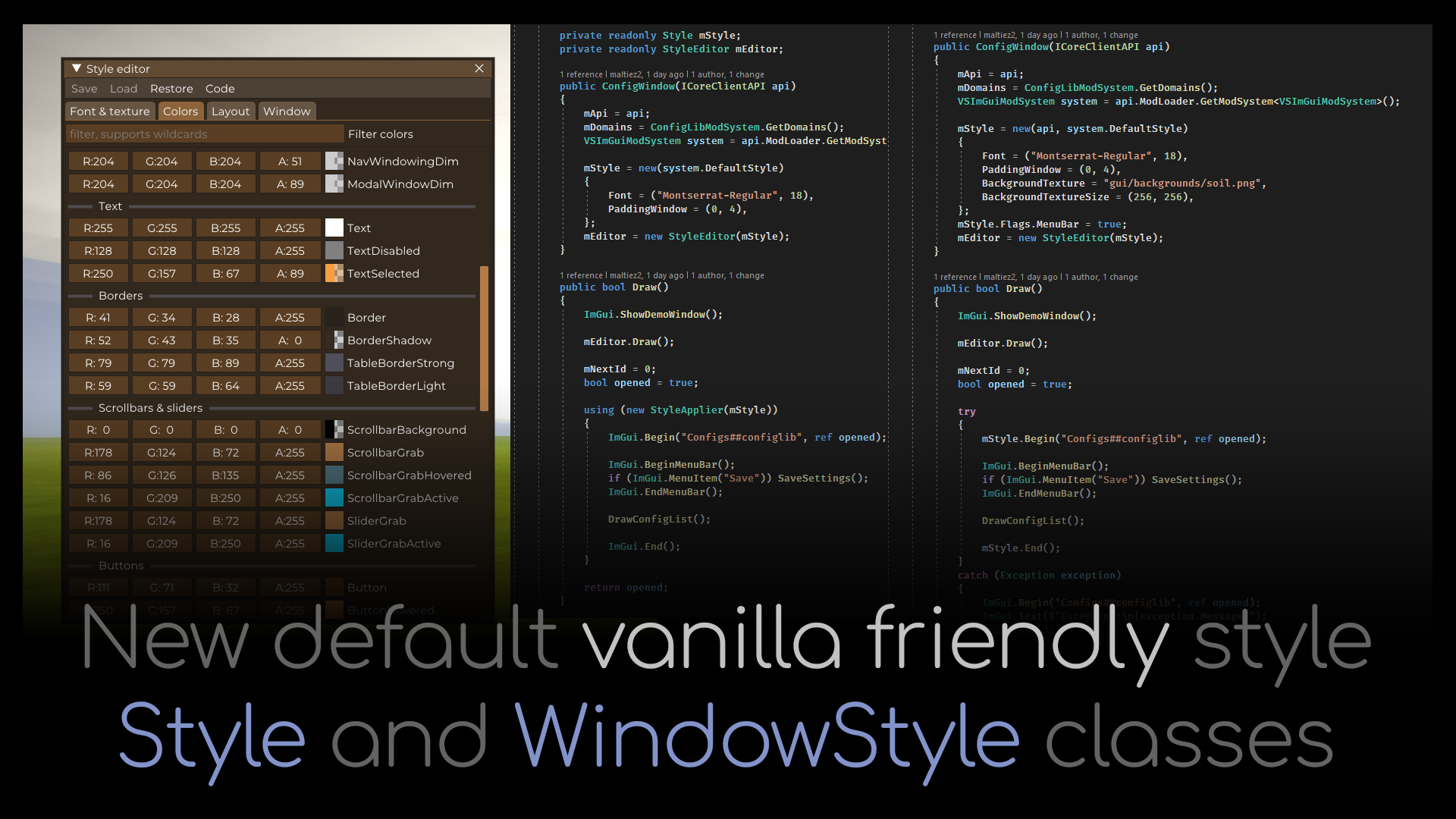
- Styles - you can change every color and size and even tile your window with a texture with a simple
StyleandWindowStyleclasses, you can serialize style into json and load it from json
Examples and docs (outdated)
ImGui manual for C++, but .NET methods should have same names and similar arguments: https://pthom.github.io/imgui_manual_online/manual/imgui_manual.html
ImGui wiki: https://github.com/ocornut/imgui/wiki
Example of showing demo window: api.ModLoader.GetModSystem<VSImGuiModSystem>().SetUpImGuiWindows += ImGuiNET.ImGui.ShowDemoWindow;
If you have some field or property in your class (or just some reference type value) you want to display or edit via GUI, you can call a static mehod of a DebugWindow class that will display a widget in a debug window with specified domain as name inside a tab with specified category. Given title serves as this widget id, and calling DebugWindow methods for same domain and title will replace existing widget instead of adding a new one. Some mehod require also an int id, it server same perpouse as title. You can call DebugWindow method in any place of code, any amount of time, but setter and getter delegates will be called once per frame.
private float someValue;
private void SomeMethod()
{
DebugWindow.FloatSlider("My debug window title", "Some sliders", "a slider", min: 0, max: 1.0f, getter: () => someValue, setter: value => someValue = value);
}
If you want to not add ImGui as dependency you can wrap its mehods with #if DEBUG #endif and leave them only in debug build
private float someValue;
private void SomeMethod()
{
#if DEBUG
DebugWindow.FloatSlider("My debug window title", "Some sliders", "a slider", min: 0, max: 1.0f, getter: () => someValue, setter: value => someValue = value);
#endif
}
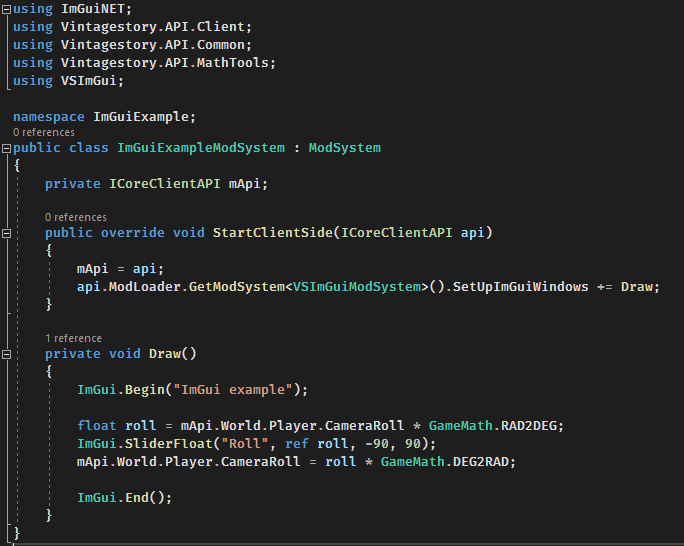
To add your own ImGui windows you can add your drawing method to SetUpImGuiWindows event of VSImGuiModSystem. This method will be called once per frame. This method should contain all ImGui methods for drawing windows and widgets. Each frame gui is fully redrawn, so this method servers as layout composer and interface logic at the same time (this is a feature of all immediate mode GUIs).
using ImGuiNET;
using Vintagestory.API.Client;
using Vintagestory.API.Common;
using Vintagestory.API.MathTools;
using VSImGui;
namespace ImGuiExample;
public class ImGuiExampleModSystem : ModSystem
{
private ICoreClientAPI mApi;
public override void StartClientSide(ICoreClientAPI api)
{
mApi = api;
api.ModLoader.GetModSystem<VSImGuiModSystem>().SetUpImGuiWindows += Draw;
}
private void Draw()
{
ImGui.Begin("ImGui example");
float roll = mApi.World.Player.CameraRoll * GameMath.RAD2DEG;
ImGui.SliderFloat("Roll", ref roll, -90, 90);
mApi.World.Player.CameraRoll = roll * GameMath.DEG2RAD;
ImGui.End();
}
}
| Mod Version | Mod Identifier | For Game version | Downloads | Released | Changelog | Download | 1-click mod install* |
|---|---|---|---|---|---|---|---|
| 1.2.5 | vsimgui | 45531 | May 7th at 5:41 PM | vsimgui_1.2.5.zip | 1-click install | ||
|
Now MultiViewportSupport is set to false only on Mac. Will fix issues with it properly later. | |||||||
| 1.2.4 | vsimgui | 9111 | May 3rd at 1:32 PM | vsimgui_1.2.4.zip | 1-click install | ||
|
Some changes to multiviewport support of different OS | |||||||
| 1.2.3-pre.1 | vsimgui | 407 | May 3rd at 7:32 AM | vsimgui_1.2.3-pre.1.zip | 1-click install | ||
|
Potential fix for issues with some linux distros | |||||||
| 1.2.2 | vsimgui | 22970 | Apr 20th at 2:15 AM | vsimgui_1.2.2.zip | 1-click install | ||
|
Made multiview port support (dragging out imgui windows out of main game window) turned off by default | |||||||
| 1.2.1 | vsimgui | 3339 | Apr 4th at 1:50 PM | vsimgui_1.2.1.zip | 1-click install | ||
|
Added config option to disable multi view support. On Mac it is disabled by default. | |||||||
| 1.2.0 | vsimgui | 8450 | Feb 15th at 12:35 PM | vsimgui_1.2.0.zip | 1-click install | ||
|
Updated to 1.22 | |||||||
| 1.1.16 | vsimgui | 113415 | Nov 13th 2025 at 4:33 AM | vsimgui_1.1.16.zip | 1-click install | ||
|
Fixed Almendra font | |||||||
| 1.1.15 | vsimgui | 11522 | Nov 4th 2025 at 10:46 PM | vsimgui_1.1.15.zip | 1-click install | ||
|
Added some safeguards | |||||||
| 1.1.14 | vsimgui | 42404 | Oct 5th 2025 at 2:55 PM | vsimgui_1.1.14.zip | 1-click install | ||
|
Fixed text input softlock | |||||||
| 1.1.13 | vsimgui | 16330 | Sep 23rd 2025 at 12:50 PM | vsimgui_1.1.13.zip | 1-click install | ||
|
Fixed bug when you can still hover and click over gui elements when mouse is not visible on screen | |||||||
| 1.1.12 | vsimgui | 45113 | Aug 15th 2025 at 10:34 PM | vsimgui_1.1.12.zip | 1-click install | ||
|
Possible fix for crash when imgui window is outside of main game window | |||||||
| 1.1.11 | vsimgui | 772 | Aug 9th 2025 at 9:45 PM | vsimgui_1.1.11.zip | 1-click install | ||
|
Changed how Esc works. Fixed crash when ImGui can't access monitor | |||||||
| 1.1.10 | vsimgui | 2695 | Jul 16th 2025 at 3:03 PM | vsimgui_1.1.10.zip | 1-click install | ||
|
Recompiled for pre.3 | |||||||
| 1.1.9 | vsimgui | 3745 | Jun 17th 2025 at 8:39 AM | vsimgui_1.1.9.zip | 1-click install | ||
|
Recompiled for 1.21 | |||||||
| 1.1.8 | vsimgui | 64859 | Apr 4th 2025 at 9:09 AM | vsimgui_1.1.8.zip | 1-click install | ||
|
Added hotkeys to increase/decrease default font size | |||||||
| 1.1.7 | vsimgui | 62222 | Oct 24th 2024 at 3:13 AM | vsimgui_1.1.7.zip | 1-click install | ||
|
Updated to 1.20.0-pre.7 | |||||||
| 1.1.6 | vsimgui | 2128 | Oct 5th 2024 at 3:36 PM | Empty | vsimgui_1.1.6.zip | 1-click install | |
| 1.1.5 | vsimgui | 32468 | Jun 6th 2024 at 12:56 PM | vsimgui_1.1.5.zip | 1-click install | ||
|
Added support for cyrillic, chinese, japanese, korean characters | |||||||
| 1.1.4 | vsimgui | 1935 | May 30th 2024 at 10:51 AM | vsimgui_1.1.4.zip | 1-click install | ||
|
Fixed memory leak on word reloads | |||||||
| 1.1.3 | vsimgui | 13392 | Mar 21st 2024 at 8:32 AM | vsimgui_1.1.3.zip | 1-click install | ||
|
Fixed problems with rendering and cursor position registering if monitor scale was not set to 100% Fixed mouse wheel not being captured by imgui windows | |||||||
| 1.1.2 | vsimgui | 2443 | Mar 7th 2024 at 5:42 PM | vsimgui_1.1.2.zip | 1-click install | ||
|
Nuget packages support | |||||||
| 1.1.1 | vsimgui | 1173 | Mar 2nd 2024 at 12:10 PM | vsimgui_1.1.1.zip | 1-click install | ||
|
Fixed bug with popups sticking to mouse with window that created them when they cross main window border | |||||||
| 1.1.0 | vsimgui | 6038 | Mar 2nd 2024 at 12:42 AM | vsimgui_1.1.0.zip | 1-click install | ||
|
Changelog
| |||||||
| 1.0.0 | vsimgui | 731 | Feb 28th 2024 at 9:16 AM | vsimgui_1.0.0.zip | 1-click install | ||
|
Added on imgui closed event | |||||||
| 1.0.0-pre.3 | vsimgui | 393 | Feb 28th 2024 at 5:51 AM | vsimgui_1.0.0-pre.3.zip | 1-click install | ||
|
Changelog
| |||||||
| 1.0.0-pre.2 | vsimgui | 542 | Feb 26th 2024 at 3:10 PM | vsimgui_1.0.0-pre.2.zip | 1-click install | ||
|
Use previous versions (prior to 1.0.0) for dependent mods unless they explicitly state the opposite. This release is for modders and testing. Unstable, not backwards compatible (to versions prior 1.0.0), will certainly break dependent mods. Changelog
| |||||||
| 1.0.0-pre.1 | vsimgui | 392 | Feb 26th 2024 at 4:49 AM | vsimgui_1.0.0-pre.1.zip | 1-click install | ||
|
Use previous versions for dependent mods unless they explicitly state the opposite. This release is for modders and testing. Unstable, not backwards compatible (will certainly break dependent mods). Changelog
| |||||||
| 0.3.5 | vsimgui | 1426 | Feb 13th 2024 at 10:01 PM | vsimgui_0.3.5.zip | 1-click install | ||
|
Fixed Mac support | |||||||
| 0.3.4 | vsimgui | 1873 | Feb 13th 2024 at 7:52 PM | vsimgui_0.3.4.zip | 1-click install | ||
|
Version with requirement for both sides | |||||||
| 0.3.3 | vsimgui | 6095 | Jan 18th 2024 at 11:26 AM | Empty | vsimgui_0.3.3.zip | 1-click install | |
| 0.3.2 | vsimgui | 842 | Jan 14th 2024 at 3:22 AM | vsimgui_0.3.2.zip | 1-click install | ||
|
Just updated required game version to help moddb pull correct version of the mod | |||||||
| 0.3.1 | vsimgui | 637 | Jan 13th 2024 at 1:27 PM | vsimgui_0.3.1.zip | 1-click install | ||
|
Fixed a bug related to some stuff not being disposed | |||||||
| 0.3.0 | vsimgui | 359 | Jan 13th 2024 at 9:33 AM | vsimgui_0.3.0.zip | 1-click install | ||
|
New helper classes (editors and filtering) New debug widgets (now you can easily add a widget to a dedicated debug window from any part of your code with just a one line) | |||||||
| 0.2.4 | vsimgui | 382 | Jan 12th 2024 at 2:28 PM | vsimgui_0.2.4.zip | 1-click install | ||
|
Removed debug logs | |||||||
| 0.2.3 | vsimgui | 398 | Jan 11th 2024 at 7:51 PM | vsimgui_0.2.3.zip | 1-click install | ||
|
Added support for Linux (previously it was bugged and gave an error on loading specific library) | |||||||
| 0.2.2 | vsimgui | 535 | Jan 9th 2024 at 10:18 AM | vsimgui_0.2.2.zip | 1-click install | ||
|
Made not required on both server and client | |||||||
| 0.2.1 | vsimgui | 655 | Dec 19th 2023 at 3:24 AM | vsimgui_0.2.1.zip | 1-click install | ||
|
Assigned ExecuteOrder to 0.001 so it will be loaded before other mods | |||||||
| 0.2.0 | vsimgui | 419 | Dec 16th 2023 at 7:34 AM | vsimgui_0.2.0.zip | 1-click install | ||
|
New default vanilla friendly style Style and WindowStyle classes Style editor for editing them Export styles to json and load from json Tiling window background with texutre (in Utils class) Vanilla fonts are loaded and used by default | |||||||
| 0.1.1 | vsimgui | 524 | Dec 12th 2023 at 4:42 AM | Empty | vsimgui_0.1.1.zip | 1-click install | |
| 0.1.0 | vsimgui | 385 | Dec 5th 2023 at 2:12 AM | vsimgui_0.1.0.zip | 1-click install | ||
|
Config file (imgui.ini) now saved in ModConfig folder Added support for:
| |||||||
| 0.0.1 | vsimgui | 389 | Nov 30th 2023 at 7:09 PM | vsimgui_0.0.1.zip | 1-click install | ||
|
first test version | |||||||
VSImGui does not seem to work on Apple Silicon Mac when Vintage Story is running natively as arm64.
The log says:cimgui.dylib: mach-o file, but is an incompatible architecture (have 'x86_64', need 'arm64')
So the included macOS cimgui.dylib appears to be Intel/x86_64 only. An arm64 or universal macOS build would be needed for Apple Silicon. This also breaks xSkills/xSkillGilded because they depend on VSImGui.
I'm having trouble with this mod crashing me on a silicon Mac. We get an error code when it is first loaded in that it should be moved to trash. If I try to ignore this pop-up, the game will immediately crash. Not sure what you would need from me, but it does auto-kill. Thank you!!
I cant see the md options when I click escape???
1.2.4 has fixed all the problems for me. Thank you for the hard work ^^
Confirming vsimgui_1.2.3-pre.1 is broken on Linux for me as well. Rolling back to 1.2.0 fixes it. Posting full system info as Jena_Thornwyrd suggested.
System:
Symptoms with 1.2.3-pre.1:
Happy to provide additional logs, GL context info, or test specific builds if useful.
So, to summarize, Maltiez, it seems that the multiview feature cause a serious issue for linux users if I only read the changelog, I may be wrong because I didn't audited your code, I only read the changelog.
ElTioGaara: just downgrade ImGui to the 1.2.0 version it should be okay for now. Also on a more global and serious level, a comment devoid of context and informations to help debugging cause more harm and ressentment than it helps, so, if you use "Linux", at least understand that, what makes its power, is the ability to look up precisely what's wrong and provide detailled informations to the devs, especially those that are working for free. So, I don't tell you to provide all the logs of your system, but at least some informations to help someone that has nearly 0 incentives to takes you in account, to help you. So please, next time, at least provide the name of your distribution, which version of the kernel you're using (`uname -a` in the terminal), which desktop environment, windows manager and .Net version you're rocking (`dotnet --version` in the terminal for the .Net version), thank you.
I'm truly sorry, I didn't mean to be offensive at all, I didn't realize the comment wasn't written in full, I apologize.
mi specs:
Operating System: Kubuntu 26.04 LTS
KDE Plasma Version: 6.6.4
KDE Frameworks Version: 6.24.0
Qt Version: 6.10.2
Kernel Version: 7.0.0-15-generic (64-bit)
Graphics Platform: Wayland
Processors: 12 × AMD Ryzen 5 5600G with Radeon Graphics
Memory: 32 GiB of RAM (30.6 GiB usable)
Graphics Processor 1: AMD Radeon RX 6650 XT
Graphics Processor 2: AMD Radeon Graphics
Manufacturer: ASUS
The problem is that when I click the mod settings button, the window doesn't appear, so I can't modify anything. I hope this helps, and I'm really sorry; I didn't realize the comment hadn't been written completely.
Yup Maltiez, sorry, I love your work, but there is a serious issue, I'll try to pinpoint the version, but yeah, ImGui is curently KO on EndeavourOS Linux 7.0.3-arch1-1 (niri + KDE → Wayland) .Net 10.0.104, VS 1.22.1
nevermind, the mod maximum VS version is 1.22.0…
Testing various versions in progress.
ImGui version 1.2.0 works in VS 1.22.0|1 in my config.
The config window appears when I press "Mod Config", and the value tweaks are saved.
this mod not working on VS 1.22.1 linux
nevermind i found it lol
Louis_Vuitton If Imgui and its buddy Configlib are not on the server, then configuration yaml files do not appear in the server files for server admins like me to configure the server.
Why does this have a server-side (marked as "both")? Any reason to have it on the server?
Edit: I think I got it. If mod using ImGui does server and client side, dependancy will come up on the server side as well?
Mentalman, VS 1.21.6 is on .NET 8 but VS 1.22-rc is already on .NET10 so make sure you get the correct version for your game version.
I'm getting an error from vsigmui stating:
Exception: Could not load file or assembly 'System.Runtime, Version=10.0.0.0, Culture=neutral, PublicKeyToken=b03f5f7f11d50a3a'. The system cannot find the file specified.
It looks like the csproj file is targeting 10. but (i could be wrong im not a modder) VS is on .net 8.0. Should this be targeting 8.0?
Maltiez Thank you!! working great now :)
Leavraell I have no way for debugging code on mac, but I will add a config option to disable multiple viewports
Thank you for the update to 1.22.0-pre.2! Really appreciate the continued support for this mod.
I wanted to flag an issue for macOS users — vsimgui crashes immediately on VS 1.22+ on Apple Silicon Macs. Since configlib and autoconfiglib both depend on vsimgui, this effectively breaks a lot of mods for Mac players. I've filed a GitHub issue at maltiez2/VintageStory_ImGui#13, but wanted to let you know.
The crash looks like this: System.InvalidOperationException: GLFW Version unavailable: NSGL: Failed to create OpenGL context at ImGuiController_OpenTK.ImGuiWindow..ctor(...)
I was able to find a workaround, details below if it helps with a fix:
Patch ImGuiController_OpenTK.dll with Mono.Cecil to NOP out three flag assignments in SetImGuiParameters():
- ImGuiConfigFlags.ViewportsEnable (0x400)
- ImGuiBackendFlags.PlatformHasViewports (0x800)
- ImGuiBackendFlags.RendererHasViewports (0x1000)
With this patch, ImGui renders everything docked inside the main game window instead of spawning secondary OS windows. DockingEnable is preserved so configlib panels still work normally.
Tested with vsimgui 1.1.16 + configlib 1.10.14 on VS 1.22.0-rc.2, macOS M1Max.
Would love to see a native fix — maybe a runtime platform check to skip ViewportsEnable on macOS?
Thanks again for all the work on this!
FYI, I loaded this up with a 1.21.6 install and got no launch errors. Have not played with it extensively yet.
I have tried changing the HiDPI settings and all of the suggestions on the ImGUI site, but for whatever reason the CTRL+= does not change the size font in my games (laptop and desktop). It is almost impossible to read. I have also changed the scaling in the settings which doesn't change the font. Also, for whatever reason the resize button in the bottom right only works for vertical and not horizontal. I would love to be able to resize on both axises.
Does this work with 1.21.6? Or does it bug out?
Does this work in 1.21.6?
Bug: IMGUI controls missing 'f' in "Font".
TY TY TY so much!!!!
I'm not sure what I'm doing wrong, but I would like to increase the structure rates drastically and for whatever reason, either this or config don't work. When I open my world, it gives me a couple error messages, and then when I open up the settings area, it just doesn't show anything to edit. Anyone have any idea how to fix this?
@Maltiez Thank you for the reply! Unfortunately I don't seem to have an imgui.ini file in my ModConfig folder. I installed the latest version of imgui for 1.21.0-rc.4, but there's no imgui.ini, or even a vsimgui.ini that I see.
SabineWebb remove imgui.ini file in ModConfig folder
I'm playing 1.21.0 with one monitor. When I tried to move the mod settings window, it made a second window with the settings window and now I have to tab out of the game to make any modifications. The problem is that when I do so, none of the changes stick. How do I get the window back into the game window?
Running this in conjunction with Config Lib 1.10.1 (for 1.21.0-rc.6) + BetterRuins 0.5.0 (for 1.21.0-rc.7) on latest 1.21 stable release without any issues.
That's not to say there aren't any, but it generally seems to play nice with the stable version!
Latest version no crash on RC4.
I don't know about RC5 since I reverted back due to the windmill bug.
Crash still happening with RC4 and latest version.
I can reproduce it, it is that regular.
Game Version: v1.21.0-rc.3 (Unstable)8/9/2025 11:15:46: Critical error occurred in the following mod: vsimgui@1.1.10
Loaded Mods: buzzwords@1.8.0, cutthehides@1.0.0, immersivecorpsedrop@1.0.3, lanternsarelighters@1.0.0, makesaltnmore@1.0.1, mbr@1.0.0, moreicons@1.1.0, noisybears@1.1.0, particlesplus@2.3.1, patchdebug@1.1.2, recyclablebags@1.0.0, ripened_wild_crops@1.0.0, simplelogging@0.1.5, stepfixelk@0.0.1, sletharm@0.1.1, visibleore@1.0.1, game@1.21.0-rc.3, vsimgui@1.1.10, zoombuttonreborn@2.0.0, kalwaysgetcropseeds@1.0.0, egocaribautomapmarkers@4.0.3, betterfirepit@1.1.6, betterstonepath@1.0.4, blocksoverlay@4.5.2, carryon@1.10.0-rc.1, commonlib@2.6.1, composter@1.2.1, configlib@1.9.1, cratebulkinput@1.0.0, danatweaks@3.5.0, easylightlevels@1.0.3, extrainfo@1.9.10, farmlanddropswithnutrients@1.2.1, freedomunits@1.1.4, harvestcorpsesquickly@1.0.0, healthbar@1.0.7, hudclockpatch@1.1.1, improvedhandbookrecipes@1.1.3, knapster@2.14.6, mobsradar@2.1.9, projectiletracker@1.0.4, statushudcont@3.2.7, stepupcontinued@0.0.1, stripper@0.0.5, traitacquirer@0.9.6, translocatordirectionindicator@1.0.0, creative@1.21.0-rc.3, survival@1.21.0-rc.3, extraoverlays@1.5.0, pickupartist@0.3.1, traitacquireraddon@1.0.0, treetapping@1.0.0
System.NullReferenceException: Object reference not set to an instance of an object.
at OpenTK.Windowing.Desktop.MonitorInfo..ctor(MonitorHandle handle)
at OpenTK.Windowing.Desktop.Monitors.GetMonitorFromWindow(Window* window)
at VSImGui.Controller.Update(Single deltaSeconds, Boolean captureInputs) in D:\Projects\VintageStory\vsimgui\VSImGui\source\Integration\Controller.cs:line 46
at VSImGui.OffWindowRenderer.OnRenderFrame(Single deltaTime, EnumRenderStage stage) in D:\Projects\VintageStory\vsimgui\VSImGui\source\Integration\Dialog.cs:line 153
at Vintagestory.Client.NoObf.ClientMain.RenderToDefaultFramebuffer(Single dt) in VintagestoryLib\Client\ClientMain.cs:line 1010
at Vintagestory.Client.GuiScreenRunningGame.RenderToDefaultFramebuffer(Single dt) in VintagestoryLib\Client\MainMenu\Screens\GuiScreenRunningGame.cs:line 250
at Vintagestory.Client.ScreenManager.Render(Single dt) in VintagestoryLib\Client\ScreenManager.cs:line 760
at Vintagestory.Client.ScreenManager.OnNewFrame(Single dt) in VintagestoryLib\Client\ScreenManager.cs:line 663
at Vintagestory.Client.NoObf.ClientPlatformWindows.window_RenderFrame(FrameEventArgs e) in VintagestoryLib\Client\ClientPlatform\GameWindow.cs:line 113
at OpenTK.Windowing.Desktop.GameWindow.Run()
at Vintagestory.Client.ClientProgram.Start(ClientProgramArgs args, String[] rawArgs) in VintagestoryLib\Client\ClientProgram.cs:line 337
at Vintagestory.Client.ClientProgram.<>c__DisplayClass10_0.<.ctor>b__1() in VintagestoryLib\Client\ClientProgram.cs:line 133
at Vintagestory.ClientNative.CrashReporter.Start(ThreadStart start) in VintagestoryLib\Client\ClientPlatform\ClientNative\CrashReporter.cs:line 95
This happens when I forget the game is running and go away long enough for my monitor to shut off.
Usually the game will be paused, but it has even happened when I was just in the main menu.
I don't know how different PR3 is from RC3 or if it makes a difference, but I figured better to let you know.
Maltiez Hi, how did you added version "for testers" on the page?
If you are having issues with this mod and config lib:
uninstall both and go into the "files" tab on both mod pages to download the previous version
make sure you restart your game.
the problem is that the mods have updated to support the unstable branch of the game, but that does not support the stable branch anymore.
once you go back to the previous version and restart the game, the issue will be fixed.
1.20.12?
TassieTiger I'm running the 1.1.8 version and I get the same message...
Im running the latest version of both mods for betterRuins but the button doesent do anything.. im on 1.20.12 am i doing something wrong?
TassieTiger Bang on accurate and thanks for that.
As you mentioned ImGUI 1.1.9 is ONLY good for unstable VS 1.21.0-pre.1
I can probably reconfirm what other people already know - Tested on stable and using ImGUI 1.1.8 = works fine
Easy fix when choosing the correct version (me = dum-dum)
A big thanks for Maltiez for the mod too!
Guys make sure you are running the appropriate version. Go into the files tab and make sure the version you download matches the game version you are running. I dare say most of you are running the latest stable game version 120.12 while trying to use a version of this mod for the unstable version. It is working fine for me
I'm having the same issue as everyone else. Same error.
Checked this mod for the error - full log here with line errors mentioned when using ModContainer.cs:lines 457 & 454 : https://pastebin.com/PX3iNFHi
vsimgui was the only mod enabled, so doesn't look to be related to other mods.
was using mod version 1.1.9 with VS v1.20.12 (in case I'm using the wrong version - is this latest version not backwards compatible with v1.20.12?)
vsimgui fails to initialise with this error occuring
same are you also not getting the button to use stuff like config lib
RedRockG came to comment im getting the same error
Hello, I am receiving the following message:
21.6.2025 16:04:30 [StoryEvent] Comienza...
21.6.2025 16:04:30 [StoryEvent] Siente...
21.6.2025 16:04:32 [Error] [vsimqui] An exception was thrown when trying to load assembly:
21.6.2025 16:04:32 [Error] [vsimqui] Exception: Could not load file or assembly 'System.Runtime, Version=8.0.0.0, Culture=neutral, PublicKeyToken=b03f5f7f11d50a3a'. El sistema no puede encontrar el archivo especificado.
at System.ModuleHandle.ResolveType(QCallModule module, Int32 typeToken, IntPtr* typeInstArgs, Int32 typeInstCount, IntPtr* methodInstArgs, Int32 methodInstCount, ObjectHandleOnStack type)
at System.ModuleHandle.ResolveTypeHandle(Int32 typeToken, RuntimeTypeHandle[] typeInstantiationContext, RuntimeTypeHandle[] methodInstantiationContext)
at System.Reflection.RuntimeModule.ResolveType(Int32 metadataToken, Type[]
I uploaded wrong build and reuploaded correct one after several minutes
that fixed it. so it just didn't download correctly the first time?
TakeoTheWolf
Redownload latest release
somehow this new update cuases crashes upon saving and leaving a single player world, it prevents the save sometimes as well. and doesn't activate the crash handler so I have no logs to offer you. sorry to be a bother.
Losa98
Added hotkeys to decrease/increase gui size, dont want to tie it to vanilla gui scale
Hello please patch to scale with in-game gui size setting, I can't see anything in the config window because the text is way too small!! Tried a bunch of different things to fix it and while I could make it bigger it would drop the resolution of the rest of the game by a ton. thank you!!
Edit: this issue caused me to find out windows magnifying glass exists xD pretty useful tbh, the shortcut is the windows key and the plus button
Does most current version work with 1.20.4?
Can I use this mod to increase font size? It's hard for me to read text in this game...
Do i need this mod, for BetterRuins? Is it necessary?
which version is compatible with 1.19.8 please!
which version is compatible with 1.19.8? (current stable)
Exstructor
You can try building binaries yourself. This is stuff I used to do this: https://drive.google.com/file/d/1mJ5b5-5wkU4Fo9jQJAUiQT3RmJZtPotX/view?usp=sharing, I dont remember the steps and details cause it was long ago. If you will be able to successfully build it, just replace binaries in mod archive.
Hey, I'm using Linux ARM (aarch64), and the so files have the wrong architecture, how can I fix that?
Maltiez thanks
Just tested latest version on Ubuntu 20: works fine
adres4t
Should work on linux, need more info, logs and such, better in VS discord.
what about linux compatibility? can't join any server with this library on.
Maltiez
yep you are right i finally fixed it and it works, Thanks.
Yes. Considering you asked this question, it probably does. You have 0.3.5 version for 1.19.4-rc.1 version of the game, but your game version is probably 1.19.3.
says that unable to resolve some mod dependencies???
Maltiez
I just checked on 19.1.4-rc and with v0.3.5 and the game loads normally! You are the best for resolving this so fast, really appreciate it!
Dmitryz
0.3.5 will hopefully fix mac support
Dmitryz
Mac... It is kinda not supported, or rather I cant test it on mac and debug cause I dont have mac, and library needs a binary for it. I will try to solve Mac support in a couple of days.
Upd. Ok, found an image of mac for vmware
I am on a Mac (v19.1.3) and I believe I am facing the
problem.
Is anyone aware of any workarounds? Tried googling how to change the noexec status, but the suggested solutions didn't seem to work, game crashes on startup if I have this mod enabled
rayray
Make sure that you have the latest versions of both ImGui and Config lib mods, mod manager warning does not matter in this case
say it needs error say it needs 1.18.8 even though you said for 1.19 and crashes when i press p to change elements on hud for mod