Mods / Particles Plus

Tags:
Graphics QoL
Authors:
Louis_Vuitton, MediocreGaming
Side:
Client
Created:
Jun 5th 2024 at 6:28 PM
Last modified:
May 30th at 1:30 PM
Downloads:
40910
Follow Unfollow 1109
Recommended download (for Vintage Story 1.22.0 - 1.22.3):
particlesplus-2.5.8.zip  1-click install

Note2: 1.22 version requires ImGui 1.2.0 or higher 

Demo Video

Features:

  • Presets for:
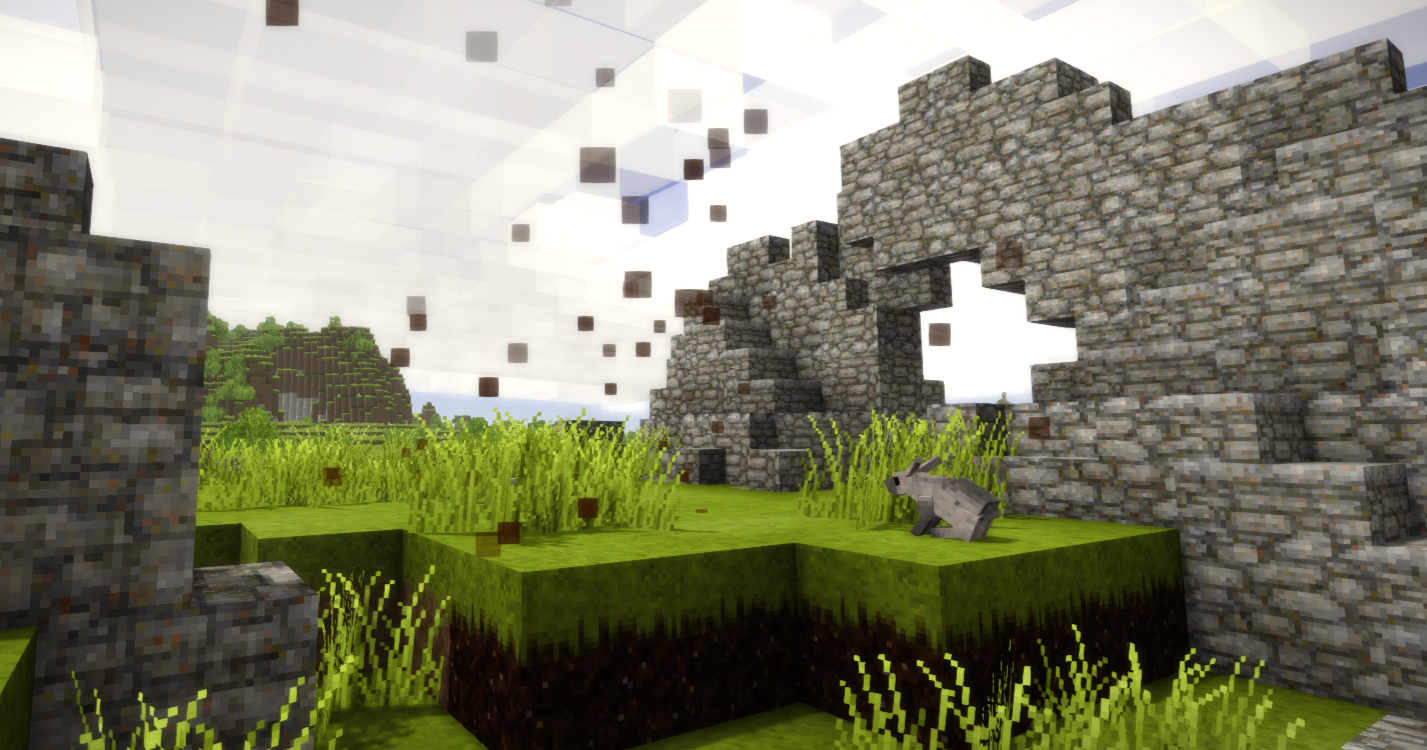
    • Terra Preta (enabled by default)
    • High Fertility Soil (enabled by default)
    • Peat (disabled by default)
    • Blue Clay (disabled by default)
    • Red Clay (disabled by default)
    • Cracked Vessels (enabled by default)
    • Bony Soil (enabled by default)
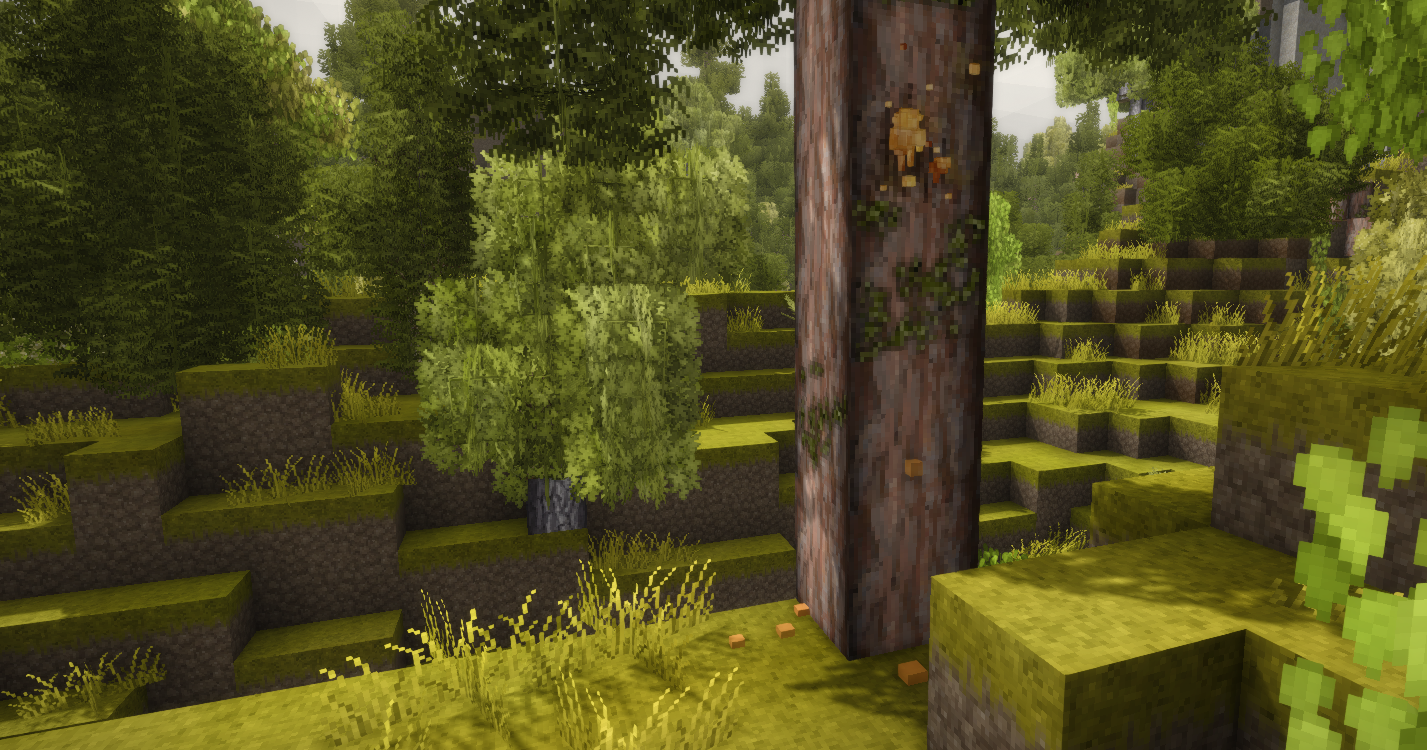
    • Resin (enabled by default)
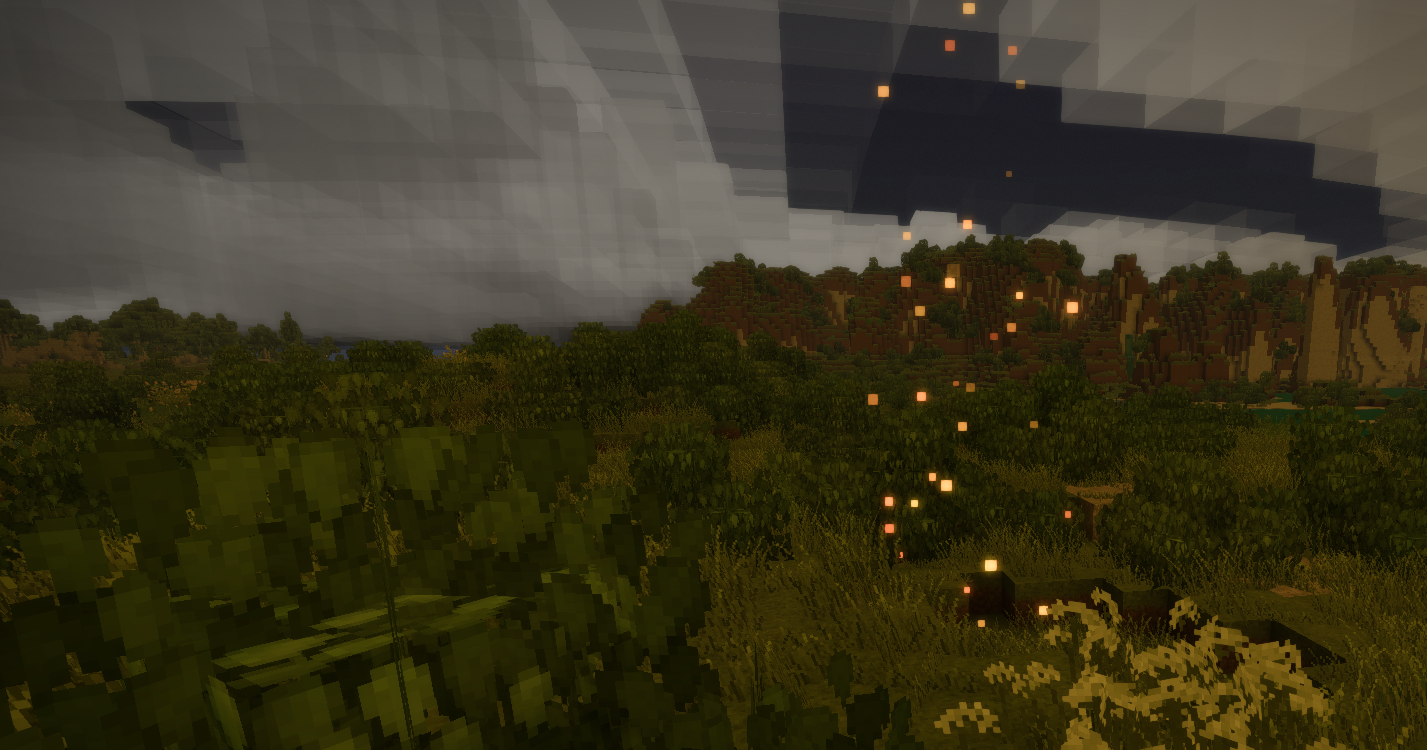
    • Meteoric Iron (enabled by default)
    • Loose Ore Bits (disabled by default)
    • Copper Ore (disabled by default)
  • 4 Particles presets, you can add those to w/e you want.
  • GUI configuration: enable/disable particles, add new presets within the game ("P" key by default)
  • Toggle all active presets on/off from GUI or with hotkey ("CTRL + P" by default)
  • Technically customizable particles (requires config file editing)


Adding custom particles:

If you want to add custom particles you can do it in the mod's config. You should be familiar with:

  • JSON formating
  • Wildcards and Regex
  • AdvancedParticleProperties Class properties from VintageStory API.


Just follow default config format. I highly recommend to use Modding Tools by Maltiez for creating / exporting particles code.

edit: Modding Tools are very outdated

Planned:

  • Particles editor


Q and A:

Q: Mod doesn't work on the server but works on SP

A: Some servers only allow whitelisted mods, others have a blacklist for certain mods. This mod is probably not allowed on that server.


Q: Can the render distance of the particles be changed?

A: No, it uses vanilla particle system and it renders exactly the same way as any particle in the game.


Q: "P" / "CTRL + P" does something else

A: Go to Settings > Controls and rebind Particles Plus hotkeys to something else.

Not working with 1.22: Delete old config file.

Edit: Should be handled automatically in 2.5.8... hopefully :)


If you need any help you can ask on Discord

Mod Version Mod IdentifierFor Game version Downloads Released Changelog Download 1-click mod install*
2.5.8 particlesplus
1.22.0 - 1.22.3
6898 Apr 24th at 5:24 PM particlesplus-2.5.8.zip 1-click install

Fix: If particlesplus.bad.json exists it won't be overwriten by new bad config. 

2.5.7 particlesplus 48 Apr 24th at 4:57 PM particlesplus-2.5.7.zip 1-click install

Improved bad config handling. If something goes wrong "bad" config will be saved as particlesplus.bad.json and default will be loaded instead.

2.5.6 particlesplus 64 Apr 24th at 4:25 PM particlesplus-2.5.6.zip 1-click install

- Added option to restore default config
- Added loose bits and copper ore presets (disabled by default)
- Added confirmation modal

2.5.2 particlesplus
1.22.0-pre.1 - 1.22.0-rc.8
969 Apr 15th at 10:25 AM particlesplus-2.5.2.zip 1-click install

Update to this version for 1.22 is recommended as it have some good improvements and fixes


Refactor: Optimized code base (should run faster, at least it feels faster)
Fix: Early initialization caused particles not appear on the servers unless toggled on/off
Fix: Global toggle persistence

2.5.0 particlesplus
1.22.0-pre.1 - 1.22.0-rc.8
92 Apr 14th at 7:22 PM ParticlesPlus-2.5.0.zip 1-click install

Fix: possibly fixed some shananigans with null values

Feat: New Gui based on ImGui library, you will need to install dependancy for it

--------------------

If this works well I will clean up some code and start on particles editor


2.4.1 particlesplus
1.22.0-pre.1 - 1.22.0-rc.8
66 Apr 14th at 10:50 AM particlesplus_2.4.1.zip 1-click install

Fix: "Add New" crashing the game...

2.4.0 particlesplus
1.22.0-pre.1 - 1.22.0-rc.2
1096 Mar 12th at 6:53 PM particlesplus_2.4.0.zip 1-click install

Updated to 1.22


Note: You will need to regenerate your config or delete every null value in it.

2.3.3 particlesplus 602 Apr 15th at 7:33 AM particlesplus-2.3.3.zip 1-click install

Fix: Not working with DarkUI2

Fix: Possible root of all random null reference errors that were hard to reproduce


Note: let me know if there is any problems with this release, I did tested it to my best ability. Otherwise this is the last update for 1.21 I will concentrate my effort on 1.22 ImGui version

2.3.2 particlesplus 740 Apr 2nd at 10:25 PM particlesplus-2.3.2.zip 1-click install

- Removed null values from config file, deleting old config is adviced if you have crashes with mods like Optitime / Real Smoke

2.3.1 particlesplus
1.21.5 - 1.21.6
14145 Aug 1st 2025 at 2:03 PM particlesplus-2.3.1.zip 1-click install
  • Same as 2.3.0 compiled for 1.21 won't work with 1.20.x and older
  • Tested on 1.21.6
2.3.0 particlesplus 2261 Aug 1st 2025 at 2:01 PM particlesplus-2.3.0.zip 1-click install
  • Added chat messages for errors / operations
  • Reduced font size for input fields
  • Added regex validation
2.2.0 particlesplus 920 Jul 23rd 2025 at 9:34 PM particlesplus-2.2.0.zip 1-click install

Default Config Changes:

  • Peat and Clay are disabled by default
  • Added new particles and presets for bonysoil and cracked vessels. Enabled by default


If you want those changes you will need to regenerate your config file

Global Toggle Feature:

  • Added ability to turn all Particle Plus presets on and off from GUI (little switch in titlebar) and by pressing Ctrl + P
2.0.1 particlesplus 943 Jul 15th 2025 at 6:31 PM particlesplus-2.0.1.zip 1-click install
  • Fixed GUI appear black when using with VintageSymphony
2.0.0 particlesplus 428 Jul 13th 2025 at 1:16 PM particlesplus-2.0.0.zip 1-click install
  • Restructured config for easier use (if you used external config prior 2.x you will need to delete / backup)
  • GUI dialog for presets configuration and toggle. ("P" key by default), can be changed in controls settings
1.2.1 particlesplus 5161 Feb 17th 2025 at 9:24 PM particlesplus-1.2.1.zip 1-click install
  • Added blue ember particles for suevite diamonds to default config.
1.1.1 particlesplus
1.20.0-rc.9 - 1.20.1
3053 Jan 10th 2025 at 8:29 AM particlesplus_1.1.1.zip 1-click install
  • Removed game dependancy version
  • Added icon
  • Cleaned up project files
1.1.0 particlesplus 3401 Jun 6th 2024 at 11:15 AM particlesplus_v1.1.0.zip 1-click install

Removed config file from ModConfig by default. For those who want to customize the particles / add their own please copy particlesplus.json from mod archive under assets/particlesplus/config/ to your ModConfig folder.

If you used previous versions, without modifying or adding anything in config file you can remove it in order to update particle effects.

183 Comments (oldest first | newest first) (threaded | flat)

Doden, Jun 1st at 7:15 PM

Is there a way for a server to force a config setting? I don't want players having the meteoric particles.

fuckoceane, May 30th at 7:14 PM

thank you for helping me find annoying things in my world! i was wondering if there's any way to make fruit trees show? i've got


"Fruit Trees": {
"Enabled": true,
"Wildcard": "fruittree-*",
"Particles": "Cursed Smoke"
},


and i'm pretty sure it's supposed to work. it work when i hold the cutting or the leaves in my hand but not when they're in a block form.

fuckoceane, Jun 1st at 5:26 PM
@Louis_Vuitton: Try regex i think it would be "@fruittree-(.*)" or something

nope, sadly. i've also tried

  • fruittree-(.*)
  • fruittree-(*)
  • fruittree-(*.)
  • fruittree-(.)

and all of the above with the @ at the start, still nothing.

Louis_Vuitton , Jun 2nd at 10:18 AM
@fuckoceane: nope, sadly. i've also tried fruittree-(.*) fruittree-(*) fruittree-(*.) fruittree-(.) and all of the above with the @ at the start, still nothing.

Ah yes, I remember now, something about the fruit tree being wierd. I never figured out what its not working with fruittree block. Perhaps there some wierd blockcodes. I will look into it at some point.

Novalus, May 15th at 8:44 PM (modified May 15th at 8:55 PM)

I just LOVE what this mod does for resin, the drip effect is great and adds a certain immersion, it's helped me find nodes that generated at the bottom of the tree and seemed to be facing the cut into dirt etc. Resin usually tends to make a mess all down the side of a tree when it leaks, so having be so hidden is a pain especially since only generated trees may may have it, so now cutting any pine down is rather questionable until you know.

But the reveal for meteorite that is 100% buried under a layer of dirt(and snow ontop of that) is just way too much IMHO, it's like a massive beacon you can't ignore, that is more akin to xray as it's things that were just absolutely not visible to the player otherwise.

Edit: I just realized I'm dumb and the info about 'modding tools' is 100% not needed to toggle existing particle, since you gave it a config dialog with 'P' thank you SO much, resin has never looked better.

Louis_Vuitton , May 8th at 9:17 AM

Here is official discord for this https://discord.gg/ruDU722u9Z

JimmyMac, Apr 30th at 7:10 PM

Quick note - Subtle Particles Plus companion mod to Particles Plus has just been updated too

KATLA, Apr 25th at 11:12 PM

Hello
2.5.6 patch note says it added copper and loose ores, but after looking into the configs i couldnt find them. Here are the ones you noted me down when i asked for them

    "Loose Ores": {
      "Enabled": true,
      "Wildcard": "looseores-*",
      "Particles": "Cursed Smoke"
    },
    "Copper": {
      "Enabled": false,
      "Wildcard": "@ore-(.*)-(malachite|nativecopper)-(.*)",
      "Particles": "Meteorite Sparks"
    }
B3tt3rCallJM, Apr 24th at 11:57 PM

Ignore previous comment, I finally managed to get it working again. Seriously, thanks. This mod is a huge lifesaver for me and I appreciate the work you put into it. 


JustDavid, Apr 24th at 5:18 PM

Louis_Vuitton Thank you for the information and update. I really appreciate your work.

Louis_Vuitton , Apr 24th at 5:29 PM
@JustDavid: Louis_Vuitton Thank you for the information and update. I really appreciate your work.

Thank you for your kind words. Let me know if it works for you now. We kind of figured the config thing out on release candidates but never implemented any system to automatically handle it. I just added it in. 2.5.8 should handle things automatically.

Louis_Vuitton , Apr 24th at 4:59 PM

Alright 2.5.7 should handle bad configs automatically... In ideal world.

Louis_Vuitton , Apr 24th at 4:24 PM

JustDavid Zxynix I do test this and use this daily you know. Try to delete config. There were some changes to API in 1.22 I think and old config can cause some issues. And for real, please don't have an attitute towards me, I'm not getting paid for this. As for the previous post it was resolved by simply deleting old config file.

JustDavid, Apr 24th at 3:53 PM

I believe it's fairly obvious that this verison isn't working in 1.22.0 stable version. I play a fresh single player world and no particles al the while following all the instruction for the mod. Please address this problem. Many of us do depend on your mod as an accessibility. I for one use it because I'm sight impaired and this mod is extremly helpful to my game play.

Zxynix, Apr 24th at 2:41 PM (modified Apr 24th at 2:51 PM)

Just started a new world in 1.22.0.      My beloved particles are not showing up.

Ctrl+P does nothing. No windows open although it does show up in settings that it -should- do something.

P shows my other mods to config, but particle is not listed.

VSIMGUI is 1.2.2, ParticlePlus is 2.5.2

.

Edit was looking at mods and clicking around and added AutoConfigLib. It is now working? I see particles. Settings said Ctrl+P is same toggle as ImGui Windows so I rebound it now.

Zxynix, Apr 24th at 11:32 PM
@Zxynix: Just started a new world in 1.22.0. My beloved particles are not showing up. Ctrl+P does nothing. No windows open although it does show up in settings that it -should- do something. P shows my other mods to config, but particle is not listed. VSIMGUI is 1

Louis_Vuitton I'm sorry, I didn't mean to sound aggressive or have an attitude. I had seen you asking other people what versions they had so I wanted to make sure I had as much information in my comment as I could. I love this mod and Ive used it ever since I found it. It's one of my must-haves and I truly appreciate the work you've done :)

Louis_Vuitton , Apr 24th at 11:41 PM (modified Apr 24th at 11:42 PM)
@Zxynix: Louis_Vuitton I'm sorry, I didn't mean to sound aggressive or have an attitude. I had seen you asking other people what versions they had so I wanted to make sure I had as much information in my comment as I could. I love this mod and Ive used it ever sin

Oh no, it wasn't directed to you, don't worry, just tagged both of you to keep it short, latest version should fix things automatically if you haven't fixed it yet. Let me know if it works or not.

Kamulton, Apr 24th at 10:39 AM
I'm playing on 1.22 and it doesn't work in server (not my server)
B3tt3rCallJM, Apr 23rd at 2:19 AM

Isn't working in 1.22 Stable. Created a test world to try out all of my mods and when I ran past some clay and some resin. Not sure what the cause could be.

Louis_Vuitton , Apr 24th at 8:15 AM (modified Apr 24th at 8:23 AM)
@B3tt3rCallJM: Isn't working in 1.22 Stable. Created a test world to try out all of my mods and when I ran past some clay and some resin. Not sure what the cause could be.

what version are you on? works fine for me. Tested on 1.22. Make sure global is on in options (ctrl + P) Otherwise I need to see full client log

kajdaniec, Apr 20th at 2:57 PM

hello, it's me again, i have stumbled upon blockage with mod demanding imgui 1.2.1, the problem was i had it but server have 1.2.0 so i removed specific version depedency from modinfo file

KATLA, Apr 17th at 5:52 PM

XD sorry, thanks


Louis_Vuitton , Apr 17th at 5:31 PM

u need to use regex....when you do u use @

KATLA, Apr 17th at 4:40 PM

Hello there Louis_Vuitton

Quick question could you explain me what i need to ass to the config if i wish for example to ass particles on surface copper bits ?
could this work? 

},
"Native Copper Bit": {
"Enabled": true,
"Wildcard": "copper-bit-*",
"Particles": "Meteorite Sparks"
}

Louis_Vuitton , Apr 17th at 5:25 PM
@KATLA: Hello there Louis_Vuitton Quick question could you explain me what i need to ass to the config if i wish for example to ass particles on surface copper bits ?could this work? },"Native Copper Bit": {"Enabled": true,"Wildcard": "copper-bit-*","Particles":

haha, ass.... you said it :D 

Spoiler
    "Loose Ores": {
      "Enabled": true,
      "Wildcard": "looseores-*",
      "Particles": "Cursed Smoke"
    },
    "Copper": {
      "Enabled": false,
      "Wildcard": "@ore-(.*)-(malachite|nativecopper)-(.*)",
      "Particles": "Meteorite Sparks"
    }
Aluado, Apr 17th at 12:03 AM

I'm on version 1.22.0-rc.8, I installed everything correctly, but I can't open the configuration interface.

Louis_Vuitton , Apr 17th at 1:38 PM (modified Apr 17th at 1:39 PM)
@Aluado: I'm on version 1.22.0-rc.8, I installed everything correctly, but I can't open the configuration interface.

Please let me know more, versions of the mod, game, imgui , was it server or single player? Did you checked logs? Did you see any errors?

Louis_Vuitton , Apr 15th at 7:34 AM

kajdaniec alright I actually properly fixed it in 2.3.3 and also fixed some code that could have lead to some nasty problems.

kajdaniec, Apr 14th at 12:38 PM

with that, it works flawlessly

Louis_Vuitton , Apr 14th at 11:53 AM (modified Apr 15th at 7:35 AM)

kajdaniec well if you really want to run this with particles plus you can modify modinfo.json inside of particlesplus-2.3.2.zip and add darkui2 as dependancy. Here is modified modinfo.json:

Spoiler
{
    "type": "code",
    "modid": "particlesplus",
    "name": "ParticlesPlus",
    "side": "client",
    "authors": [
        "el_shift"
    ],
    "description": "Adds particles to various blocks.",
    "version": "2.3.2",
    "dependencies": {
        "darkui2": "*"
    }
}

Or you can get modified mod version here: Mega

Fixed in 2.3.3

kajdaniec, Apr 14th at 11:26 AM

then idk how it's not working for me


Louis_Vuitton , Apr 14th at 11:17 AM (modified Apr 14th at 11:18 AM)

kajdaniec works on the second try for me, before changing UI it fails to start :-/ I really don't know what to say. It something to do with modifying GUI assets I guess (You can actually see errors related to DarkUI in that log). Good news is that I will be switching to ImGui library for UI so that could work better. Bad news it won't apply dark theme to it :D I would send this error to DarkUI dev as well. This is VS 1.21.6, PP 2.3.2, DarkUI2 1.0.1

kajdaniec, Apr 14th at 11:07 AM

from modconfig folder


Louis_Vuitton , Apr 14th at 11:01 AM

kajdaniec where do you delete particlesplus.json from?

kajdaniec, Apr 14th at 10:53 AM

1.21.6 game version and mod version 2.3.2


Louis_Vuitton , Apr 14th at 10:52 AM

kajdaniec what game version and particlesplus version are trying to run it with?

kajdaniec, Apr 14th at 9:58 AM (modified Apr 14th at 10:14 AM)

i did removed config before starting game with dark ui2

i'll try again i guess

EDIT: same thing no matter how many times i'll remove mod config

Louis_Vuitton , Apr 14th at 9:35 AM

JimmyMac yup, actually will try to do pretty comprehensive editor 

Louis_Vuitton , Apr 14th at 9:34 AM

kajdaniec you need to go to your configs and delete old config for particlesplus

kajdaniec, Apr 13th at 1:00 PM

i have exactly same error with dark ui2 on V2.3.2

Crash Report
13.4.2026 14:53:56 [Error] [particlesplus] An exception was thrown when trying to start the mod:
13.4.2026 14:53:56 [Error] [particlesplus] Exception: Object reference not set to an instance of an object.
at DarkUI8.DarkUI8ModSystem.SetUpMovableState(String val, ElementBounds Bounds, ElementBounds parentBoundsBefore, Boolean movable, GuiComposer baseComposer) in D:\Projects\VisualStudio\VintageStory\DarkUI8\DarkUI8\DarkUI8ModSystem.cs:line 1346
at DarkUI8.DarkUI8ModSystem.NewDialogTL(Context ctx, ImageSurface surface, Boolean ___movable, GuiComposer ___baseComposer, String ___text, ElementBounds ___parentBoundsBefore, LoadedTexture ___menuIconHoverTexture, LoadedTexture ___closeIconHoverTexture, ElementBounds ___Bounds, Boolean ___didInit, CairoFont ___Font, Rectangled& ___menuIconRect, Rectangled& ___closeIconRect, GuiElementListMenu ___listMenu) in D:\Projects\VisualStudio\VintageStory\DarkUI8\DarkUI8\DarkUI8ModSystem.cs:line 1030
at Vintagestory.API.Client.GuiElementDialogTitleBar.ComposeTextElements_Patch1(GuiElementDialogTitleBar this, Context ctx, ImageSurface surface)
at Vintagestory.API.Client.GuiComposer.Compose_Patch1(GuiComposer this, Boolean focusFirstElement)
at ParticlesPlus.MainGuiDialog.SetupDialog() in C:\Users\stanl\OneDrive\Desktop\Projects\VintageStory\ParticlesPlus\ParticlesPlus\GUI.cs:line 89
at ParticlesPlus.MainGuiDialog..ctor(ICoreClientAPI capi, ModConfig config, ModSystem modSystem) in C:\Users\stanl\OneDrive\Desktop\Projects\VintageStory\ParticlesPlus\ParticlesPlus\GUI.cs:line 19
at ParticlesPlus.ModSystem.StartClientSide_Patch0(ModSystem this, ICoreClientAPI api)
at Vintagestory.Common.ModLoader.TryRunModPhase(Mod mod, ModSystem system, ICoreAPI api, ModRunPhase phase) in VintagestoryLib\Common\API\ModLoader.cs:line 675
13.4.2026 14:53:56 [Error] Failed to start system ParticlesPlus.ModSystem
JimmyMac, Apr 12th at 7:23 PM

I notice a particles tab on that GUI - Does that mean we might see an easy (maybe slider bar) way of creating our own particle effects? That would be super cool if you can pull it off. Good Luck!

Louis_Vuitton , Apr 10th at 3:39 PM (modified Apr 10th at 3:39 PM)

new gui, we will have a dependancy tho :( ImGui

Louis_Vuitton , Apr 7th at 5:21 AM

PebbleMTN no worries, happens to the best of us

PebbleMTN, Apr 6th at 10:05 PM (modified Apr 6th at 10:18 PM)

In the mod manager the tile blue tile is on. I only have 2 other mods. I tried it again with turning the other ones off, but still no particles. Ctl+P is not taken in the control settings. The game version is 1.21.6 and I downloaded the recommeded 2.3.2 zip file. [Edit] I realized that I had the game particles off because the torch flames messes with my eyes. Thanks so much for trying to help :) I feel dumb it was so simple but I'm also glad

Louis_Vuitton , Apr 6th at 6:35 PM (modified Apr 6th at 6:37 PM)

PebbleMTN you probably have it globally off. Is that little blue square on top next to the title is on? Idk try Ctrl + P if its not taken by any other mods. What is the game version, what is the mod version?

PebbleMTN, Apr 6th at 5:15 PM

Hi, I'm new to downloading vintage story mods. I was able to download the zip fine and I can see the GUI and turn it on, but I don't see any particles. I'm currently testing it on pine resin in the area but the particles don't show even though the resin is right there. I don't really know what to do and I'm not really familiar with mods. 

JimmyMac, Apr 5th at 6:30 PM

Endrid "Wildcard": "rawclay-fire-*" or you could could just add my companion mod to this mod Subtle Particles Plus

Endrid, Apr 5th at 5:15 AM

What would be the proper wildcard to be able to get particles on fireclay? If anyone knows, would appreciate it! Ty in advanced.

Louis_Vuitton , Apr 2nd at 10:52 PM (modified Apr 2nd at 11:09 PM)

kajdaniec I think we found the problem... Try 2.3.2 version and let me know. Works fine for me with Dark UI 2 on 1.21.6 make sure to delete old config file

Louis_Vuitton , Apr 2nd at 8:00 PM (modified Apr 2nd at 8:02 PM)

TaliaKuznetsova Would be nice to see the whole log, there is nothing about ParticlesPlus in what you have posted. What VS version is this, what PP version is this? What mods are installed?  You can send me full log on Discord

TaliaKuznetsova, Apr 2nd at 4:38 AM

I for some reason get a crash with this. It gives me this as the reason whenever it does so. Is there a way to track down further on my own what is causing this? 

Crash Report
2.4.2026 00:21:59 [Fatal] Caught unhandled exception in thread 'asyncparticles'. Exiting game.
2.4.2026 00:21:59 [Error] Exception: Object reference not set to an instance of an object.
at Vintagestory.API.MathTools.EvolvingNatFloat.nextFloat(Single firstvalue, Single sequence) in VintagestoryApi\Math\EvolvingNatFloat.cs:line 128
at Vintagestory.Client.NoObf.ParticleGeneric.UpdateBuffers(MeshData buffer, Vec3d cameraPos, Int32& posPosition, Int32& rgbaPosition, Int32& flagPosition) in VintagestoryLib\Client\Systems\Render\Particle\ParticleGeneric.cs:line 226
at Vintagestory.Client.NoObf.ParticlePoolQuads.OnNewFrameOffThread(Single dt, Vec3d cameraPos) in VintagestoryLib\Client\Systems\Render\Particle\ParticlePoolQuads.cs:line 432
at Vintagestory.Client.NoObf.SystemRenderParticles.OnSeperateThreadGameTick(Single dt) in VintagestoryLib\Client\Systems\Render\Particle\RenderParticles.cs:line 243
at Vintagestory.Client.NoObf.ClientThread.Update() in VintagestoryLib\Client\ClientThread.cs:line 98
at Vintagestory.Client.NoObf.ClientThread.Process() in VintagestoryLib\Client\ClientThread.cs:line 40
JimmyMac, Apr 2nd at 4:03 AM

Just a quick heads-up for anyone interested: I finally released my little companion addon config mod for Particles Plus called Subtle Particles Plus.

It just takes the particle effects and tones them down to stay lower to the ground, softer, and less easy to spot from far away. The goal was to keep the usefulness of Particles Plus while making exploration necessary but not a total frustration because you missed the block you were looking for.

Big thanks to el_shift for creating Particles Plus in the first place.

Louis_Vuitton , Mar 30th at 10:56 AM (modified Mar 30th at 10:59 AM)

kajdaniec I can't even find DarkUI on DB. Not sure what issues it can have. It uses Vanilla UI system. You can ask it's developer to look into it. Source code for this mod is available.

JimmyMac, Mar 29th at 7:36 PM

SaxonJaxon I have been meaning to post my custom config as download here in the DB. I'll work on doing that ASAP. It will add my config changes and require this mod and mine to be installed. That should make it as simple as hiting the 1 click install for both and anyone who wants to can use it. Comming Soon™

kajdaniec, Mar 29th at 5:38 PM (modified Mar 29th at 5:52 PM)

for me mod just stopped working, i have removed config few times and that not helped, i'm on 1.21.6, EDIT: turns out mod have some issues with darkUI2 mod:

Crash Report
9.3.2026 19:48:51 [Error] [particlesplus] An exception was thrown when trying to start the mod:
29.3.2026 19:48:51 [Error] [particlesplus] Exception: Object reference not set to an instance of an object.
at DarkUI8.DarkUI8ModSystem.SetUpMovableState(String val, ElementBounds Bounds, ElementBounds parentBoundsBefore, Boolean movable, GuiComposer baseComposer) in D:\Projects\VisualStudio\VintageStory\DarkUI8\DarkUI8\DarkUI8ModSystem.cs:line 1346
at DarkUI8.DarkUI8ModSystem.NewDialogTL(Context ctx, ImageSurface surface, Boolean ___movable, GuiComposer ___baseComposer, String ___text, ElementBounds ___parentBoundsBefore, LoadedTexture ___menuIconHoverTexture, LoadedTexture ___closeIconHoverTexture, ElementBounds ___Bounds, Boolean ___didInit, CairoFont ___Font, Rectangled& ___menuIconRect, Rectangled& ___closeIconRect, GuiElementListMenu ___listMenu) in D:\Projects\VisualStudio\VintageStory\DarkUI8\DarkUI8\DarkUI8ModSystem.cs:line 1030
at Vintagestory.API.Client.GuiElementDialogTitleBar.ComposeTextElements_Patch1(GuiElementDialogTitleBar this, Context ctx, ImageSurface surface)
at Vintagestory.API.Client.GuiElementTextBase.ComposeElements(Context ctx, ImageSurface surface) in VintagestoryApi\Client\UI\Elements\Impl\Static\GuiElementTextBase.cs:line 44
at Vintagestory.API.Client.GuiComposer.Compose_Patch1(GuiComposer this, Boolean focusFirstElement)
at ParticlesPlus.MainGuiDialog.SetupDialog() in C:\Users\stanl\OneDrive\Desktop\Projects\VintageStory\ParticlesPlus\ParticlesPlus\GUI.cs:line 89
at ParticlesPlus.MainGuiDialog..ctor(ICoreClientAPI capi, ModConfig config, ModSystem modSystem) in C:\Users\stanl\OneDrive\Desktop\Projects\VintageStory\ParticlesPlus\ParticlesPlus\GUI.cs:line 19
at ParticlesPlus.ModSystem.StartClientSide(ICoreClientAPI api) in C:\Users\stanl\OneDrive\Desktop\Projects\VintageStory\ParticlesPlus\ParticlesPlus\ModSystem.cs:line 54
at Vintagestory.Common.ModLoader.TryRunModPhase(Mod mod, ModSystem system, ICoreAPI api, ModRunPhase phase) in VintagestoryLib\Common\API\ModLoader.cs:line 675


SaxonJaxon, Mar 28th at 4:33 PM (modified Mar 28th at 6:49 PM)

I'd like to use the custom config provided by JimmyMac in the comments below, but I'm unfamiliar with JSON formatting. Is the code in the custom config to be added into the base config provided by the mod? What is the correct formatting to make it work?

edit: I understand the issue now. JimmyMac's config is from an earlier version, before the GUI was added, and the config files are totally different.

Louis_Vuitton , Mar 22nd at 1:42 PM (modified Mar 22nd at 1:43 PM)

Trucker_Schakal just delete the old config file from config folder it will create the right one.

Trucker_Schakal, Mar 18th at 6:01 PM

Hallo also mir werden sie auch nicht angezeigt ... du musst die Konfiguration neu generieren oder alle Schlüssel mit dem Wert „null“ löschen. Wie mache ich das ?

Louis_Vuitton , Mar 18th at 6:07 AM (modified Mar 18th at 6:08 AM)

RanCipher SirThrive you need to regenerate config or delete every key that have "null" value.There was the change to the game that doesn't allow null values anymore.

RanCipher, Mar 17th at 12:46 AM (modified Mar 17th at 12:57 AM)

I can also confirm that it doesn't work at all in the current release candidate (1.22.0-rc.2), even with ConfigLib installed you don't get any configuration options. After deleting the original config particles have started to appear again, though.

SirThrive, Mar 16th at 8:54 PM

The particles controls don't appear in the latest download... I'm not a modder so I have no idea what to do with the source code, but when I type "Part" in the controls section, nothing shows up.

Louis_Vuitton , Mar 8th at 8:39 AM (modified Apr 8th at 9:49 AM)

DetachableMonkey thanks for the heads up, I will look in to it when release is there. I will aslo release it opensource I think, since im not that into the game anymore I lied :)

DetachableMonkey, Mar 6th at 7:11 PM

el_shift Just a heads-up, I've never used your mod before and have installed it on VS 1.22.0-pre.5 and it does not create a config file. Additionally, I'm not sure it does anything at all. I don't see any kind of warnings in the client-main or the client-debug.log.  I know this is targeted for lower (stable) versions, so it's not an issue now -- but may become one soon?

Louis_Vuitton , Mar 5th at 2:47 PM (modified Mar 5th at 2:51 PM)

Tsukasa this is client-side only mod, it should be in your client mods not on the server. It only renders particles for you. I did tested it on 1.21.6 and it works fine for me. Can't help you with this without any logs. Try removing your config file for this mod.

Tsukasa, Feb 27th at 7:28 PM

el_shift I turn off all the mods, only left the P+ and still not show hot key in the settings, or any way to see the GUI, the server is 1.21.6, even I try in a server with less mod on, pnñy works in solo worlds like I say sometimes doesn't show any particle

Louis_Vuitton , Feb 27th at 6:57 AM (modified Feb 27th at 7:03 AM)

Tsukasa not sure what you mean by that. This is client-side only mod. Seems to work fine for me. Make sure global is on (little checkmark in configuration UI or ctrl + P) hotkeys could be taken by another mod. In this case you will need to rebind those in settings.

Tsukasa, Feb 26th at 7:44 PM

The particles it shows random, sometimes work, sometimes dont in local, in server show the gui but not the particles at all 

Louis_Vuitton , Feb 6th at 11:56 PM

Ratbatboo yup, sorry about that, it was there at some point but I had to rewrite the whole thing and forgot to add it back in. BTW you don't have to edit config u can use in-game GUI for enabling / disabling those.

Ratbatboo, Feb 4th at 6:30 PM

That'd certainly explain it!

Let me just go fix that...

Did you add that 'disabled by default' text just now? I'd swear I should've noticed that...

Louis_Vuitton , Jan 25th at 1:47 PM

Ratbatboo
image
🤔🤔🤔

Ratbatboo, Jan 25th at 1:35 AM

So, I just had a peculiar experience in 1.21.6, in which I was able to detect particles from cracked urns, resinous trees (neat albeit kinda lava-like), preta soil, and meteoric iron, but even after flying around multiple seeds, it did not seem to be finding clay. In fact, having found a field of clay I was experiencing no particles there.

ThatSurfingOtter, Jan 12th at 2:54 AM (modified Jan 12th at 2:58 AM)

To add new Targets, press Ctrl+F3 to bring up the debug details, look at your target with its hitbox highlighted. On the Right side, you should see the targets name...
ie; ore-medium-nativecopper-granite
If you want to add it, enter in the Wildcard ore-medium-nativecopper-*
Quality is -poor- -medium- -rich- -bountiful-

Having trouble findind new crop seeds? 
crop-carrot-*
for all crops
crop-*-*

Want to see at a glance that a crop is ready for harvest?
crop-flax-9 
crop-carrot-7
Number is the growth stage.

I just wish there were more particle options and that I could enter multiple wildcards on one entry. or for ore-*-nativecopper to be a valid wildcard.

WolfBuilds, Jan 8th at 6:34 PM

Is it possible to highlight the dragoneggs of the draconis mod? 
How can i find the correct words and syntax to target the eggs?

Rhyagelle, Jan 5th at 7:27 PM

How do we find Wildcards to add custom particles? And can we adjust the distance in which we see the particles? 

Myoron, Jan 4th at 12:55 PM

Fun mod, definitely useful once you figure out where to get Wildcards from and working. Playing with the particles is pretty fun too.

GillamtheGreat, Dec 29th 2025 at 7:55 AM

Does this let you only activate the particles at a certain/controlable distnace? Flirting with using this but i only want a little help if I get pretty close. 

MonsterBoyIz, Dec 29th 2025 at 7:52 AM

Any way to make this highlight fruit trees? I tried @fruittree-(cutting|stem|branch) but it only highlighted them after they were cut down and picked up.

Jadesy, Dec 22nd 2025 at 9:00 PM

This mod causes serious lag spikes.

Louis_Vuitton , Dec 17th 2025 at 11:18 AM (modified Dec 17th 2025 at 11:20 AM)

Mossling as PrinceShuu said, also I suggest using VS Code with prettifier or something like that so you don't make mistakes in formating and syntax.
paulogabbi how much time is sometime? what other mods you have? Can't take it seriously with this much information. Make sure you have it on in GUI and you are not pressing toggle hotkeys (CTRL + P could be default to some other mods)

PrinceShuu, Dec 5th 2025 at 4:32 PM

Mossling

Make sure they "Enabled": true,

Right now it looks like they are not enabled.

Mossling, Dec 2nd 2025 at 4:21 AM

Can someone explain how editing the json file is meant to be done? I have been trying to add in copper and copied and pasted exactly what was described below, tried various other forms, made presents through the ingame GUI, but nothing happens. It repeatedly breaks the mod and nothing has particle effects as a result.


Image
image
paulogabbi, Dec 1st 2025 at 11:47 PM

for some reason it stops working after some time

MEHTOJIKA, Nov 30th 2025 at 2:11 PM

@Jotix Hi. Im pretty sure there is a mod called "Buzzword" to notify you about close beehives, plus hives have naturally visible particles around them

Jotix, Nov 18th 2025 at 1:29 PM (modified Nov 18th 2025 at 1:29 PM)

hi, is possible add particles or like for bee hives ?
i look at code and try but cant find the wildcard for the beehives ;(

thansk for your time and work

Louis_Vuitton , Nov 1st 2025 at 12:58 PM

MushroomDot Azraile you can do all of that via config and particle editing yourself. I'm not feeling like investing anytime in it.

MushroomDot, Oct 28th 2025 at 12:53 PM

nice mod, but would be nice for the particles to be a little less obvious. rn its a beacon

Azraile, Oct 28th 2025 at 12:46 AM

some sugestions: 

add hight controls for particles,

add fire clay  (PLEASE)

add tree stumps PARTICUARLY with the fungus infection ... LOTS of partricals in the whole area for that for the wildcraft trees mod XD

UncleBiff, Sep 20th 2025 at 12:58 AM

Is there a way to change the max height of the particles?

Rui333, Sep 15th 2025 at 11:15 PM

Tried to do this for Primitive Survival's tree hollows but wasn't successful. Tried "treehollowgrown-*" for the wildcard. Any advice?

Delta0010, Sep 8th 2025 at 7:06 AM

bintoss thanks mate 👍

bintoss, Sep 8th 2025 at 1:05 AM

Delta0010 SHIFT+P or CTRL+P.

Delta0010, Sep 5th 2025 at 2:25 PM

where can i find the configuration menu that appears in the 5th pic? been searching everywhere and i can't find it


Louis_Vuitton , Aug 28th 2025 at 2:36 AM (modified Sep 2nd 2025 at 1:52 PM)

Pamela this is HSVA (Hue, Saturation, Value, and Alpha), try get values here https://www.selecolor.com/en/hsv-color-picker/ last value is for alpha so it represents transparency. Little problem is that most pickers represent values in degrees for hue (360 max) and percentage for SV (100 max) while in game values are all in 8 bits (255 max) so you will need to use a bit of math there or use mods mentioned in the description. Example: 
Hue of 180 is picker would be 127 in game
Saturation or Value of 50% would be 127 in game


Hope that makes sense. 

Pamela, Aug 28th 2025 at 12:30 AM

I would like to change the color of the clay particles, but can't figure out which numbers to change as RGB only has 3 numbers....
Can you please help?

Louis_Vuitton , Aug 27th 2025 at 1:34 AM

NylonCat no problem <3

Louis_Vuitton , Aug 27th 2025 at 1:33 AM

MoltenSlag this is client side only mod, there is no server side

NylonCat, Aug 26th 2025 at 6:15 PM

Thank you for updating your mod so quickly, i'm playing with default settings/config and haven't encountered any issues.

MoltenSlag, Aug 26th 2025 at 2:39 PM (modified Aug 26th 2025 at 2:44 PM)

So I appreciate the mod and really want to use it, but the current rate at which some of the particle types appear is a bit overwhelming. How can I adjust the particle rate? Thank you.


edit: so I scrolled down the comment section and saw you already answered this, but I have another question. How can I ensure that the changes are effective server-side, if they aren't by default? I'm running a small private server, so I could guide my players through the process, but I'd rather not have to if that's possible.

Louis_Vuitton , Aug 25th 2025 at 9:36 PM

pimblokto try treehollowplaced-*

pimblokto, Aug 25th 2025 at 7:11 PM

They all start with primitivesurvival:treehollowplaced-(type)

Louis_Vuitton , Aug 25th 2025 at 11:07 AM

pimblokto with enabled debug info in creative for example. it will say "code" in block tooltip

pimblokto, Aug 25th 2025 at 4:44 AM

I'm not sure how to find it, how can I do that?

Louis_Vuitton , Aug 25th 2025 at 3:09 AM

pimblokto its block id?

pimblokto, Aug 24th 2025 at 11:42 PM

what could i add to the code make particles appear for the tree hollows from primitive survival?

Louis_Vuitton , Aug 19th 2025 at 5:06 PM

Laimfo_II you can't this is the game limitation 

Laimfo, Aug 19th 2025 at 3:11 PM

The particles begin to appear at a distance of 40 blocks. How can I increase the distance?

Okuromatsu, Aug 17th 2025 at 2:07 PM

For those who come after me :
Make sure your server time is not stopped

Thanks again el_shift for the debug :)

Louis_Vuitton , Aug 17th 2025 at 1:27 PM (modified Aug 17th 2025 at 1:31 PM)

Okuromatsu send me client-main.log and your particlesplus.json to discord.

Okuromatsu, Aug 17th 2025 at 11:32 AM (modified Aug 17th 2025 at 11:34 AM)

@el_shift I know it's client side, the mod is only installed on my client but the particle won't show on the server only in solo. The mod is NOT installed on the server.
The GUI work in the server but no particle (event pressing ctrl P). I'm on 1.20.12 with 2.3.0 version of the mod

Louis_Vuitton , Aug 17th 2025 at 11:17 AM (modified Aug 17th 2025 at 11:23 AM)

Criticalhat  - "@looseores-(nativecopper|malachite)-(.*)" if you want to cover malachite ore as well

Okuromatsu - This is client side only mod, all particles client side only. You don't need to install this on the server side.

Okuromatsu, Aug 17th 2025 at 10:37 AM (modified Aug 17th 2025 at 10:37 AM)

The mod work perfectly on solo but not on my custom private server and I don't know why, I can open the GUI but can't see any particles ;(
Do I miss any server side config ?

Criticalhat, Aug 17th 2025 at 4:40 AM

Apologies if this is a dumb question, but what would the wildcard value need to be set to to mark surface copper bits?

Louis_Vuitton , Aug 12th 2025 at 3:55 PM (modified Aug 12th 2025 at 3:57 PM)

PeridotClod go to game settings and change it to whatever you want under controls. Any hotkey for any mod is reassignable by default in controls settings.

PeridotClod, Aug 12th 2025 at 2:31 PM (modified Aug 12th 2025 at 2:31 PM)

Hi, couldn't it be useful to set the shortcut to another key than P, already used by ConfigLib, or at least add the shortcut key into the config JSON? Having to delete configlib to access the mod configuration seems inconvenient :/ ..

Gerby, Aug 10th 2025 at 6:49 AM

Thank you

Louis_Vuitton , Aug 10th 2025 at 1:12 AM

Gerby enable debug in the game settings, check in creative? it should show it in block tooltip 

Gerby, Aug 9th 2025 at 5:06 PM

How can you find the wildcard name for the blocks?

Pamela, Jul 30th 2025 at 2:44 PM

Super!  Thanks so much!

Louis_Vuitton , Jul 29th 2025 at 5:02 PM (modified Jul 29th 2025 at 5:03 PM)

Pamela
1. Read https://wiki.vintagestory.at/index.php/Modding:Simple_Particles , Properties Overview section

2. Make copy of existing soil particles with different name in config

3. Adjust "HsvaColor" section

Pamela, Jul 29th 2025 at 4:09 PM

I would like to change the color of the particles for clay, so I can tell them apart from soil.  Can you guide me through that??

JustDavid, Jul 27th 2025 at 4:13 PM

@el_shift Thank you

Louis_Vuitton , Jul 27th 2025 at 3:27 PM

JustDavid just delete particlesplus.json and mod will recreate default one or add it back via GUI. Wildcard is "meteorite-iron"

JustDavid, Jul 27th 2025 at 3:21 PM

I goofed and deleted meteoric iron and I have no idea how to add it back correctly. I don't know the Wildcard for it. Any help would be appreceated.

Louis_Vuitton , Jul 27th 2025 at 8:41 AM

Tanihk If you had 1.x config you will need to delete / backup the old one, otherwise mod will not load.

Send me the log from %APPDATA%\VintagestoryData\Logs\client-main.log to my Discord - el_shift.


Tanihk, Jul 27th 2025 at 1:37 AM

For some reason this mod isnt working for me. It has in the past but now its not. I even deleted and redownloaded the mod. WWhen I press P it opens ConfigLib instead of this and if I change keybinds it still wont open. CTRL+P doesnt do anythingf either which makes me beleieve its not even loading. Im currently using version 1.20.12. I would love any help you could offer. My vision isnt great and this was a hugehelp.

Louis_Vuitton , Jul 24th 2025 at 7:15 PM

Just for someone who is looking for the answers and have a simular problem I will post the solution here:


"copper / malachite": {

"Enabled": false,

"Wildcard": "@ore-(.*)-(malachite|nativecopper)-(.*)",

"Particles": "Ore Sparks"

},

"hematite / limonite / magnetite ": {

"Enabled": false,

"Wildcard": "@ore-(.*)-(hematite|limonite|magnetite)-(.*)",

"Particles": "Ore Sparks"

},

"olivine": {

"Enabled": false,

"Wildcard": "ore-olivine-*",

"Particles": "Ore Sparks"

}

Valkyrja, Jul 24th 2025 at 5:24 PM

el_shift I sent you a friend req on discord!

I didn't realize it was regex, I guess. I was just noodling around in the config like an idiot, haha. I thought the could only be used as the last symbol, and didn't realize it could be used in any of the slots gdi- Now my only struggle is getting something like copper and other multi block shite to work. My attempt to have two ores in the wildcard with a comma between them;

"Wildcard": "ore--nativecopper-","ore--malachite-",


Or iron which has three 

"Wildcard": "ore--hematite-","ore--limonite-","ore--magnetite-",


I tried with [] and () around them as well, but I might just be doing it wrong?

"Wildcard": ("ore--olivine_peridot-","ore-olivine-*",),

But the version with () and [] both break the gui, and so does just putting commas between them. And if it breaks the gui, I'm assuming it doesn't work. Sorry this has basically turned into regex 101 whoops.

We're also going to ignore the ten minutes I spent trying to figure out a symbol on the regex cheat sheet I was looking at, only for it to turn out to be a speck on my moniter.

I just reread your message and now I'm more confused- I can swap wildcard for regex? I definitely don't follow ^^;

Louis_Vuitton , Jul 24th 2025 at 8:49 AM

Valkyrja could you send me your config that breaks GUI? :D I can also fix it for you and it will help me to bulletproof GUI from breaking :D Hit me up on Discord - el_shift

To target all gold quartz you can do ore-*-quartz_nativegold-*

You can also do ore-*-quartz_native*-* for silver and gold

In reality you can do as many different blocks you want by using regex, the line have to start with @ character for regex to work. Examples above are not regex, those just using wildcard character

Valkyrja, Jul 24th 2025 at 4:15 AM

I love this so much, the clay ones really help with being colorblind lmao.
Is there a way to put multiple things in the wildcard section? Like, I've tried a few different attempts, but something with my sytax just cause the gui to utterly break and I have to revert back lmao.

right now i have a section labelled goldA -goldD, 

"Golda": {
"Enabled": true,
"Wildcard": "ore-poor-quartz_nativegold-*",
"Particles": "Ore Sparks"
},
"Goldb": {
"Enabled": true,
"Wildcard": "ore-medium-quartz_nativegold-*",
"Particles": "Ore Sparks"
},
"Goldc": {
"Enabled": true,
"Wildcard": "ore-rich-quartz_nativegold-*",
"Particles": "Ore Sparks"
},
"Goldd": {
"Enabled": true,
"Wildcard": "ore-bountiful-quartz_nativegold-*",
"Particles": "Ore Sparks"
},

Basically, is there a way to mush all of those into one chunk so I don't have to enable/disable 4 seperate options?
Also, making my own particle effects was actually pretty entertaining, so that was a cool side effect.

Louis_Vuitton , Jul 20th 2025 at 8:34 PM

Crowflake this is why I made this :D Some use it for halite but I don't go that far. Planning to add cracked vessels and bonysoil to it...

GalloViking, Jul 20th 2025 at 6:48 PM

Love this mod! I wish there was a more "organic" way to find high fertility dirt, because right now my "tolerance to pure RNG crap" is already spent on halite prospecting.

Louis_Vuitton , Jul 15th 2025 at 10:49 PM

Cairen yes you can do it in gui, press P to open it up.

Cairen, Jul 15th 2025 at 8:37 PM

 Is there a way to disable particles just for peat? I find SO MUCH of it during my games that I dont need to actively go out and search for it, but I have a hard time distinguishing it from High Fertility Soil.

Louis_Vuitton , Jul 15th 2025 at 6:32 PM

AlexUnknown fixed the bug with VintageSymphony, we used same id for gui composer, thank you for reporting.

Louis_Vuitton , Jul 15th 2025 at 7:47 AM

AlexUnknown you can, manually in particlesplus.json. Under particles key you want to modify, look for

"Quantity" and "Size". Beware that Resin contains 4 instances of the same particles for each side of the block so you will need to modify it 4 times.

This article might help you big time editing / adding your own https://wiki.vintagestory.at/index.php/Modding:Simple_Particles

You don't need C# code from there but it explains what those properties do pretty well.

AlexUnknown, Jul 15th 2025 at 1:12 AM

Vintage Symphony seems to break the gui.
Is there a way to lower the amount of particles and size? I wanted to lower it a bit. 

Louis_Vuitton , Jul 14th 2025 at 6:16 PM

AlexUnknown have you used 1.x version? Do you have an old config mb? Personally never seen it black. GUI is writen using vanilla API. What version are you on? Try running it without other mods.

AlexUnknown, Jul 14th 2025 at 3:15 PM

I need to look more into it, probably a mod conflicting. The settings window is pure black.

eerino, Jun 18th 2025 at 12:56 AM

Thanks JimmyMac!!!

Louis_Vuitton , Jun 17th 2025 at 5:59 PM

Byucknah still works for me

¯\_(ツ)_/¯

Byucknah, Jun 6th 2025 at 8:12 PM

The mod just stopped working entirely for me today. I have tried removing it and re-adding it. I tried removing the customized config json. I removed all mods and then reinstalled it fresh. Nothing is working. The particles will not appear anymore.

Byucknah, Apr 21st 2025 at 5:55 PM

Is there a way to increase the distance at which particles can start appearing? It seems that if I am too high up they wont spawn.

Pamela, Apr 5th 2025 at 6:36 PM

Would you consider adding particles for blue and fire clay, now that they are so hard to find??

Gaylad, Mar 24th 2025 at 5:51 PM

JimmyMac

This JSON is perfect as far as my needs go. Thanks a ton for uploading this here.


Have you considered maybe posting the file as a mod on this database so people could parse versions and whatnot? Would keep it from staying buried in the comment section of its parent mod.

Louis_Vuitton , Mar 24th 2025 at 5:14 AM

Ghaelen why would farmland give any particles? Particles are for soil not farmland. And this mod is a client side only mod. Why are you installing this on your server?

Louis_Vuitton , Mar 24th 2025 at 5:12 AM

Thap not with this mod no

Thap, Mar 23rd 2025 at 6:03 AM

Is there a way to make the particles only appear when you are close? And not go much far up, only like three blocks?

Zadak, Mar 19th 2025 at 10:32 PM

It is still working fine as of 1.20.5 btw, not sure why it isn't working for others

Tanihk, Mar 19th 2025 at 9:37 PM

This doesnt seem to work for me either.


Edit: I didn't rwealise time was stopped. Works just fine

Morcalvin, Mar 16th 2025 at 8:20 AM

Does this affect surface copper? I struggle to see them and am hoping this could help with that


Louis_Vuitton , Feb 23rd 2025 at 2:04 PM

Ragnarogk it seems that it only applies to running water. My guess would be that it spawns right bellow the block it's on with offset probably have something that checks in JSON assets for water or could be hardcoded into the game.

Ragnarogk, Feb 23rd 2025 at 12:30 PM

what about dripping particles to blocks just below water? Like if you are digging and the block above have water directly over it, particle that falls like dripping water.

Zadak, Feb 19th 2025 at 10:44 PM

Is it possible to have a hotkey to disable it/enable it (and reload when re-enabled)?

SternFr, Feb 18th 2025 at 10:46 AM

good soup


Zadak, Feb 14th 2025 at 10:11 AM

Ah that makes sense, it works! Thanks Staniboy

Louis_Vuitton , Feb 11th 2025 at 3:03 PM

JimmyMac good job, I would add some more X and Z position variation through.

Louis_Vuitton , Feb 11th 2025 at 2:59 PM

Zadak for regex you need to start key with "@" also use "(.*)" instead of plain "*". Soil setup is pretty good example for it. If you need to test it you can use something like regex101. Hit me up on discord I will take a look

JimmyMac, Feb 8th 2025 at 9:31 PM

Custom Config - All the things! - Video

I love this mod. Thanks for making it. I modified the iron, high fert, and terra. I added red blue and fire clay particles. For me the particles were just standing out too much making them way too easy to find. My version makes them much more subtle. You can't just look off at the horizon and see them a hundred blocks away but if you come across them in the world you won't miss them.

Custom JSON Config - JSON Download

Zadak, Feb 8th 2025 at 8:22 PM

Best mod out there, I have a suggestion, because you say it supports Regex, but I tried it e.g. with using wildcards (.*) and it doesn't seem to work, however, wildcards (*) do act as "any"?

Am I misunderstanding naming things and the pattern matching it uses? Is it pure regex?

Louis_Vuitton , Jan 18th 2025 at 10:36 PM

Keagan yup

Keagan, Jan 18th 2025 at 9:22 PM

will this work in 1.20.1 or will you update it to 1.20.1?

Ijkdenem, Jan 18th 2025 at 12:01 AM

i like how it looks like dripping honey.

Louis_Vuitton , Jan 14th 2025 at 6:51 PM

Sapion yes

Sapion, Jan 13th 2025 at 6:47 PM

is this a client side mod?

Louis_Vuitton , Oct 7th 2024 at 4:42 PM

NastyFlytrap Once again you can do pretty much anything u want via config file. I don't think I will be writing any UI for it ever. If you need help with config file you can write me on discord.

NastyFlytrap, Oct 5th 2024 at 11:01 PM

Yea, they are, but the game logic you wrote isnt, and if you write a bit more that lets us toggle the individual functionalities on and off, and then let us change those in game using config lib, then that'll work

Louis_Vuitton , Sep 30th 2024 at 11:15 PM

NastyFlytrap yeah no promises :D those particle configs are pretty much raw game object so... Again if u want particle editing Modding Tools are pretty good. This plugin is just a hook for the game engine pretty much to insert w/e u want 

NastyFlytrap, Sep 29th 2024 at 3:54 PM

Config lib is for editing the config files of mods, in game, without having to edit text files, and needing to relaunch the game.

Louis_Vuitton , Sep 28th 2024 at 8:30 PM

NastyFlytrap you probably can configure it this way ticking some box for particle collision just like in resin particles. Or you could remove meteoric iron from config completely since there is really no exposed meteoric iron in-game. I don't see any reason to add config lib since you pretty much can add any particles to any blocks and if you need to create your own particles u can use Modding Tools by Maltiez who also created Config Lib. You can hit me up on discord @staniboy if you need help with editing config 

edit: Under meteorite-iron, change "TerrainCollision" to true

NastyFlytrap, Sep 23rd 2024 at 6:02 PM

It'd be really nice if i could make it not show the meteoric iron particles if the blocks are still buried. Yes, i know it defeats the purpose of easily finding it, but, still. I dont want the game to tell me these things if i cant physically see the block. With the terra preta its fine because its the top layer, i can see it, i just need to pay attention, so its not cheating with that.


Edit: Its great that you're letting us configure the mod, but, would it be possible to create a setting that only shows the particles for the iron if its 'exposed to air'?

Also, any chance for config lib support?

Louis_Vuitton , Sep 19th 2024 at 1:46 PM

Germugulgon yes, see "Advanced Usage" then you can remove particles for meteoric iron, basicly you can cut out whole section. Let me know if you need more help.

Germugulgon, Aug 13th 2024 at 1:13 AM

Great mod! Is there a way I can disable the functionality for meteoric iron and keep the other two?

I'm fine with the help finding soil and resin, but would rather keep iron rare and more meaningful to find.  Unsure if I can do that with the config, it appears to mostly be the visuals related to the particles rather than a flag toggle.

Cheers.

DUCATISLO, Jun 9th 2024 at 1:37 PM

gg

karma_cool, Jun 6th 2024 at 5:37 PM

nice mod, it's a real time-saver!

Louis_Vuitton , Jun 6th 2024 at 11:25 AM

@DUCATISLO Yeah I agree, I tonned them down a bit.

YourCreator, Jun 6th 2024 at 10:20 AM

👎

DUCATISLO, Jun 6th 2024 at 10:08 AM

i like it but the terra preta soils isnt that good but hey i can always "edit it out"