
Mods / Vanilla: Expanded
- Tags:
- Author:
- dsisco
- Side:
- Both
- Created:
- Dec 7th 2025 at 1:27 AM
- Last modified:
- Oct 25th at 7:33 PM
- Downloads:
- 7645
-
Recommended download (for Vintage Story 1.22.7):
vanillaexpanded_1.7.0.zip 1-click install



Vanilla: Expanded is a mod for VintageStory that aims to add quality-of-life enhancements, missing functionality, and minor bug fixes while remaining true to the vanilla game and with minimal impacts to game balance.
Reporting Issues
Please file all issues on the issue tracker linked above, this greatly helps us keep track of what needs to be fixed and allows issues to be dealt with in a timely manner.
A big thank you to everyone who takes time to report issues!
Auto-Stashing
You can now bulk transfer matching items from your inventory into storage containers!
- When interacting with a container, hold the interact button (default: right-click).
- If you have items in your inventory which match items already in the container, a brief progress-bar will be shown at the center of the screen.
- After the progress-bar completes, all matching items from your inventory will be moved into the container.
Auto-Looting
Collect harvested corpse loot without shift-clicking every stack.
- Hold right-click on a harvested creature’s corpse to collect everything that fits in your inventory.
New Hotkeys
| Action | Keybind | Description |
| Equip Light - Left hand | F |
Swaps the players brightest light source to/from their left hand (offhand) |
| Equip Light - Right hand | Shift + F |
Swaps the players brightest light source to/from their right hand (active hotbar slot) |
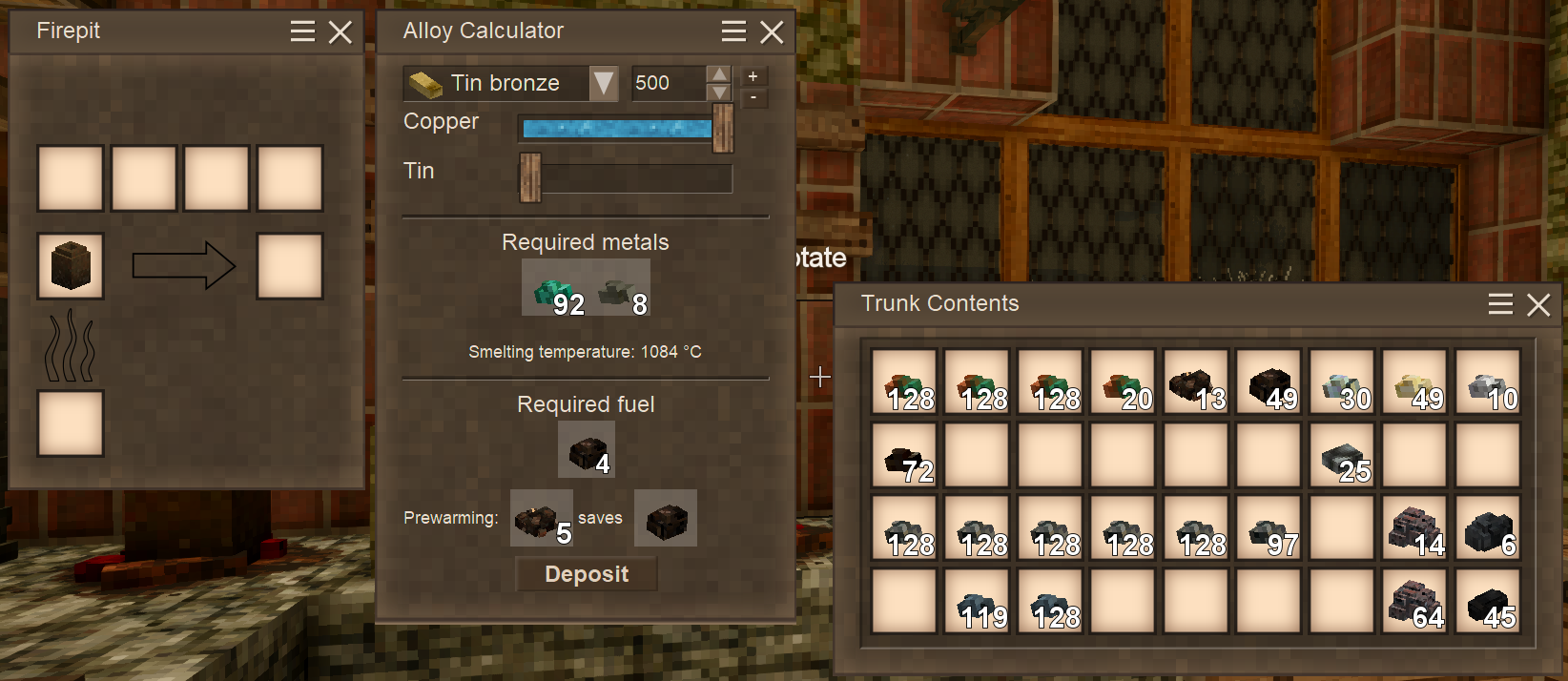
When opening a firepit with a crucible, an Alloy Calculator dialog automatically appears alongside the firepit UI. This tool helps you calculate the exact metal ratios needed for creating alloys:
- Select an alloy from the dropdown to see its ingredient requirements
- Adjust the target units to specify how much metal you want to produce
- Fine-tune ingredient ratios using the sliders which automatically stay within valid alloy ranges
- See required amounts as item stacks for easy reference
- Deposit button automatically transfers the required ingredients from your inventory into the crucible, spreading them evenly across slots
The calculator remembers your settings per crucible, so your preferred alloy and ratios are restored when you reopen the dialog (currently not remembered across restarts).
Quick Swap Menu
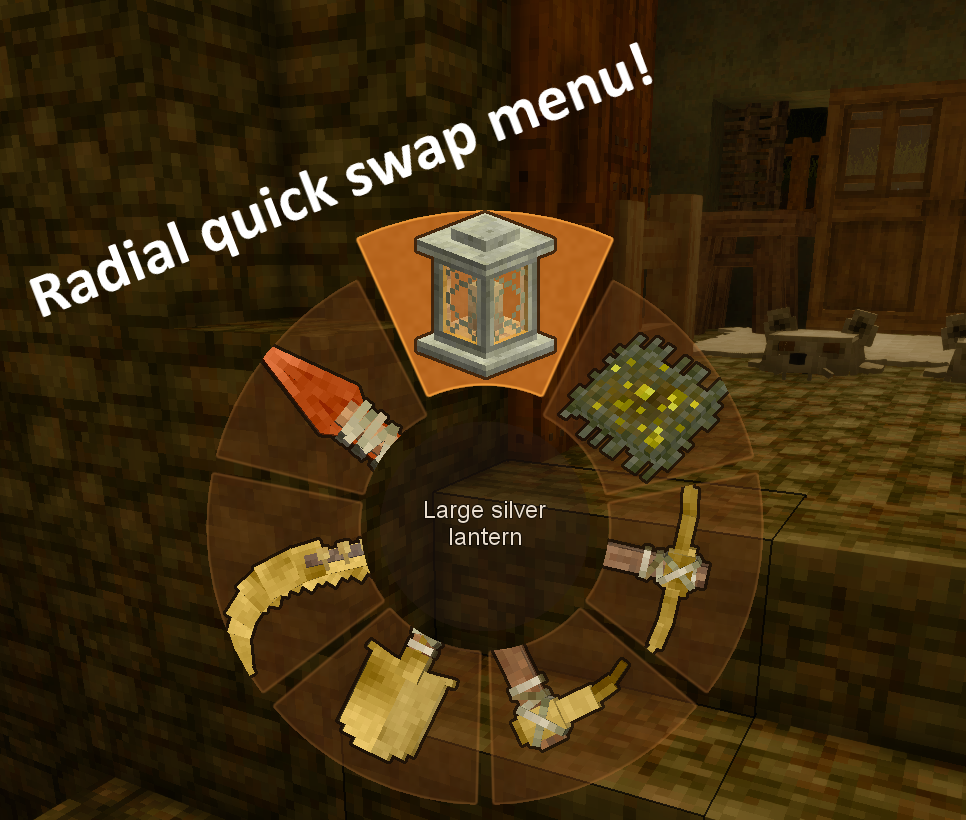
The quick swap menu allows you to bind a key (default: `R`) which, when held, will open a radial menu displaying each of the various kinds of tools, weapons, and healing items in your backpacks & hotbar.
- To select an item simply move your mouse in the direction of an item until it becomes highlighted and then release the menu key.
- After an item is selected it will be moved into your active hand, switching slots with whatever item was previously in your hand.
- The center circle of the menu acts as the "Unequip" option, which will move your actively held item back to its previous position prior to being equipped or to an unoccupied slot in your backpack.
Radial Tool Menus
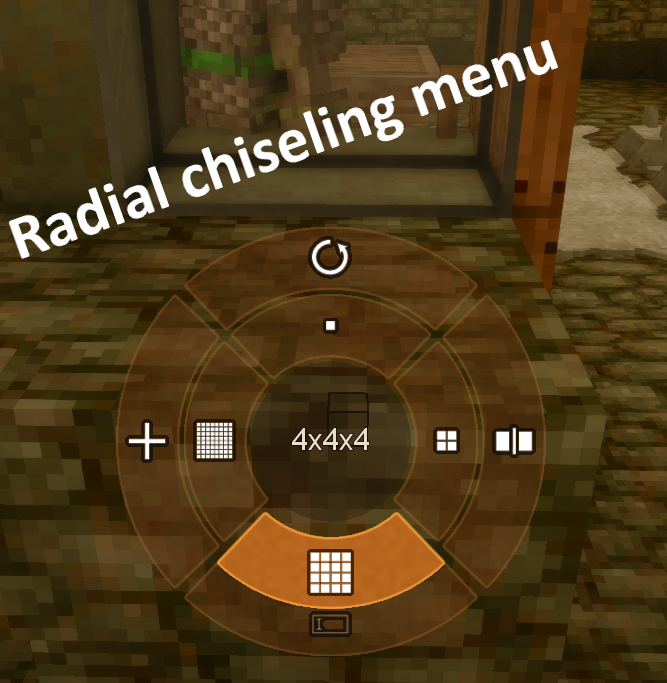
The base game menus for changing a tools active mode (e.g. blacksmithing hammer options, chisel size setting, etc), is optionally replaced with a radial menu.
Tools with directional modes (such as the blacksmithing hammer) will display those modes in an inner ring with each option occupying a sensible and predictable position to make working with those tools faster and more intuitive.
Quality-of-life Additions
- Player respawn point appears as a glowing gear symbol on the ground.
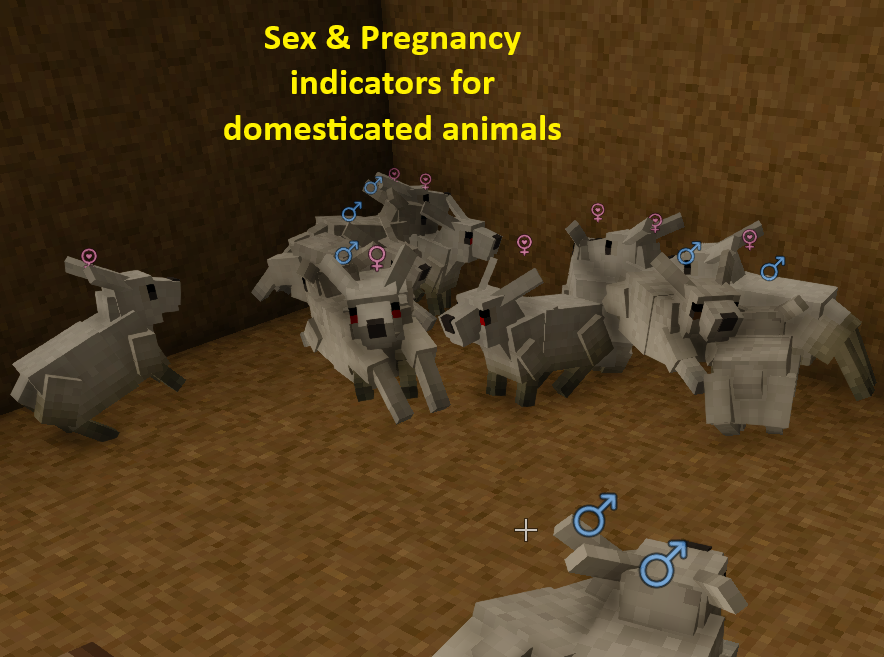
Animal Sex and Pregnancy Indicators
Identify your bred animals at a glance.
- Small male and female symbols appear above living animals of generation 1 or higher, including young animals.
- Pregnant females display a special heart-marked symbol.
Missing Functionalities Implemented
- Ignitable things (firepits, etc) can now be ignited using lanterns, oillamps, & candles.
New Recipes
Note: for decrafting recipes
A low-tier tool (e.g. knife) yields ~50% of the original materials.
A high-tier tool (e.g. saw or shears) yields ~70% of the original materials
- Planks & Firewood can be cut into sticks using a knife or saw (saw yields more).
- Linen & Leather bags can be de-crafted back into their crafting components using a knife or shears (shears yield more).
- Wattle fences/gates can be de-crafted back into sticks using a knife or saw (saw yields more).
- Metal tool-heads can be de-crafted back into metal-bits using a chisel.
- Metal arrow-heads can be de-crafted back into metal-bits using a chisel.
VanillaExpanded supports ConfigLib for in-game configuration. If ConfigLib is installed, a "Mod Settings" button appears in the pause menu where you can toggle features on or off.
Without ConfigLib, settings can be edited manually in ModConfig/VanillaExpanded.json.
Available Settings
Below is a partial list of settings, many more exist and should be self-explanitory. if you have questions feel free to ask in the comments.
| Setting | Default | Description |
|---|---|---|
| EnableAutoStash | true | Enable auto-stashing items into containers by holding interact |
| EnableIgnitionTools | true | Enable lighting fires using lanterns, candles, and oil lamps |
| EnableSpawnDecal | true | Show a glowing decal at the player's respawn point |
| EnableAlloyCalculator | true | Enable the alloy calculator GUI for crucibles |
| EnableEquipLightHotkey | true | Enable the hotkey to equip light sources to offhand/hotbar |
| EnableToolModeRadialMenu | true | Replace base-game tool-mode grids with a radial menu |
| EnableBackpackDecraft | true | Enable decrafting backpacks into leather |
| EnableLinenSackDecraft | true | Enable decrafting linen sacks into flax fibers |
| EnableMetalBitsRecycling | true | Enable recycling metal tool heads into metal bits |
| EnableStickRecipes | true | Enable crafting sticks from planks and firewood |
| EnableWattleDecraft | true | Enable decrafting wattle blocks into sticks |
| AutoStashDelay | 0.5 | Time in seconds to hold interact before auto-stashing begins |
| IgnitionDelay | 0.5 | Time in seconds to hold interact before igniting a fire |
| SpawnDecalSize | 0.4 | Size of the spawn point decal (0.2 to 1.0) |
Note: Feature toggles (Enable*) require a world reload to take effect.
| Mod Version | Mod Identifier | For Game version | Downloads | Released | Changelog | Download | 1-click mod install* |
|---|---|---|---|---|---|---|---|
| 1.7.0 | vanillaexpanded | 273 | Oct 25th at 7:33 PM | vanillaexpanded_1.7.0.zip | 1-click install | ||
VanillaExpanded v1.7.0New FeaturesAuto-LootCollect harvested corpse loot without shift-clicking every stack.
Animal Sex and Pregnancy IndicatorsIdentify your bred animals at a glance.
Auto-Stash for QuernsQuickly refill a quern with matching ingredients.
Alloy Calculator Improvements
Other Improvements and Fixes- Shields now appear in the Quick Tools radial menu. ConfigurationAuto-Loot and animal indicators are enabled by default. With ConfigLib installed, their options are available under Pause Menu → Mod Settings → VanillaExpanded. ConfigLib remains optional. | |||||||
| 1.6.0 | vanillaexpanded | 394 | Oct 9th at 11:19 PM | vanillaexpanded_1.6.0.zip | 1-click install | ||
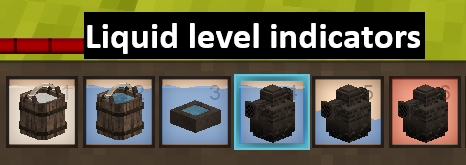
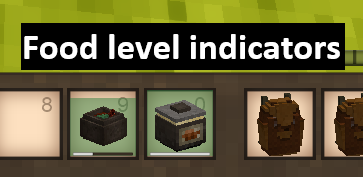
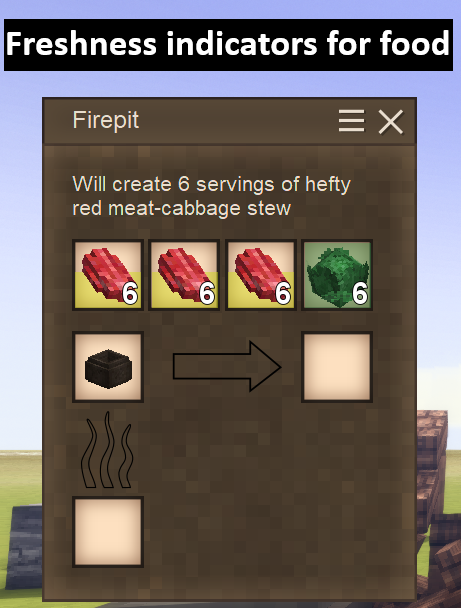
Release notes — v1.6.0Inventory indicators
Alloy calculator
Radial menus
Auto-Stash
Other fixes and configuration
| |||||||
| 1.5.0 | vanillaexpanded | 299 | Sep 29th at 5:33 AM | vanillaexpanded_1.5.0.zip | 1-click install | ||
| |||||||
| 1.4.3 | vanillaexpanded | 313 | Sep 22nd at 7:12 PM | vanillaexpanded_1.4.3.zip | 1-click install | ||
Vanilla Expanded v1.4.3Auto-Stashing
| |||||||
| 1.4.2 | vanillaexpanded | 49 | Sep 22nd at 5:37 PM | vanillaexpanded_1.4.2.zip | 1-click install | ||
VanillaExpanded v1.4.2Highlights
Fixes
| |||||||
| 1.4.1 | vanillaexpanded | 210 | Sep 19th at 2:08 PM | vanillaexpanded_1.4.1.zip | 1-click install | ||
| |||||||
| 1.4.0 | vanillaexpanded | 122 | Sep 18th at 8:11 AM | vanillaexpanded_1.4.0.zip | 1-click install | ||
| |||||||
| 1.3.4 | vanillaexpanded | 1823 | Jan 31st at 4:40 PM | vanillaexpanded_1.3.4.zip | 1-click install | ||
Release v1.3.4This release is a minor bug fix for the spawn-decal renderer corrupting the render state and causing certain transparent objects (smoke particles & building previews) to not render correctly. | |||||||
| 1.3.3 | vanillaexpanded | 545 | Jan 28th at 4:36 AM | vanillaexpanded_1.3.3.zip | 1-click install | ||
Release v1.3.3
| |||||||
| 1.3.2 | vanillaexpanded | 769 | Jan 16th at 1:22 PM | vanillaexpanded_1.3.2.zip | 1-click install | ||
|
VanillaExpanded - Release Notes (v1.3.2) Highlights
New / Improved
Fixes
Configuration Notes
| |||||||
| 1.3.1 | vanillaexpanded | 924 | Jan 2nd at 9:07 PM | vanillaexpanded_1.3.1.zip | 1-click install | ||
🐛 Bug FixesLight Source Equip Bug Fixed
ConfigLib Dependency
| |||||||
| 1.3.0 | vanillaexpanded | 212 | Jan 2nd at 3:08 AM | vanillaexpanded_1.3.0.zip | 1-click install | ||
Release Notes - v1.3.0New: In-Game ConfigurationVanillaExpanded now supports ConfigLib for in-game settings! With ConfigLib installed:
Without ConfigLib:
Configurable OptionsFeature Toggles:
Recipe Toggles:
Timing Settings:
| |||||||
| 1.2.1 | vanillaexpanded | 780 | Dec 19th 2025 at 5:24 PM | vanillaexpanded_1.2.1.zip | 1-click install | ||
|
- Fixed issue with alloy calculator's deposit button not working correctly sometimes. | |||||||
| 1.2.0 | vanillaexpanded | 210 | Dec 18th 2025 at 2:53 PM | vanillaexpanded_1.2.0.zip | 1-click install | ||
| |||||||
| 1.1.1 | vanillaexpanded | 212 | Dec 13th 2025 at 12:04 PM | vanillaexpanded_1.1.1.zip | 1-click install | ||
|
fix: issue with respawn point decal corrupting the rendering of particles. | |||||||
| 1.1.0 | vanillaexpanded | 76 | Dec 13th 2025 at 9:52 AM | vanillaexpanded_1.1.0.zip | 1-click install | ||
|
- **Fix:** crash related to the auto-stash functionality. | |||||||
| 1.0.3 | vanillaexpanded | 112 | Dec 11th 2025 at 6:11 AM | vanillaexpanded_1.0.3.zip | 1-click install | ||
| |||||||
| 1.0.2 | vanillaexpanded | 80 | Dec 11th 2025 at 3:00 AM | vanillaexpanded_1.0.2.zip | 1-click install | ||
| |||||||
| 1.0.1 | vanillaexpanded | 110 | Dec 9th 2025 at 7:51 AM | vanillaexpanded_1.0.1.zip | 1-click install | ||
| |||||||
| 1.0.0 | vanillaexpanded | 132 | Dec 7th 2025 at 1:27 AM | vanillaexpanded_1.0.0.zip | 1-click install | ||
|
Initial release | |||||||
Updated the Russian translation to version 1.7.0
you can raise a PR to add this to the mod officially and I'll accept it!
That’s exactly what I’ve been doing recently, but for some reason it’s not working at the moment – nothing happens when I click the "Fork this repository" button. 😒
I checked the repositorys settings and I dont have forking disabled or anything, so maybe your issue was just a temporary github problem or something?
I’ve tried using two different browsers. Firefox simply does nothing when I click the ‘Fork this repository’ button, whilst Chrome displays an error message (which doesn’t explain anything) and also does nothing. I don’t know why this is happening; I’ve been able to create forks normally in other projects. Of course, I’m not a programmer – I’m just a translator – and I don’t know all the ins and outs of using GitHub, so perhaps I’m doing something wrong...
thats very strange.
I dont have anything special about my repository to my knowledge.
Maybe github updated an api or a script and you need to refresh your browser cache?
or maybe try logging out and back in, it could be like a stale authentication thing.
I don’t use Chrome at all and have never accessed GitHub via it, so this is an example of a browser without prior authentication or a cache. I’ll give it another go from home this evening...
I’ve tried from home – it still doesn’t work; I get the error message: ‘An unexpected error occurred. Please try again.’
Hello,
I have been enjoying your mod, however, my current game crashes when I hover over a raft that has a reed chest placed on it, the crash report specifically says that it has something to do with the AutoStash. It was a pine raft and i had nothing in my off-hand and main hand. I can log back into the world no issue and the server is running, but my player-side client crashes the second I hover over the reed chest attached to the raft.
When I removed the mod from the server and client and rejoined the server it no longer crashed.
Running on 64 bit Windows 10.0.26300.0 with 31849 MB RAM
Game Version: v1.22.7 (Stable)
10/12/2026 7:38:08 AM: Critical error occurred in the following mod: vanillaexpanded@1.5.0
Loaded Mods: walkingsticklite@1.0.0, amphorae@1.0.2, arrowsnslings@2.0.3, deartibusrusticis@0.9.3, deciduoustrees@1.8.2, fallingtree@0.5.2, fowlmod@1.0.1, fuelbriquettes@1.0.2, geoaddons@1.4.8, hydrateordiedrate@2.5.5, jsonpatcheslib@1.5.9, leaflitter@1.2.6, mycodiversity@1.0.8, overhaullib@2.0.10, rootedstump@0.1.0, sortablestorage@3.0.0, spinningwheel@1.2.14, game@1.22.7, vsimgui@1.2.7, wetcrops@1.2.2, almanacilluminated@0.3.1, butchering@1.14.3, carryon@1.14.3, carryonlib@1.0.0-pre.8, configlib@1.13.2, effectlib@1.1.1, helianthus@1.0.6, immersivewoodworking@1.2.0, improvedhandbookrecipesfork@1227.0.5, mnflowers@2.0.0, mngeology@2.0.10, placeonslabs@1.2.0, playercorpseforkedazu@1.15.2, realisticwater@0.3.2, realsmoke@1.3.1, ricepaddies@1.0.4, rivers@5.0.3, runestory@0.9.12, shadehouse@1.8.2, palmiersamasimplebedspawn@1.3.0, sleepneed@3.1.4, stonebakeoven@1.4.0, struggletosleep@1.0.6, tasshunting@0.14.41, temporallives@0.1.0, thecritterpackcontinued@1.4.4, toolsmith@1.2.19, vanillaarmory@2.4.9, vanillaexpanded@1.5.0, creative@1.22.7, vsroofing@1.7.2, vssiding@1.3.0, survival@1.22.7, warmweathereffects@1.6.0, wilderlandsadjustments@2.0.3, almanactcm@0.5.17, autoconfiglib@2.0.10, em@3.8.1, mapper@0.5.2, rootedforests@0.1.3, terrainslabs@1.0.17, toolsmithweapons@1.1.4, moreroads@2.0.0
Involved Harmony IDs: vanillaexpanded
System.ArgumentNullException: Value cannot be null. (Parameter 'source')
at System.Linq.ThrowHelper.ThrowArgumentNullException(ExceptionArgument argument)
at System.Linq.Enumerable.Where[TSource](IEnumerable`1 source, Func`2 predicate)
at VanillaExpanded.AutoStashing.EntityAttachedContainerAutoStash.CanAutoStash(IPlayerInventoryManager playerInventory, ItemSlot attachmentSlot, IWorldAccessor world) in /home/runner/work/VanillaExpanded/VanillaExpanded/VanillaExpanded/src/AutoStashing/EntityAttachedContainerAutoStash.cs:line 92
at VanillaExpanded.AutoStashing.EntityAttachedContainerAutoStash.AppendInteractionHelp(EntityBehaviorAttachable attachable, IClientWorldAccessor world, EntitySelection selection, IClientPlayer player, WorldInteraction[]& interactions) in /home/runner/work/VanillaExpanded/VanillaExpanded/VanillaExpanded/src/AutoStashing/EntityAttachedContainerAutoStash.cs:line 68
at Vintagestory.GameContent.EntityBehaviorAttachable.GetInteractionHelp_Patch1(EntityBehaviorAttachable this, IClientWorldAccessor world, EntitySelection es, IClientPlayer player, EnumHandling& handled)
at Vintagestory.API.Common.Entities.Entity.GetInteractionHelp(IClientWorldAccessor world, EntitySelection es, IClientPlayer player) in VintagestoryApi\Common\Entity\Entity.cs:line 1522
at Vintagestory.GameContent.EntityBoat.GetInteractionHelp(IClientWorldAccessor world, EntitySelection es, IClientPlayer player) in VSSurvivalMod\Systems\Boats\EntityBoat.cs:line 723
at Vintagestory.Client.NoObf.HudElementInteractionHelp.getWorldInteractions() in VintagestoryLib\Client\Systems\Gui\Huds\HudElementInteractionHelp.cs:line 315
at Vintagestory.Client.NoObf.HudElementInteractionHelp.ComposeBlockWorldInteractionHelp() in VintagestoryLib\Client\Systems\Gui\Huds\HudElementInteractionHelp.cs:line 294
at Vintagestory.Client.NoObf.HudElementInteractionHelp.EntityInView() in VintagestoryLib\Client\Systems\Gui\Huds\HudElementInteractionHelp.cs:line 406
at Vintagestory.Common.GameTickListener.OnTriggered(Int64 ellapsedMilliseconds) in VintagestoryLib\Common\Model\GameTickListener.cs:line 36
at Vintagestory.Common.EventManager.TriggerGameTick(Int64 ellapsedMilliseconds, IWorldAccessor world) in VintagestoryLib\Common\EventManager.cs:line 134
at Vintagestory.Client.NoObf.ClientMain.MainRenderLoop(Single dt) in VintagestoryLib\Client\ClientMain.cs:line 867
at Vintagestory.Client.GuiScreenRunningGame.RenderToPrimary(Single dt) in VintagestoryLib\Client\MainMenu\Screens\GuiScreenRunningGame.cs:line 173
at Vintagestory.Client.ScreenManager.Render(Single dt) in VintagestoryLib\Client\ScreenManager.cs:line 742
at Vintagestory.Client.ScreenManager.OnNewFrame(Single dt) in VintagestoryLib\Client\ScreenManager.cs:line 686
at Vintagestory.Client.NoObf.ClientPlatformWindows.window_RenderFrame(FrameEventArgs e) in VintagestoryLib\Client\ClientPlatform\GameWindow.cs:line 112
at OpenTK.Windowing.Desktop.GameWindow.Run()
at Vintagestory.Client.ClientProgram.Start(ClientProgramArgs args, String[] rawArgs) in VintagestoryLib\Client\ClientProgram.cs:line 354
at Vintagestory.Client.ClientProgram.<>c__DisplayClass10_0.<.ctor>b__1() in VintagestoryLib\Client\ClientProgram.cs:line 131
at Vintagestory.ClientNative.CrashReporter.Start(ThreadStart start) in VintagestoryLib\Client\ClientPlatform\ClientNative\CrashReporter.cs:line 95
Event Log entries for Vintagestory.exe, the latest 3
==================================
{ TimeGenerated = 9/14/2026 6:30:27 AM, Site = , Source = Application Error, Message = Faulting application name: Vintagestory.exe, version: 1.22.7.0, time stamp: 0x693c0000
Faulting module name: openal32.dll, version: 1.23.0.0, time stamp: 0x63dd31ad
Exception code: 0x40000015
Fault offset: 0x00000000000df046
Faulting process id: 0x3504
Faulting application start time: 0x1dd444cc444821a
Faulting application path: C:\Users\dread\AppData\Roaming\Vintagestory\Vintagestory.exe
Faulting module path: C:\Users\dread\AppData\Roaming\Vintagestory\Lib\openal32.dll
Report Id: 485ec156-d379-4723-b67a-5a751085bc24
Faulting package full name:
Faulting package-relative application ID: }
--------------
{ TimeGenerated = 9/14/2026 6:25:22 AM, Site = , Source = Application Error, Message = Faulting application name: Vintagestory.exe, version: 1.22.7.0, time stamp: 0x693c0000
Faulting module name: openal32.dll, version: 1.23.0.0, time stamp: 0x63dd31ad
Exception code: 0x40000015
Fault offset: 0x00000000000df046
Faulting process id: 0x52bc
Faulting application start time: 0x1dd444c74200b6d
Faulting application path: C:\Users\dread\AppData\Roaming\Vintagestory\Vintagestory.exe
Faulting module path: C:\Users\dread\AppData\Roaming\Vintagestory\Lib\openal32.dll
Report Id: 5a4b31a3-178d-40c4-b6d4-3f8b0ad72e3c
Faulting package full name:
Faulting package-relative application ID: }
--------------
{ TimeGenerated = 9/14/2026 6:23:04 AM, Site = , Source = Application Error, Message = Faulting application name: Vintagestory.exe, version: 1.22.7.0, time stamp: 0x693c0000
Faulting module name: openal32.dll, version: 1.23.0.0, time stamp: 0x63dd31ad
Exception code: 0x40000015
Fault offset: 0x00000000000df046
Faulting process id: 0x1ecc
Faulting application start time: 0x1dd4449eb3db5f5
Faulting application path: C:\Users\dread\AppData\Roaming\Vintagestory\Vintagestory.exe
Faulting module path: C:\Users\dread\AppData\Roaming\Vintagestory\Lib\openal32.dll
Report Id: 534e3867-c009-4347-90a0-39d4781e267e
Faulting package full name:
Faulting package-relative application ID: }
Looks like you are using v1.5.0
The latest version is v1.6.0 and this issue should be fixed in that version. Try downloading the latest version and let me know immediately if you still encounter a crash, sorry for the inconvenience!
Yes, updating it did fix the issue, thanks
Hello, the last version of the mod causes a crash when loading a world for me, ill attach the crash log in case it helps.
I looked into this and while I honestly cant reproduce your crash or confirm that VanillaExpanded is the cause, I refactored some of my shader code to make it more resilient against potentially conflicting with other mods.
But if you can send me your `client-main.txt` file (maybe on discord, username: dsisco11) then I could be more certain of what the cause is.
Done sended you the file, thank you
Did some testing seems to be prosequor mod when i disable it i can load a world, it do work on the previeus version tho
Not sure if anyone has noticed this yet, but the "EnableSpawnDecal" option in this breaks VS's rendering of ghost blocks. For example when you right click on the beehive kiln door to see the structure outline, or the stone coffin to display the cementation furnace preview. The ghost blocks render without their colors and simply show as black.
was about to push an update, ill fix this before then so its part of the update. its probably just due to some simple OpenGL state not being reset.
Fixed, let me know if you encounter the issue again but I think the new code structure should prevent similar problems.
I'm also not able to disable the quick swap or radial menu. For me the text is too small for both. I dislike how Tool Mode menu is smaller than the Quick Swap one.
Thanks for the feedback!
I just made a fix for the tool-mode radial menu enablement setting and I'll be putting out a fix today, along with a lot of other new features!
Also, I can't reproduce the issue with the quick-swap menu enablement setting not working, but you can also disable the quick-swap menu by unbinding its key (which will be the intended way to disable it in the upcoming release).
Yes, I also find the text in the central circle of the radial menu too small. I’ve checked the settings – there’s no option to turn it off. We’re waiting for an update.
Love the option to control the radial menu!! Can confirm the disablement issue is fixed.
Unfortunately it seems like it doesn't play well with cave art. I cant draw with charcoal and have difficulty bringing up the cave art menu, even with radial disable I can't seem to open it. The few times I was able to open the radial menu with the charcoal it was extremely small (cannot see any of the art).
I'll be honest, I didnt even know caveart has a tool menu lol. I'm looking into it now!
Disabling the radial menu doesn't seem to work?
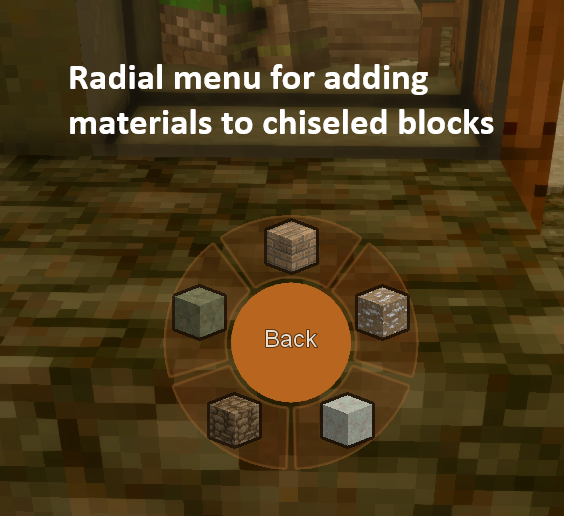
Also major problem with it: You can't interact with your hotbar with the radial menu, so you cannot add materials while chisseling.
yea, for chiseling you have to hold ALT and grab the material item with your mouse, then open the chiseling tool radial menu and you can select the add material option.
But refactoring the menu system to make interacting with your hotbar possible is on my todo list soon, since that would be way more intuitive.
I love the idea of the radial menus, but their design is way too intrusive for my tastes. It would be great if they were smaller and more transparent, similar to the vanilla tool mode select icons. Or perhaps make size and opacity configurable by the user?
I agree, I've been fiddling with them a bit to make them cleaner. Thanks for the feedback!
Can we disable the radial menu?
Yes! its listed in the available settings in the mod description.
I assume you are referring to the "tool mode" radial menu and not the "quick swap" radial menu which is just a keybind.
In which case you just set `"EnableToolModeRadialMenu": false` in the mod config json file.
The config file is under "%APPDATA%\VintagestoryData\ModConfig\VanillaExpanded.json" on windows.
In the interest of feedback, can you let me know what it is you dislike about the radial menu?
Thank you so much!
This mod just keeps on getting better and better
is there a way to set priority with the lightsource hotkey. I have the witches walking stick but the hotkey often grabs normal torches first
There isnt, and I cant currently imagine a nice way to allow players to specify priorities.
The equip lightsource functionality chooses your highest intensity light source according to the game data.
I just added the new radial menu which can also be used for equipping light sources, but it only equips to your primary hand not your off hand.
Yesterday I was trying to put pieces of iron ore (120 pieces) into a bloomery, and the game crashed just after the Auto-Stashing indicator filled up. In other words, if I put in 5 pieces of ore at a time, everything’s fine, but if I hold it for longer, the game simply freezes for a few seconds and then crashes straight away.
I just tried reproducing this and I cant get the crash to happen.
Can you send me the crashlog?
This is a bit of an ask, but is there any chance your alloy calculator can be made to work for this mod?
https://mods.vintagestory.at/crucibulum
I'll passively look into it, but I wont make a conclusive promise at this time.
That being said, it's absolutely possible for the alloy calculator to work with that mod (in the sense that anything is technically possible, i.e. I don't currently know of any technical limitation that would prevent it).
I'll see what I can do with what time I have available!
Awesome I appreciate that, but I totally understand if its a bit of a hassle and you end up unable to do it
Is there any way that the Auto-stashing could be expanded to allow a fast dump into crates?
You already can!
The interaction pattern is slightly different (`Ctrl + Shift + Hold RMB` for crates vs `Hold RMB` for other containers) due to a technical limitation with how VintageStory handles the interaction behavior for crates.
This is a must have mod :s
Can we expect a 1.22 update to this mod at some point? This is definitely one of my favorite QOL mods.
Russian translation.
I've removed the unstable block particles feature.
Not only was it causing issues, it was also out of scope for VanillaExpanded stated goals.
Sorry guys, I'll release an update to fix the unstable particles and the smoke issue!
On my hands and knees over here, dying for this feature lol:
An always empty slot that does not show up on the toolbar, cannot accept items, and has a dedicated keybind to swap to. The sole purpose of this hotbar slot is to enable an "empty hands" slot. Obviously if you've got something in your offhand then that would need to be cleared.
Reason being is for the plethora of mods (and even vanilla features) that require empty hands to do something, and also roleplaying purposes; it's sort of like Bethesda games, where you can press a button to sheathe everything.
Imo this is such a desperately need QoL feature for inventory management and I'm surpried nobody has made it yet, hoping you'd be willing to take a look at it. :)
Third Hiro9's suggestion, mod just breaks smoke particles for me.
I second Hiro9's suggestion of only wanting a mod with the autostash and alloy calculator...
Makes particles loop and lag. Also crashes upon entering world if you turn off unstable particles. If you can make a standalone mod with only the autostash feature and the alloy calculator that would be great :)
Rabblerouser
1) It wasn't intended to make configlib a hard requirement, I'll fix that ASAP!
2) yes it should absolutely be safe to remove mid-save.
3) the vs roofing incompatibility is noted and will be looked into soon.
Also I just wanted to throw out there that I don't really suspect that config-lib is the kind of mod which would realisticly have an impact on performance, for what its worth.
I'm not sure if this was intended but the latest update makes it so configlib is required as a dependency. For performance reasons, I prefer to use fewer mods and don't really want to install configlib.
Also with the comments below saying there's an incompatibility with vs roofing, I think I'll remove this mod, sadly.
Is it safe to remove mid-save?
referring to the carryon issue, it might be possible to adjust the time it takes carryon to pick up the container to be quicker or vise versa as in make this mod take double the time so carryon can do its thing.
DarkSeedRA
Absolutely add this to the issue tracker, thats a pretty major incompatibility!
I've never used the CarryOn mod you mention, but offhand it does make sense to me that there would be incompatibilities with other mods that try to alter the "interact" handling for container entities, since the interact system can be tempermental at the best of times.
Still though, I may be able to make my system less invasive or something so its more compatible.
@dsisco, I am having an odd interaction between the Auto-Stashing and Carry On. If I am trying to pick up a chest with Carry On and I have items in my inventory / belt it will move the items to the chest. Sometimes it stops Carry On from working and just transfers the items. I must throw out whatever it is transferring on the ground then I can get Carry On to work, or reload, but that takes a lot of time. Is this something I should add to the issue tracker or am I doing something wrong? I would love to see a config for the mod so I can either change the hotkey or disable parts of the mod. I really love the mod and do not want to remove it.
@dsisco no problem. Good to know it won't break anything haha. I am curious, can you explain what is happening. I just like learning. I am on the VS discord under the same name, if that is easier than here 👍🏻
Algernon Thats odd, I would expect this from my "Vanilla Building: Expanded" mod but not from this one. I'll look into it.
gNecrOz Thank you so much for reporting it on the issue tracker, I'm aware of the issue and the good news is that it wont break anything else. Also know that I'm never upset with anyone for reporting an issue, I can't know about something if nobody says anything so you're being very helpful!
Incompatable with VSRoofing/One roof mod
You're going to be fed up with me always commenting things I find on your mods D: I am sorry...
20:49:57 [Error] Patch 1 (target: game:blocktypes/clay/fired/oillamp.json) in vanillaexpanded:patches/fireSources.json failed because
supplied path /behaviorsByType//0 is invalid: The json path /behaviorsByType//0 was not found. No such element 'behaviorsByType' at the root path
I am not sure what it means, the world loads and runs fine. I posted it in the issue tracker on Git as well since you prefer that. <3
Good things here; add configs tho. Configlib is easy to set up
Madman2429 I'll look into it, thanks for reporting!
Not 100% certain of it, but I suspect a conflict with bricklayers mod?
During world loading it references an error with the oil lamp change in the fireSources patch file.
(target: game:blocktypes/clay/fired/oillamp.json) in vanillaexpanded:patches/fireSources.json failed because supplied path /behaviorsByType/*/0 is invalid:
The json path /behaviorsByType/*/0 was not found. No such element 'behaviorsByType' at the root path
Shadow_Oni The decrafting recipes arent anything special, they are just JSON recipe definitions like the base-game ones.
Any idea how your decrafting method would interact with the 'Recycling Tools' mod by Potusek?
Parf In the mean time, you can just remove the metalbits.json file from the recipes folder. Works about the same way.
Parf Currently there arent any config settings to disable certain decrafting recipes.
Would you be willing to raise an issue on the projects github about this?
I'd like to know more details such as if you have already encountered a conflict with the other mod.
Yaaay! Is there a config for disabling certain aspects of the mod? I'd want to turn off decrafting of tool heads so it doesn't mess with Toolsmith/Smithing Plus, for instance.
This is a QoL mod I didn't know I wanted but now I think I won't ever be able to play without it, thank you!