

Mods / Vintage E

Tags:
Magic QoL Weapons Flight Armor
Author:
Demonic69
Side:
Both
Created:
Oct 17th at 2:52 AM
Last modified:
1 day ago
Downloads:
416
Recommended download (for Vintage Story 1.22.0 - 1.22.7):
vintagee_1.18.11.zip  1-click install

Equivalent exchange for Vintage Story 1.22, inspired by the Minecraft mod ProjectE.


AI disclaimer: Vintage-E is made with Claude, an AI assistant. Claude writes the code, tests, textures, models and this description; I decide what goes in, direct the work and test every version in game. No AI image generator was used. The Original look and optional sounds are ProjectE's.


Burn items into EMC, learn them, and turn your EMC back into anything you've learned. Every block and item gets its EMC value worked out from the recipes loaded in your game each time the server starts. Items from other mods get values too, with no compatibility patches needed.

Getting started

  1. Craft a Philosopher's Stone from copper ingots, gold ingots and a temporal gear.
  2. Craft a Transmutation Table from rock and stone around the Philosopher's Stone (the stone isn't used up).
  3. Drop items on the table's Burn slot to turn them into EMC and learn them, or on the Learn slot to learn them and keep them. Then click anything you've learned to create it from your EMC.

Every recipe is in the in-game handbook. Hover any item to see its EMC value; Vintage-E's own items also list their ranges, costs and speeds in the tooltip. Server owners: /emc configure opens every setting in game, with what each does; /emc help lists every command; Ctrl+H opens the EMC doctor if anything looks wrong.

What's in it

  • Philosopher's Stone: right-click to transmute blocks in the world (rock and wood types, sand and gravel, soil and grass, water and ice) in 1×1, 3×3 or 5×5. It's also the catalyst for the alchemy recipes, and is never used up.
  • Transmutation Table and Tablet: a searchable, sortable list of everything you know, with Burn and Learn slots. The tablet works anywhere and has a magnet slot: with a Black Hole Band or Void Ring and a filter, it pulls nearby items in and turns them into EMC. A hopper or chute pointing into a table feeds it items, which it burns into its owner's EMC.
  • Alchemical fuels: Alchemical Coal, Mobius Fuel and Aeternalis Fuel burn hotter and far longer than charcoal, in forges and fire pits.
  • Dark and Red Matter tools: pickaxe, shovel, axe, sword, hoe and sledgehammer. They never wear out and dig up to 3×3 (dark) or 5×5 (red).
  • Energy Collectors and Condensers: collectors turn sunlight into EMC, and condensers burn what you give them to make copies of a target item. Condensers work with hoppers and chutes.
  • Klein Stars: portable EMC storage, from Ein to Omega.
  • Rings, stones and amulets: Swiftwolf's Rending Gale (flight), Black Hole Band, Harvest Goddess Band, Ignition Ring, Zero Ring, Ring of Arcana, Void Ring, Body, Soul and Life Stones, Repair Talisman, Gem of Eternal Density, Evertide and Volcanite Amulets, and the Watch of Flowing Time. Rings can be worn in the hand slot, and Klein Stars in the emblem slot.
  • Gadgets: Destruction Catalyst, Hyperkinetic and Catalytic Lenses, Mercurial Eye, Archangel's Smite, Divining Rods and Everlasting Pitch Glue (repairs ruined clutter for EMC instead of glue, and never runs out).
  • Armour: Dark Matter, Red Matter and Gem armour that never wears out.
  • Storage and machines: Alchemical Chest (104 slots), Alchemical Bags, Dark and Red Matter Furnaces, Anti-Matter Relays, Dark and Red Matter Pedestals, Nova Catalyst and Cataclysm, and the Interdiction Torch.

Three looks, your choice

Vintage-E's blocks and items come in three looks, and each player picks their own.

How to change it:

  • Your own look: type .vintagee in chat, pick one from the Look drop-down. It applies at once (worn rings and projectiles change the next time you join).
  • The server's default (admin; for players who haven't picked one): /emc configure Look New, Middle or Original, or the Look drop-down in the /emc configure window. Players see it next time they join.
  • ProjectE's sounds (admin): /emc configure ProjectESounds true.

New (the default): 3D models made to blend in with Vintage Story, built from the game's own planks, metal plates, polished stone, gems, linen, leather, paper and candles. Rings are metal bands with a set gem, the Transmutation Table is a slate slab with the circle cut in and a candle at each corner, collectors carry a glowing crystal, matter furnaces are stone-ringed fire pits, the Everlasting Pitch Glue is a banded wooden bucket of pitch, and so on.
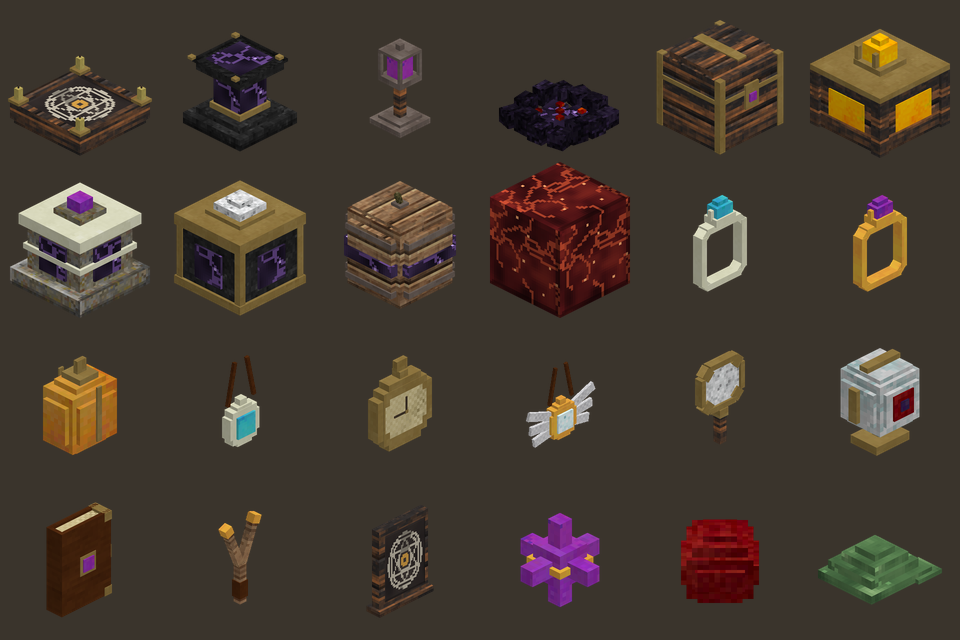
Vintage-E items and blocks in the New look

Middle: Vintage-E's original flat pixel-art textures.
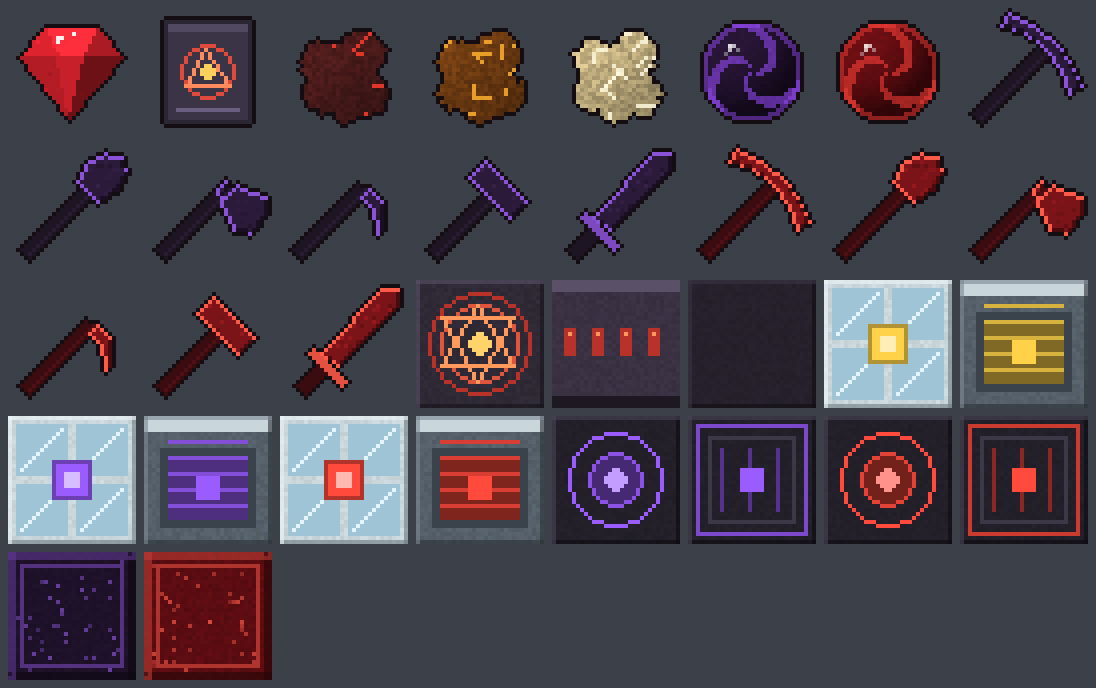
Vintage-E items and blocks in the Middle look

Original: ProjectE's own textures wherever ProjectE has one; rings and stones light up while switched on.
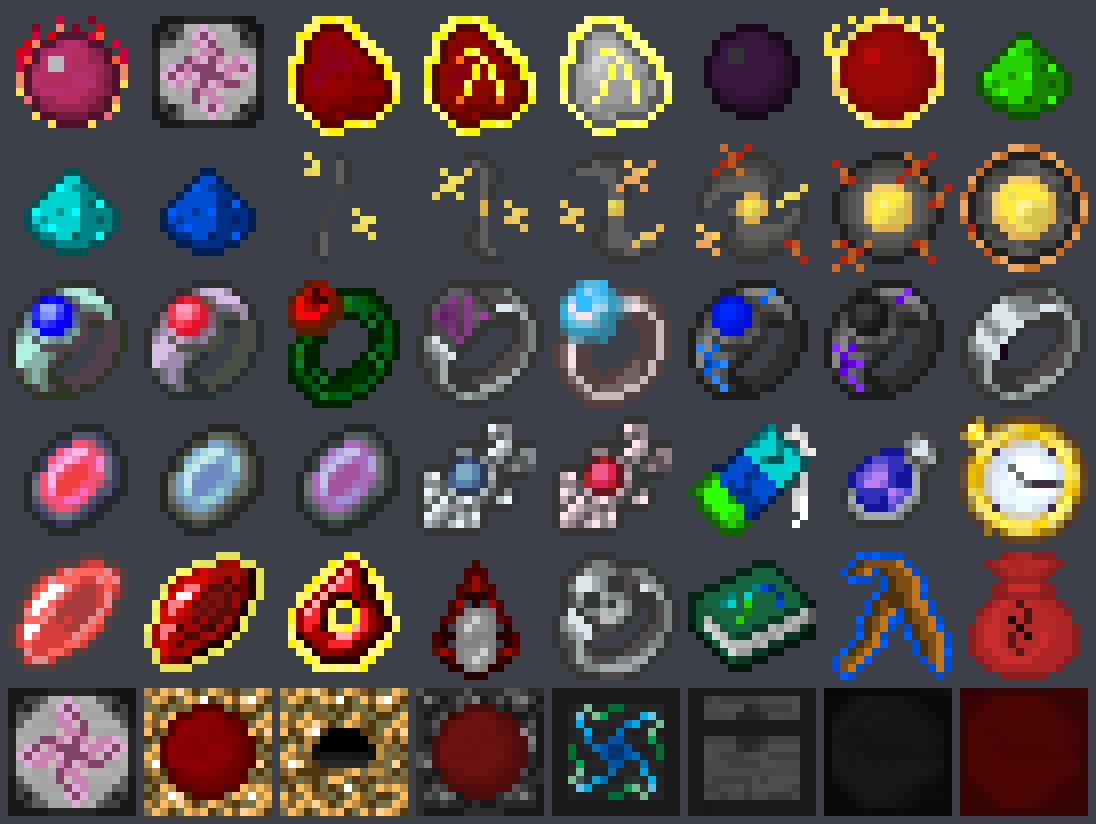
Vintage-E items and blocks in the Original look

How EMC values are worked out

Nothing is hard-coded per item. Vintage-E starts from a short list of base values for raw materials (rock, soil, logs, ores, ingots, food…). From there it follows every way the loaded mods let you make things:

  • crafting, smithing, knapping and clay forming;
  • alloys, casting, smelting and cooking;
  • grinding, drying, curing and other changes over time;
  • pressing, sawing and squeezing, and what blocks drop.

Each item gets the cheapest value any recipe gives it, so crafting something and burning it never earns more EMC than its ingredients. Things no recipe makes are valued from trader prices, from their variants, or from how well they burn or feed you. Those guesses are then checked against the recipes: a guess is lowered when a recipe makes the item for less, and raised when processing it yields more (a fish is worth the fillets it cuts into), so neither crafting nor processing makes free EMC. Worn tools and clothes are worth their remaining durability or condition.

Other mods' raw materials that nothing makes get last-resort values from Vintage-E's compatibility files, for Primitive Survival (fish, crabs, snakes, worms, trophies), Wildcraft: Trees and Shrubs, Wildcraft: Fruits and Nuts, Butchering (carcasses, blood, offal, sinew, prime meat), From Golden Combs and Expanded Matter. Each only loads when its mod does, and any recipe, trader price or variant that values an item wins over it. /emc compat lists them and switches each one off or on.

The values are cached per world, and are only worked out again when something that affects them changes: a mod, a recipe or the config.


Items that hold things or keep their material (buckets, bags, shields, chiseled blocks)

Some items carry data on the item itself. Containers hold things: buckets, jugs, bowls, pots, crocks, barrels and bags (including the Alchemical Bags). Material items keep what they're made of on the item: round shields (their metal and wood), lanterns (metal, lining and glass), chests and clutter (their type). Chiseled blocks keep their design. Each of these transmutes in one of three modes:

  • Item only – burning gives the plain item's value, and you learn and create the plain item. A container that still holds something won't burn (see below), so nothing inside is lost by accident.
  • Item + contents – worth the item plus what it holds or is made of: a gold round shield is worth more than a tin bronze one, a bucket of honey more than an empty bucket, a chiseled block its voxels of each material. You learn and create exactly that version: that shield, that filled bucket, that design.
  • Item price only – exactly that version, but it costs and burns for the item (and its material) alone; what it holds is free.

What's on by default: containers are item only, so a bucket is just a bucket and bags can't be burned with things inside. Material items and chiseled blocks are item + contents, because a plain copy of those would be the wrong or default version. Klein Stars are always worth what they hold: their stored EMC is added to their own value.

How to tell: the tooltip says which mode an item uses ("Transmutes as the plain item", "Transmutes with its contents (counted in its EMC)", "Transmutes with its contents, for the item's price only") and, for a container whose contents aren't counted, what they would be worth ("Contents EMC: …"). /emc dump hand lists each thing inside with its value, or each material and its voxels.

Changing it (admin): /emc contents opens a window of every such block and item with its mode and kind. Search, filter by mod, kind or mode, select one or many, then pick a mode or Default. /emc contents item|full|itemprice|default sets the held item. Changes are saved to StackDataModes in the server config and apply straight away; a value file can set them for a whole family with stackData.

Settings that affect them:

  • ProtectContainersWithContents (on by default) – a container in item only mode that still holds something is refused by the table, condensers and hopper feeding, so you empty it first. Switch it off and such a container burns, and you get the EMC of what was inside as well as the container's.
  • MaxExactKnowledge (500) – how many exact versions (filled containers, shields of each metal, chiseled designs) one player can know. Things that only exist as an exact version (clutter, tapestry patterns, fruit tree cuttings) don't count toward it. Ctrl + right-click an entry in the table to forget it.
  • DurabilityScalesEmc (on) – worn tools are worth their remaining durability and clothes their condition; it doesn't change what's inside a container.

Copies made from EMC always come out new: no wear, full freshness and 100% condition, and a filled container holds exactly what the learned version held. Condensers follow the same modes for their target item.

Using the items: controls, modes and pedestals

Every item's handbook page has a How it works section with the details and costs. The short version:

  • Tool-mode key (F by default): picks the Philosopher's Stone's 1×1, 3×3 or 5×5; the matter pickaxe, shovel and axe's dig size (1×1 by default, 3×3 for dark, up to 5×5 for red; the sledgehammers start at 3×3); the Mercurial Eye's 1×1 to 9×9; Swiftwolf's Rending Gale's flight and shield (both, flight only or shield only) and its 1× to 3× speed; the Ring of Arcana's four effects, each on or off on its own; and the Body and Life Stones' saturation-only or saturation-and-nutrition mode. Sneak with a matter tool to dig a single block.
  • Philosopher's Stone: right-click a block to transmute it: rock types cycle, wood types cycle, sand ↔ gravel, bare soil ↔ grassy soil, water ↔ ice. Sneak to go backwards.
  • Rings, stones and amulets: right-click switches them on and off. They work from your hotbar or backpack, and the rings also from the hand slot. They pay their running cost from your personal EMC and any Klein Star you carry (or wear in the emblem slot), and switch off when you can't pay. Swiftwolf's flight: jump to rise, sneak to sink; no fall damage while it's on and for 15 s after. The Black Hole Band pulls in items within 7 blocks and the Void Ring within 12; the Void Ring also teleports with sneak + right-click (up to 64 blocks). The Harvest Goddess Band plants your seeds with right-click on farmland. The Black Hole Band removes a liquid source with right-click.
  • Fire-projectile key (R by default): shoots with the Hyperkinetic and Catalytic Lenses (hold to charge: the tooltip shows the cost of each charge), the Ignition Ring (a fireball that sets creatures and burnable blocks alight), the Evertide Amulet (water) and the Volcanite Amulet (lava). Archangel's Smite fires a homing arrow with right-click and a volley with left-click; each arrow costs what an arrow is worth.
  • Klein Stars: right-click to empty one into your EMC, sneak + right-click to fill it from your EMC. Rings and gadgets draw from stars you carry.
  • Energy Collectors: make EMC from sunlight (4, 12 and 40 a second in full sun for MK1–MK3) and push it into a condenser or relay next to them. Sneak + right-click one with an empty hand to take its EMC yourself.
  • Energy Condensers: put an item in the target slot; everything else inside is burned (plus whatever collectors feed in) to make copies of the target. Hoppers and chutes can load them and only take the finished copies out.
  • Pedestals: put a ring, stone or amulet on a Dark Matter Pedestal and it works for everyone nearby: the stones heal and feed players, the Repair Talisman repairs their gear, the Black Hole Band pulls items in and drops them into containers next to the pedestal, the Zero Ring freezes water and puts out burning creatures, the Evertide Amulet makes it rain and the Volcanite Amulet clears the weather, the Ignition Ring burns hostile creatures and the Interdiction Torch keeps them away. The Red Matter Pedestal reaches twice as far and makes each effect twice as strong.
  • Matter furnaces: hotter, faster firepits. Feed them fuel, or EMC from a collector, relay or condenser next to them.
  • Nova Catalyst and Cataclysm: lit like the game's bombs, by holding right-click with a torch or firestarter.
  • Alchemical Bags: 32-slot bags worn in a backpack slot. Craft one with 4 dark matter for 48 slots, and that one with 4 red matter for 64; upgrading keeps what's inside.
  • Everlasting Pitch Glue: right-click a ruined clutter block (furniture, banners, chest rubble) to repair it by one glue portion's worth, paying what a litre of pitch glue is worth (32 EMC by default).
  • Divining Rods: right-click the ground to see the EMC of the blocks below, 16, 32 or 128 deep. They wear out after as many uses as 10× their EMC value.

Off until you turn it on: nutrition from the Body and Life Stones (tool-mode key), flight speed above 1× (tool-mode key; it costs more EMC), and ProjectE's sounds (server setting). On by default and changeable: the New look, and the Watch of Flowing Time's on-screen icon and glow, which each player sets with .vintagee.

Not in Vintage-E: Swiftwolf's lightning shot and the Zero Ring's snow aren't done; the Watch can't run time backwards or speed up other mods' machines; the Gem of Eternal Density only eats junk worth 8 EMC or less and has no filter window; the Mind Stone has nothing to store, since the game has no experience points; worn rings and Klein Stars, and the projectiles, keep Vintage-E's own look whichever look is picked.

Gameplay settings for server owners

All in /emc configure (or ModConfig/vintagee.json), saved and applied straight away. The settings about EMC values are in the sections above; these change how the items play:

  • TableUseRange (8) – how far you can walk from a transmutation table before its window closes.
  • MachineSpeedMultiplier (1) – multiplies every collector's output and every condenser's speed.
  • CollectorDarkFactor (0) – the share of its output a collector keeps at night or underground.
  • CollectorsChargePlayers (on) – sneak + right-click on a collector takes its EMC into your own.
  • TrinketCostMultiplier (1) – multiplies what rings, stones, amulets and gadgets cost to run.
  • HostileCreatures – which creatures the Ignition Ring burns, the Interdiction Torch repels and Archangel's Smite targets (codes or wildcards; livestock and players never are).
  • WatchChangesWorldTime (on), WatchSpeedUp (10) and WatchSlowDown (3) – whether the Watch of Flowing Time changes the time of day for the whole world, the way sleeping does, or only crops and creatures near its owner, and by how much.
  • RepairTalismanRepairsClothing (on), RepairTalismanClothingPercentPerMinute (1), RepairTalismanClothingMinCondition (0) and RepairTalismanClothingMaxCondition (100) – whether and how fast the Repair Talisman restores clothing condition, the condition below which it leaves clothes for a sewing kit, and where it stops.
  • ProtectContainersWithContents (on), MaxExactKnowledge (500) and DurabilityScalesEmc (on) – see the section on items that hold things.
  • AnnounceInChat (on) – the "Vintage-E version …: calculated … EMC values" line when players join.
  • CheckupOnStart (on) – runs the doctor's check-up after every mapping; the server log says how many things are worth fixing, and admins are told when they join.
  • Look (New) – the look players get unless they pick their own in .vintagee: New, Middle or Original (a drop-down in the settings window). Players see a change the next time they join.
  • ProjectESounds (off) – ProjectE's original sounds, for the same actions ProjectE plays them for.
Every command

Type /emc help in game for this list. Commands marked admin need the controlserver privilege; in singleplayer you have it. Many of them open a window, so they're easiest to use from the chat box while playing.

For everyone

  • /emc – your personal EMC, and the EMC value of the item you're holding.
  • /emc help – every command with a short description.
  • /emc learn or /emc learn hand – learn the held item without burning it: anything the transmutation table could burn (admins can learn anything). The same as the table's Learn slot.
  • .vintagee – this computer's settings: the look of Vintage-E's blocks and items (the server's default, New, Middle or Original; applies at once), and whether the Watch of Flowing Time shows an icon while it's on (size and position) and glows (colour). Client only; nothing on the server changes.
  • Ctrl+K over a block or item (admin) – a small box with its EMC value and switches for the blacklist, the gray list and free ingredients. Works on inventory slots, any window, the handbook, the block you're looking at or the held item. Save applies it all; Unpin takes a hand-set value off; Why this value? opens the explanation window. The key can be changed in the game's controls.
  • R while holding a lens, the Ignition Ring, the Evertide or Volcanite Amulet or Archangel's Smite – fires its projectile. Change it in the game's controls; the item's tooltip names the key you set.

Seeing where values come from (admin)

  • Ctrl+H or /emc diagnose – the EMC doctor: a checklist window that works out why EMC isn't working and offers the fixes (see the troubleshooting section). From the console: /emc diagnose hand|<code>|<mod id>|mods|troubleshoot|trace|changes|watch|bugreport, and /emc diagnose short for only the problems.
  • /emc dump hand or /emc dump <code> (e.g. /emc dump game:ingot-copper) – a window explaining everything that makes up an item's value: stored EMC, contents and contents mode, durability or condition, stack size; the value file or setting it comes from, or the recipe with each ingredient's value, the time bonus and what's given back; the other ways of making it; and for something with no value, which ingredients have none and the value loop it's stuck in. Click any item in it to explain that one. Also written to ModData/vintagee/emc-dump-<item>.txt.
  • /emc dump – writes every value, and what it was worked out from, to ModData/vintagee/emc-values.csv (plus emc-blacklisted.csv and emc-contents.csv).
  • /emc missing – a searchable list of every block and item without a value, with item icons and filters by mod and by blocks or items (clicking an icon opens its handbook page). Click names to select several, or Select shown for everything the filters show, then give them all one value, Blacklist them or Gray-list them in one go. With a mod picked in the filter, Blacklist whole mod blacklists everything from it (saved as modid:*) and Blacklist its missing only its unvalued things, so what already has a value keeps it. Show blacklisted lists blacklisted things too (in red) to take them off from here, and a button copies the codes ready to paste into BaseValues. Also written to emc-missing.csv.
  • /emc loop – a window of the value loops: items that are each only made from the next, so none of them can get a value. Click an item to see why; give any one of them a value to break the loop. Also written to emc-loops.txt.

Changing values (admin; all of these are saved to the server config and the values are worked out again)

  • /emc set <value> – pin the held item's value (0 removes its value entirely). Recipes never change a pinned value.
  • /emc clear – take that pin off the held item, so recipes decide again.
  • /emc recalc – work every value out again from the loaded recipes, ignoring the cache.
  • /emc recipe – the window of hand-written recipes, for things the mod can't see being made (other mods' machines, loot with a sensible cost): put the result and its ingredients in the slots and save, or edit and remove saved ones. From chat: /emc recipe add item:mymod:boat = 40 game:plank-* + 8 game:rope, /emc recipe remove …, /emc recipe list.
  • /emc blacklist – everything that never gets a value (lore, maps, creative and technical blocks…). Select items to give them a value or take them off the blacklist.
  • /emc notransmute – blocks and items that keep their value for recipes but can't be burned, learned or created. /emc notransmute add and remove do the held item.
  • /emc graylist – the gray list: things left out of /emc missing and never given a guessed value, but valued as soon as a recipe makes them (for things nothing makes yet, but a mod might later). /emc graylist add and remove do the held item.
  • /emc compat – the compatibility files for other mods: whether each one's mod is loaded, whether it's switched off, and how many items it valued, with a switch to turn each off or on (saved as DisabledCompat; values are worked out again). From the console: /emc compat disable|enable <name>.
  • /emc contents – everything that holds things or keeps its material on the item (buckets, pots, bags, round shields, chiseled blocks…) and how each is transmuted: item only (burns and is made as the plain item), item + contents (worth both; you learn and make exactly that version) or item price (exactly that version, but the contents are free). /emc contents item|full|itemprice|default sets the held item.

Settings (admin)

  • /emc configure – the settings window: every setting in ModConfig/vintagee.json, what it does, and an editor for it, with a reset button. Long lists are shown 100 lines at a time with a find box.
  • /emc configure list – prints every setting and its value. /emc configure <setting> explains one; /emc configure <setting> <value> changes it (lists: add, remove, clear; tables: set <key> <value>, remove <key>); /emc configure <setting> default resets one, /emc configure resetall resets everything and /emc configure reload re-reads the file. Saved and applied straight away.

Players' EMC (admin)

  • /emc add <amount> [player] – add EMC to a player's personal EMC (yours if no name is given). /emc give does the same.
  • /emc remove <amount> [player] – take EMC from a player's personal EMC (never below 0).
Troubleshooting: no EMC values, or something isn't working

Start with the EMC doctor. An admin presses Ctrl+H (or types /emc diagnose; in singleplayer you're the admin). It runs a check-up of the whole mod and shows each check as a card: green passed, yellow worth a look, red a problem, grey just information. The chips at the top filter them. Open a card to see what was found and what to do; green βš’ buttons apply a fix straight away and run the checks again. Under the cards are questions ("the item I'm holding has no value", "everything from one mod has no value", "values come and go", "nothing has a value") that open a report for just that. Deeper checks looks for recipes that give free EMC, blocked recipes, metal tiers out of order and more. The game keeps running while it works.

If the window says the server didn't answer, Vintage-E isn't running on the server: check that it's installed there, not only on your computer.

Is Vintage-E working at all? When you join, chat shows a line like Vintage-E version 1.17.19: calculated 16,000 EMC values, 300 missing, 1 value loops. No line means AnnounceInChat is off, or the values were never worked out. The doctor's What other mods did at start-up check covers the usual reason for that: another mod crashing while the server starts (often one that needs a library you don't have installed), which can stop the game before it reaches Vintage-E. It names the mod, mods skipped for a missing dependency and what they need, and failed patches. Vintage-E does not need any library mod itself. When this happens it still works out the values on the first tick or when the first player joins, and says so.

An item shows no EMC value. Work down this list; most cases end at step 2. The doctor has the same walkthrough (/emc diagnose troubleshoot), filled in with what it already knows about your game and the item you hold.

  1. Does the tooltip say anything at all? "No EMC value" (or a number) means your game has the values and the question is only why this item has none: go to step 2. No EMC line at all means your game hasn't got the server's values: rejoin. If that doesn't help, the doctor's Your game check says whether your version matches the server's and whether your copy of the values is missing or out of date, with a Resend button.
  2. Ask the mod why. Hold the item and open its report in the doctor (or /emc diagnose <code> from the console). It says which of these it is and offers the fix:
    • Blacklisted: creative, technical and loot blocks, creatures, maps and story items have no value on purpose, so they can't be copied or burned. If this one shouldn't be, click Allow it.
    • Nothing makes it: a raw material, or something another mod gives you in a way Vintage-E can't see. The report suggests a value (taken from its variants or related items) with a one-click Pin it. You can also set one with Ctrl+K, /emc set <value>, or teach the mod the recipe in /emc recipe.
    • Waiting on an ingredient: it has a recipe, but an ingredient has no value. Click the ingredient's why?; fix that and everything made from it follows.
    • In a loop: it and some other items are only made from each other, so none of them can start. Give any one of them a value; /emc loop lists every loop.
    • Gray-listed: left out on purpose until a recipe makes it (/emc graylist).
  3. Values are there, but not for this exact one. A worn tool, a filled bucket or a gold round shield can be worth something different from the plain item. /emc dump hand explains the number for the stack you hold. If only some variants are missing (one colour, one wood), the doctor's "values come and go" question covers it.
  4. A whole mod has no values. The mod's report in the doctor shows how much of it has values and which raw materials would fix the most items at once. It can also draft a compatibility file (/emc diagnose draftcompat <modid>): adjust it and post it in the comments here so it can ship with Vintage-E. Until then, the report's Pin all missing items that have a suggested value button gives them those values on your server.
  5. It had a value before. Values are worked out again after a mod update or a settings change. /emc diagnose changes lists what gained, lost or changed a value, and which mods were added, removed or updated.
  6. It has a value but the table won't take it. That's about learning, not value: you learn an item by burning one, or with the table's Learn slot. /emc diagnose watch lists every recent refusal by the table and why (not learned, not enough EMC, a container that isn't empty, too many exact versions…), with the fix.
  7. Still stuck? See "Reporting a problem" below.

A value looks wrong, or crafting and burning something makes EMC. /emc diagnose trace (holding the item) shows its whole value chain down to the raw materials, with weak links marked and a suggested fix for each. /emc dump hand shows the recipe used and every ingredient's value. Other mods' recipes can change base-game values on purpose: a recipe that really works in your world is the real price. /emc diagnose clean lists every base-game value a mod changed, and you can pin any you don't like with Ctrl+K.

Reporting a problem. Open the doctor (Ctrl+H), scroll to the bottom and click Put together a bug report to post, then press Copy this report to put it on your clipboard. You can also type /emc diagnose bugreport. Either way it's saved to VintagestoryData/ModData/vintagee/bug-report.txt too. It holds the versions, your mod list, the check-up's results, the server log's Vintage-E lines and the settings you changed, with addresses, player ids and user folders taken out. Read it over, then post it in the comments with the item's code and what you expected to happen.

For mod and modpack authors

When more than one source gives a block or item a value, the first of these that has one is used:

  1. A value pinned on the server: FixedValues in ModConfig/vintagee.json, which is what /emc set and Ctrl+K write. Recipes never change these.
  2. The server's BaseValues in the same file (or /emc configure), for a modpack's own starting values.
  3. An emcValue attribute on the block or item itself ("attributes": { "emcValue": 123 }; 0 means no EMC), for a mod valuing its own things.
  4. A vintagee-emc.json in another mod's assets/<modid>/config folder, in the same format as Vintage-E's; mods loaded later override earlier ones.
  5. Vintage-E's own assets/vintagee/config/vintagee-emc.json.

Everything else is worked out from recipes, so a mod whose things are made in the crafting grid, on the anvil, in a barrel or by any recipe type the game knows gets values with nothing to do. Keys take wildcards, like game:rock-*. Value files can also set liquid values per litre, ratio rules (a metal bit is 1/20 of its ingot), fallback values, hand-written recipes, the blacklist, the gray list and free ingredients. The full reference is in the README on GitHub.

Credits

Inspired by ProjectE by sinkillerj and contributors, and Equivalent Exchange 2 by x3n0ph0b3 before it. Vintage-E is an independent reimplementation; no code was copied. The Klein Star textures, and the Original look's textures and the optional ProjectE sounds, are ProjectE's own artwork and sounds, used under its MIT licence. The New look's models use Vintage Story's own textures and the matter tools its tool and armour models, by reference; nothing from the game is included.

Mod Version Mod IdentifierFor Game version Downloads Released Changelog Download 1-click mod install*
1.18.11 vintagee
1.22.0 - 1.22.7
18 1 day ago vintagee_1.18.11.zip 1-click install

For Vintage Story 1.22.x. Download vintagee_1.18.11.zip below and drop it (still zipped) into the Mods folder on the server and on every client.

What's changed

Changed

  • A Charge slot on the Transmutation Table and Tablet for Klein stars: drop a star on it to fill it from your EMC (right-click: empty it into your EMC); it stays on the cursor. Until now Burn did this, so a Klein star could never be burned.
  • Burn now burns a Klein star like anything else, for the star's own value plus the EMC it holds, so nothing is lost, and learns it. Hoppers into the table and the tablet's magnet still never burn a star.
1.18.9 vintagee
1.22.0 - 1.22.7
28 2 days ago vintagee_1.18.9.zip 1-click install

For Vintage Story 1.22.x. Download vintagee_1.18.9.zip below and drop it (still zipped) into the Mods folder on the server and on every client.

What's changed

Changed

  • Switching looks without rejoining is on by default again (HotLooksReload). It was turned off by default in 1.18.6 while a join crash was tracked down; that crash had another cause (fixed in 1.18.8). Settings files saved by 1.18.6–1.18.8 are switched back on once; if you turn it off now, it stays off.
1.18.8 vintagee
1.22.0 - 1.22.7
1 2 days ago Release Retracted

Retraction Reason:

Crash

Changelog:

For Vintage Story 1.22.x. Download vintagee_1.18.8.zip below and drop it (still zipped) into the Mods folder on the server and on every client.

What's changed

Fixed

  • Crash while joining a server (and in 1.18.7, also single player): the player's own model had no texture (EntityBehaviorTexturedClothing.GetTextureSource, with the entity texture atlas "composed from 1 textures"). Found with 1.18.7's client check lines: the game held 0 entity types all the way through the join. The cause is in how the game's client exposes its entity types: World.EntityTypes builds a list from the entity dictionary on the first read and never rebuilds it. Vintage-E read it at AssetsLoaded (since 1.17.7), which over a network join comes before the server's entity types have arrived, so the list was frozen empty (or, when timing was kinder, at a handful), no entity textures were collected, and the character screen crashed. Single player mostly escaped because the local server had already filled the dictionary. 1.18.7's new checks read it even earlier, at Start, which broke single player too. The client no longer reads World.EntityTypes at all; the check lines read the game's dictionary directly.

Added

  • Client check lines in client-main.log at each stage of joining (Start, AssetsLoaded, StartClientSide, BlockTexturesLoaded, LevelFinalize, PlayerJoin): how many blocks, items and entity types the game holds, how many entity types have textures and baked textures, the entity atlas size and position count, the player entity type's textures, renderer, shape and behaviors, the player's own entity's texture state, and the look hooks' state. For reading a crash while joining (a player model with no texture) without the doctor.
  • LookHooks client setting (on by default; .vintagee window or vintagee-client.json). Off: Vintage-E installs no hooks on the game's shape loading at all, and keeps the Middle look. For isolating load problems.

Fixed

  • The "shape-loader hooks in place" log line printed a stray "2".
1.18.7 vintagee
1.22.0 - 1.22.7
0 2 days ago Release Retracted

Retraction Reason:

crashes

Changelog:

For Vintage Story 1.22.x. Download vintagee_1.18.7.zip below and drop it (still zipped) into the Mods folder on the server and on every client.

What's changed

Added

  • Client check lines in client-main.log at each stage of joining (Start, AssetsLoaded, StartClientSide, BlockTexturesLoaded, LevelFinalize, PlayerJoin): how many blocks, items and entity types the game holds, how many entity types have textures and baked textures, the entity atlas size and position count, the player entity type's textures, renderer, shape and behaviors, the player's own entity's texture state, and the look hooks' state. For reading a crash while joining (a player model with no texture) without the doctor.
  • LookHooks client setting (on by default; .vintagee window or vintagee-client.json). Off: Vintage-E installs no hooks on the game's shape loading at all, and keeps the Middle look. For isolating load problems.

Fixed

  • The "shape-loader hooks in place" log line printed a stray "2".
1.18.6 vintagee
1.22.0 - 1.22.7
8 2 days ago vintagee_1.18.6.zip 1-click install

For Vintage Story 1.22.x. Download vintagee_1.18.6.zip below and drop it (still zipped) into the Mods folder on the server and on every client.

What's changed

Changed

  • Switching looks while you play is now an option, off by default (HotLooksReload in ModConfig/vintagee-client.json, or the switch in .vintagee). Off: a look picked in .vintagee shows the next time you join a world, and nothing reloads the game's shapes or reaches into its internals while you play; if the look didn't apply while loading, the log says so (with the advice to rejoin) instead of reloading after the world is in. On: the old behaviour (the pick shows at once; the game reloads its shapes). Added because a PC kept crashing on join and the reload paths race the game's loading threads; whether they were involved isn't known.
1.18.5 vintagee
1.22.0 - 1.22.7
5 2 days ago vintagee_1.18.5.zip 1-click install

For Vintage Story 1.22.x. Download vintagee_1.18.5.zip below and drop it (still zipped) into the Mods folder on the server and on every client.

What's changed

Fixed

  • A join that crashed on a player's own character (EntityBehaviorTexturedClothing.GetTextureSource, a null reference while the character screen opens, with the entity texture atlas built from a single texture). A second player's PC crashed this way with only Vintage-E installed. The game collects entity textures on another thread while it loads entity shapes, and Vintage-E had a hook on the game's entity shape loader that did nothing at all (the looks never change entity types). A hook on that method can still cost it time at the wrong moment, so it is gone: Vintage-E now hooks only the block and item loaders, which the look needs. Not yet confirmed to be the cause on that PC.
  • /emc diagnose counts two look hooks (blocks, items) instead of three.
1.18.4 vintagee
1.22.0 - 1.22.7
22 3 days ago vintagee_1.18.4.zip 1-click install

For Vintage Story 1.22.x. Download vintagee_1.18.4.zip below and drop it (still zipped) into the Mods folder on the server and on every client.

What's changed

Fixed

  • More things that made separate entries for the same item, found by a new self-test scan of the data every learned-as-exact item carries: a crate with its lid open and shut, a populated skep before and after it's ready to harvest, and a locust nest's import flag. These are left out of what's learned now, and players' existing entries are merged when they join (as for freshness in 1.18.3).
1.18.3 vintagee
1.22.0 - 1.22.7
5 3 days ago vintagee_1.18.3.zip 1-click install

For Vintage Story 1.22.x. Download vintagee_1.18.3.zip below and drop it (still zipped) into the Mods folder on the server and on every client.

What's changed

Fixed

  • Duplicate entries for liquids with freshness (milk, juice, cider...): the learned version kept the liquid's age, so every bucket of milk you burned became a new entry in the table. Freshness (and the other volatile data) inside a container is ignored now; a made container's liquid is fresh. Existing knowledge is tidied when a player joins: entries that differ only by age or fill level are merged.
1.18.2 vintagee
1.22.0 - 1.22.7
26 4 days ago vintagee_1.18.2.zip 1-click install

For Vintage Story 1.22.x. Download vintagee_1.18.2.zip below and drop it (still zipped) into the Mods folder on the server and on every client.

What's changed

Fixed

  • A container of an unvalued liquid (or any unvalued contents) is unvalued as a whole in item + contents mode. Before, a bucket of a liquid nothing values was worth just the bucket, so you could learn it and make the liquid for free. Give the liquid a value (/emc set, a compat file) and the container follows.
1.18.1 vintagee
1.22.0 - 1.22.7
6 4 days ago vintagee_1.18.1.zip 1-click install

For Vintage Story 1.22.x. Download vintagee_1.18.1.zip below and drop it (still zipped) into the Mods folder on the server and on every client.

What's changed

Changed

  • Liquids can be learned and made. Buckets, jugs, bowls and other liquid containers now keep their liquid by default ("item + contents" mode instead of "item only"), so burning a bucket of water teaches the bucket of water and the table can make one. Whatever was in the one you burned, you learn the full container (a 3 L bucket teaches the 10 L bucket of water) and making one costs bucket + full litres; the part-filled one still burns for what it actually held. Servers that prefer the old way set them back with /emc contents game:woodbucket item (or stackData in the config).
1.18.0 vintagee
1.22.0 - 1.22.7
11 4 days ago vintagee_1.18.0.zip 1-click install

For Vintage Story 1.22.x. Download vintagee_1.18.0.zip below and drop it (still zipped) into the Mods folder on the server and on every client.

What's changed

More of ProjectE, and the condensers at ProjectE's speed.

Added

  • Mind Stone (new): while on, keeps your body temperature at normal whatever you wear and whatever the weather, 1 EMC a second while it has to. Vintage Story has no experience points, so ProjectE's XP stone became this. Recipe: emeralds around red matter and the Philosopher's Stone.
  • Swiftwolf's Rending Gale lightning: the fire-projectile key calls a lightning strike where you look, up to 64 blocks away, 832 EMC (free on the Ring of Arcana when its Ignition effect is off).
  • Zero Ring snow and burst: it lays snow around you while on; sneak + right-click freezes water and lays snow within 8 blocks for 32 EMC (free on the Ring of Arcana).
  • Harvest Goddess Band burst: sneak + right-click harvests every ripe crop within 8 blocks and grows the rest a stage, 4 EMC a stage (free on the Ring of Arcana).
  • Gem of Eternal Density filter: "Filter..." in its tool modes opens a window with nine slots and a mode button: eat every cheap thing except these, or only these. The Void Ring has it too.
  • Alchemical Chest trinkets: a Black Hole Band or Void Ring inside pulls loose items nearby into the chest, a Repair Talisman repairs everything in it, and a Gem of Eternal Density condenses the cheap things in it (following its filter).
  • Philosopher's Stone: right-click in the air opens the crafting grid.
  • Gem armour: the helmet keeps your air full under water, the chestplate makes you immune to explosions. Red matter armour: a full set makes you immune to fire.
  • Red matter tools: 3 tall, 3 wide and 3 long modes after 3x3 and 5x5 (ProjectE's shot modes).
  • Dark Matter Sword, Red Matter Sword and Katar: right-click strikes every hostile creature within 6 blocks, sneak + right-click every creature but players and pets, 8 EMC each.
  • Klein stars in collectors and relays: right-click with a star to put it in; it is charged before anything else; right-click with an empty hand to take it out. It drops when the block is broken.
  • Interdiction Torch turns away arrows and other projectiles creatures fire (players' own fly on).
  • Divining rods also list the most valuable kinds of block they found; the server setting DiviningRodListsTop (3) says how many, 0 turns it off.
  • Tooltips say when this server scales the numbers: a trinket or gadget whose costs are multiplied (TrinketCostMultiplier), a machine running faster or slower (MachineSpeedMultiplier) and the watch's speeds (WatchSpeedUp, WatchSlowDown) get a line saying so; the client now receives those settings with the EMC table.

Changed

  • Energy Condenser speeds match ProjectE: MK1 burns 20 items a second and makes 20 copies a second (was 4 and 1) and stores 10,000,000 EMC (was 1,000,000); MK2 burns 64 and makes 64 a second (was 16 and 4).
  • Klein stars charge in the Energy Condenser: a star in the target slot is filled from the condenser's stored EMC instead of being copied (as in ProjectE). The tooltip shows how full it is. Stars in the storage slots are never burned any more (what they held was lost).
  • Klein stars charge on the Transmutation Table: drop one on Burn to fill it from your EMC; right-click to empty it into your EMC. It stays on the cursor instead of being burned.
1.17.29 vintagee
1.22.0 - 1.22.7
19 4 days ago vintagee_1.17.29.zip 1-click install

For Vintage Story 1.22.x. Download vintagee_1.17.29.zip below and drop it (still zipped) into the Mods folder on the server and on every client.

What's changed

Fixed

  • Tablet magnet took only about half of what it pulled in; the rest landed in the inventory as the item. A pulled item could fly from outside the magnet's 2.5-block take range to within the game's own pickup range (1.5 blocks) between two magnet ticks, and the hand got it first. The take range is 4 blocks and the pull is slower near the end, so the magnet always sees an item before the hand can reach it. (Reported with a Black Hole Band.)
1.17.28 vintagee
1.22.0 - 1.22.7
12 5 days ago vintagee_1.17.28.zip 1-click install

For Vintage Story 1.22.x. Download vintagee_1.17.28.zip below and drop it (still zipped) into the Mods folder on the server and on every client.

What's changed

Fixed

  • Tablet magnet with two tablets: the magnet ran from the first carried tablet that held a magnet, while the table's magnet buttons edited the tablet in hand. Both now use the same one: the tablet in hand, else the first carried one with a magnet.
  • Tablet magnet ate other players' fresh drops: an item another player dropped within range was burned at once. Any player's drop is now left alone for 8 seconds (your own for 3, as before), so a handed-over item reaches the other person.
1.17.19 vintagee
1.22.0 - 1.22.7
25 5 days ago vintagee_1.17.19.zip 1-click install

For Vintage Story 1.22.x. Download vintagee_1.17.19.zip below and drop it (still zipped) into the Mods folder on the server and on every client.

What's changed

Fixed

  • Free EMC: every base-game recipe on the doctor's list is closed. Steel now follows blister steel (336; its fixed 512 gave 128 per smithing), blister steel follows iron plus the coffin's fuel; bony remains are worth the bones they drop (a ribcage 96); crystallized ores are worth their nuggets; halite is worth the salt it grinds into, lime the stone it's ground from (chalk or limestone, so lime is 1 now), rot a quarter of the compost it makes (1); cooking a cattail root adds nothing; the bear, fox and raccoon hides of 1.22 are valued by their size (polar and brown 80, black and panda 48, sun 32, small 16), which stops the hide clothing coming out free; a bear pelt's head and body share the pelt's value instead of each being worth the whole pelt.
  • Mapper: a recipe that hands something back (a pelt's body, a hide a size down) waits until that thing has a value instead of counting it as nothing: that is what gave the head pelt the whole pelt's value.
  • Mapper: working backwards from processing, an item is now worth the most its processing yields, not the least: a fish that fillets into two fillets (48) is worth 48 even though cooking it whole gives 24, so filleting no longer makes EMC.
  • Mapper: a guessed value is raised to what the item yields when a single-input process or recipe turns it into more than it's worth (the mirror of 1.17.17's lowering), once per item so a chain that feeds back on itself can't run away. Where both would apply, the raise wins.

Known (with compatibility mods only, not the base game)

  • Butchering's strong bone comes out at 8 from a carcass and makes a 24 bone; Wildcraft's fruit juices are worth more than the fruit that is pressed (the juice's per-litre value against the compat file's fruit value). Both are compat-file numbers to revisit.
  • Blocks that are nothing without their data no longer count toward MaxExactKnowledge. Clutter, tapestry patterns, fruit tree cuttings and the like are only ever known as an exact version, so they are the plain items of their kind; the Tome of Knowledge teaches thousands of them, which put every reader "over the limit of 500" in the doctor's players check and would have had the table refuse new exact versions. The limit now counts only filled containers, material versions and chiseled blocks, as it was meant to.
  • Doctor window: with big counts the filter chips grew into the "Deeper checks" and "Run checks again" buttons. When they would, the two buttons move to a row of their own under the chips.
  • A player trying to burn something worth nothing (the Tome, say) was logged as a warning, which the doctor then reported under the server log. It's a notification now; the watch still records the refusal.
1.17.5 vintagee
1.22.0 - 1.22.7
17 6 days ago vintagee_1.17.5.zip 1-click install

For Vintage Story 1.22.x. Download vintagee_1.17.5.zip below and drop it (still zipped) into the Mods folder on the server and on every client.

What's changed

Added

  • Everlasting Pitch Glue: a gadget that repairs clutter (ruined furniture, banners, chest rubble) by the same step one portion of pitch glue would, paying what a litre of pitch glue is worth in EMC (32 by default) instead of glue. Never runs out. Made from 4 resin, 4 medium covalence dust and an alchemical coal.
  • CI: a decompile workflow (decompile.yml) for reading how a game mechanic works; its branches are for reading and get deleted afterwards.

Fixed

  • Tapestries (and other blocks whose type lives on the stack): they were learned as the blank block and created without their pattern. On the server the game hadn't resolved those blocks' creative stacks yet, so Vintage-E didn't see that they carry data; it now resolves them itself, and tapestries are recognised outright. Each pattern is learned and created as itself.
1.17.3 vintagee
1.22.0 - 1.22.7
10 6 days ago vintagee_1.17.3.zip 1-click install

For Vintage Story 1.22.x. Download vintagee_1.17.3.zip below and drop it (still zipped) into the Mods folder on the server and on every client.

What's changed

Fixed

  • Table and tablet window: the EMC balance has its own line, with the known count under it, so a long number no longer runs into the learn and burn slots. Past what fits (billions), it shows a short form (1.23 billion).
1.17.1 vintagee
1.22.0 - 1.22.7
10 6 days ago vintagee_1.17.1.zip 1-click install

For Vintage Story 1.22.x. Download vintagee_1.17.1.zip below and drop it (still zipped) into the Mods folder on the server and on every client.

What's changed

Fixed

  • Doctor: the check-up crashed with a player online (the players check walked the creative inventory, which has no slots on the server). Every health check now runs on its own: one failing is reported as a line, not as a failed diagnosis.
1.17.0 vintagee
1.22.0 - 1.22.7
10 6 days ago vintagee_1.17.0.zip 1-click install

For Vintage Story 1.22.x. Download vintagee_1.17.0.zip below and drop it (still zipped) into the Mods folder on the server and on every client.

What's changed

Added

  • Doctor: health checks (/emc diagnose health, and one line each in the check-up): the game version against the one this build was tested on; whether the mod can write its data, cache and settings folders; what a join costs (table size and send time); the online players' data (EMC a real number, learned items that still exist, the exact-knowledge cap, tablet filters naming missing items); values that moved tenfold since the last mapping with the same mods; recipes whose ingredients all have values but whose output got none (the solver's loop guard or floor); items priced from a trader although a recipe exists; look-only variant groups whose members came out worth different amounts.
  • Doctor, your game: hotkeys of other mods or the game bound to the same keys as Vintage-E's; other mods' Harmony patches on the game methods Vintage-E relies on (shape loaders, tooltips, inventories, damage), with their owners; and when client and server versions differ, what that difference breaks.
1.16.5 vintagee
1.22.0 - 1.22.7
10 6 days ago vintagee_1.16.5.zip 1-click install

For Vintage Story 1.22.x. Download vintagee_1.16.5.zip below and drop it (still zipped) into the Mods folder on the server and on every client.

What's changed

Fixed

  • Doctor, start-up check: mods the game skipped for a missing dependency were missed, because the game reports them before the line the check started reading from. Seen in the 50-mod test: 14 skipped mods went unreported.
1.14.1 vintagee
1.22.0 - 1.22.7
31 Nov 1st at 4:44 PM vintagee_1.14.1.zip 1-click install

For Vintage Story 1.22.x. Download vintagee_1.14.1.zip below and drop it (still zipped) into the Mods folder on the server and on every client.

What's changed

Fixed

  • The New look's blocks and items were invisible (only their outline showed). A player's game loads block and item shapes as soon as it receives them from the server, before mods get their usual chance to change things, so the New models were never loaded. The look is now applied right as the game loads those shapes. Middle and Original (textures only) weren't affected.
1.14.0 vintagee
1.22.0 - 1.22.7
6 Nov 1st at 4:03 PM vintagee_1.14.0.zip 1-click install

For Vintage Story 1.22.x. Download vintagee_1.14.0.zip below and drop it (still zipped) into the Mods folder on the server and on every client.

What's changed

Changed

  • Each player picks their own look. Looks are now applied on each player's own computer: open .vintagee and pick New, Middle, Original or the server's default from the Look drop-down, then leave the world and come back (single player and multiplayer alike; no server restart). The server's Look setting is the default for players who haven't picked one, and changing it reaches players the next time they join.
  • New is the default look everywhere, including worlds that already had Vintage-E, unless the server's Look setting or a player's own choice says otherwise. (1.13.0's per-world Auto is gone; a config that says Auto means New.)
  • Outlines fit the models: in the New look, a block's selection outline is sized to its model (the torch, chest, pedestals, table and fire pits no longer show a box that doesn't match). Collision stays the same in every look, so everyone bumps into the same thing whatever they see.
  • Look is a drop-down in the /emc configure window: New, Middle or Original, each with a short explanation. Typed (/emc configure Look ...), it now refuses anything that isn't one of them.
  • The release zip carries moddb.json with the mod's Mod DB page number.
1.13.0 vintagee
1.22.0 - 1.22.7
10 Nov 1st at 1:56 PM vintagee_1.13.0.zip 1-click install

For Vintage Story 1.22.x. Download vintagee_1.13.0.zip below and drop it (still zipped) into the Mods folder on the server and on every client.

What's changed

Added

  • A new look, New: models that blend in with Vintage Story. Rings, stones, amulets, gadgets, Klein Stars, the Philosopher's Stone, matter, fuels, covalence dust and the tablet become 3D models, and the transmutation table, pedestals, interdiction torch, matter furnaces, alchemical chest, collectors, relays, condensers and nova catalysts get models of their own, built mostly from the game's own planks, metal plates, polished stone, gems, linen, leather, paper and candles. Crystals glow; alchemical bags are the game's linen; dark and red matter (on tools, armour, blocks, pedestals and furnaces), fuel blocks and covalence dust get new textures in the game's style. See the README for what each looks like.

Changed

  • New worlds get the New look; worlds that already had Vintage-E keep the flat look (now called Middle). Each world remembers its look the first time it runs 1.13.0, so nothing changes in a world you're already playing.
  • The ProjectETextures switch is now the Look setting, whose default, Auto, uses each world's own look; New, Middle (Vintage-E's own flat textures, the look until now) or Original (ProjectE's original textures, what ProjectETextures did) use that look in every world. A server that had ProjectETextures on gets Original. Change it with /emc configure Look New (or Middle, Original, Auto); it takes effect the next time the server starts.
1.12.1 vintagee
1.22.0 - 1.22.7
16 Nov 1st at 2:33 AM vintagee_1.12.1.zip 1-click install

For Vintage Story 1.22.x. Download vintagee_1.12.1.zip below and drop it (still zipped) into the Mods folder on the server and on every client.

What's changed

Fixed

  • Fish with Primitive Survival. Primitive Survival adds fish eggs to what adult fish are processed into, and the eggs only get a value from its compatibility file, so adult fish (and their taxidermy) were copied from the juvenile's value (a largemouth bass 24 instead of about 118) and 25 live fish had no value at all. Raw and taxidermied fish no longer copy values across ages (fishraw:age, taxidermy:age in neverAcross), and ratio rules run once more after defaultValues, so live fish follow their raw fish again.
1.11.0 vintagee
1.22.0 - 1.22.7
34 Oct 22nd at 2:27 PM vintagee_1.11.0.zip 1-click install

For Vintage Story 1.22.x. Download vintagee_1.11.0.zip below and drop it (still zipped) into the Mods folder on the server and on every client.

What's changed

Added

  • A Learn slot in the transmutation table and tablet, next to Burn: drop an item on it to learn it and keep it, like the slots around ProjectE's circle. (Burning gives an item's full value back, so learning without burning costs nothing extra either way.)
  • /emc learn hand (or just /emc learn) learns the held item, for everyone now: anything the table could burn. Admins can still learn anything.
  • Hoppers and chutes feed the transmutation table. Point one into a table and it burns what comes in into the table owner's EMC and teaches it, up to 16 items a second while the owner is online (otherwise the items wait in the table). The owner is whoever placed it; a table placed before this version belongs to the next person to open it. Looking at the table says whose it is and what's waiting. It only takes things it can burn, and nothing comes back out of it.

Changed

  • Clothes are worth their condition: a coat at 40% condition is worth 40% of a new one (with DurabilityScalesEmc, like tools' durability). Clothes made in the table come out new (100%) instead of getting the game's random worn condition. /emc dump hand shows the condition step.
  • With ProtectContainersWithContents off, burning a container also gives what's inside (it used to give only the empty container, and the contents were lost). The table, condensers and the hopper feed all count it.
  • EMC numbers show up to two decimals (1,234.56), cut off rather than rounded, so a total never shows more than you have. Fractions were always kept; numbers of 100 and up just didn't show them.
  • The transmutation table is a thin slab on the floor, like ProjectE's, instead of a table with legs.
  • Thatch has a value of its own (0.5, like dry grass), so it's valued whatever else a server's mods do to thatch roofing.

Fixed

  • The philosopher's stone is no longer used up making a transmutation table (it already stayed in every other recipe).
  • When the table says something has no EMC value but your game showed one, the server now writes what it has for that item to its log and sends you its values again, in case yours were out of date. The message names the item's code too.
1.10.0 vintagee
1.22.0 - 1.22.7
13 Oct 20th at 12:33 AM vintagee_1.10.0.zip 1-click install

For Vintage Story 1.22.x. Download vintagee_1.10.0.zip below and drop it (still zipped) into the Mods folder on the server and on every client.

What's changed

Added

  • /emc dump hand opens a window that explains everything that makes up the held item's value, step by step with the numbers:
    • what the one you hold is worth: a Klein Star's stored EMC, what a container holds or what an item is made of (and its contents mode), its durability (e.g. Durability 120/240: worth 50% of new: 64 x 50% = 32, or that DurabilityScalesEmc is off), how many are in the stack, and whether it's a liquid;
    • where the plain item's value comes from: the value file and line, the server config's BaseValues/FixedValues (set by hand), the item's own mod, a trader price, a guess, or the recipe, with each ingredient's value and the sum (the cheapest of several that fit, free ingredients, the drying-time bonus from TransitionEmcPerDay, what's given back, how many it makes). Values worked out backwards or shared out between several products say so, with their sums;
    • the other ways of making it and what each would cost;
    • for something with no value, every way of making it and which ingredients have none (two levels down), and the value loop it's stuck in;
    • whether it's on the blacklist, the gray list or the no-transmute list, and whether you know it.
  • Click any block or item in the window to see its own value explained (Back returns). Find keeps the sections that mention what you type. Copy puts the text on the clipboard, Set value opens the Ctrl + K box for it, Handbook opens its page and Refresh asks again after you change something. The same text is still written to ModData/vintagee/emc-dump-<item>.txt.
  • /emc dump <code> explains any block or item without holding it (/emc dump game:ingot-copper).
  • The Ctrl + K box has a "Why this value?" button, which opens the window for exactly what's under the mouse (its wear and contents count).
  • /emc loop opens a window too: each value loop with its items as icons you can click, which recipe makes each from the next for short loops, and the settled loops with the values they kept. Find shows only the loops with the item you type. If the values came from the cache, they're worked out again first (the cache doesn't keep the recipes the loops are found from).
1.9.3 vintagee
1.22.0 - 1.22.7
12 Oct 19th at 11:40 PM vintagee_1.9.3.zip 1-click install

For Vintage Story 1.22.x. Download vintagee_1.9.3.zip below and drop it (still zipped) into the Mods folder on the server and on every client.

What's changed

Fixed

  • /emc loop showed nothing in chat. Chat reads messages as the game's text markup, where the -> between items (and the <value>-style placeholders in /emc help and /emc configure) look like broken tags, so the whole answer was dropped. Every /emc answer is now escaped for chat. /emc loop and /emc dump hand also send their answer a line at a time (a long loop is shortened to its first items, ... (12 more)), and the full text is still written to the file named at the end.
1.9.2 vintagee
1.22.0 - 1.22.7
16 Oct 18th at 5:33 AM vintagee_1.9.2.zip 1-click install

For Vintage Story 1.22.x. Download vintagee_1.9.2.zip below and drop it (still zipped) into the Mods folder on the server and on every client.

What's changed

Fixed

  • Rings really go in the hand slot now (and Klein Stars in the emblem slot). Clothing slots only take items marked as wearable, which they weren't, so the slot turned them away even though they were meant for it.
  • Swiftwolf's Rending Gale in shield-only mode no longer speeds you up. The speed you pick is for flying (and running) with flight on.
  • The shield keeps creatures further away: 8 blocks instead of 5, and it pushes ten times a second instead of twice, cancelling any step towards you, so melee creatures can't reach you between pushes. The Interdiction Torch pushes the same way.
  • The Ignition Ring's fireball sets things alight. Creatures it hits burn their full time, things that can be lit (firepits, torches, bombs, nova explosives) are lit as if you held a torch to them, and wood and anything else that burns catches fire, as with the game's own fire. Land claims are respected.
  • Rings and other items on a pedestal stand upright and face you, swaying a little, instead of spinning at an odd angle.

Changed

  • Divining Rods look deeper: 16, 32 and 128 blocks (were 3, 16 and 64). They wear out, after as many uses as 10x their EMC value (about 90, 230 and 4,350 uses with the default values).
  • The Mercurial Eye has 5x5, 7x7 and 9x9 modes as well as 1x1 and 3x3 (tool-mode key). The bigger squares only change blocks like the one you clicked.
1.9.1 vintagee
1.22.0 - 1.22.7
13 Oct 17th at 4:33 PM vintagee_1.9.1.zip 1-click install

For Vintage Story 1.22.x. Download vintagee_1.9.1.zip below and drop it (still zipped) into the Mods folder on the server and on every client.

What's changed

Added

  • The Ctrl + K box has switches for the blacklist, the gray list and free ingredients, set to how the item is now. Tick or untick any of them, change the value or not, and press Save: the server applies it all and works the values out once. A value is only saved when you change it, so ticking a box doesn't also pin the item's current value. Where a value file (or a wildcard) puts an item on the gray list or makes it a free ingredient, the box says that unticking there can't undo it.

Changed

  • Lore paper is blacklisted again, with the rest of the lore.
  • /emc configure shows long lists and tables 100 lines at a time, with < and > to page through them and a Find box that shows only the lines containing what you type. Edits on each page are kept until you save.

Fixed

  • The FixedValues page of /emc configure was a black box once it held a few hundred values: the editor drew the whole table into one picture, taller than the graphics card allows. It now only holds a page at a time.
  • The note on free ingredients in the value file said the illuminal divergence manifold only comes from ruins. It's a story reward: Tobias gives it to you after you bring him the lens from the Devastation, along with the blueprint.
1.9.0 vintagee
1.22.0 - 1.22.7
11 Oct 17th at 10:02 AM vintagee_1.9.0.zip 1-click install

For Vintage Story 1.22.x. Download vintagee_1.9.0.zip below and drop it (still zipped) into the Mods folder on the server and on every client.

What's changed

Added

  • Set a value from anywhere (admins). Hover a block or item and press Ctrl + K: a small box shows its value and lets you set one (saved like /emc set) or Unpin it again. It works on inventory and container slots, the handbook (item pictures on a page, or the page's own item), any other window, the block you're looking at, and the held item. Change the key in the game's controls.
  • Hand-written recipes. /emc recipe opens a window to tell the mapper about things it can't see being made, like other mods' boats: put the result in the first slot and its ingredients in the others by clicking them with an item held on the mouse (pick a slot to change its amount), or edit the recipe line by hand, wildcards included (game:plank-*). The server checks each recipe against the mapper, saves it to the new CustomRecipes setting and works out the values again; recipes it can't use are refused with the reason. Saved recipes can be edited or removed there, or with /emc recipe add|remove|list from chat. Value files can carry them too (recipes).
  • Constructions are found by themselves. Things built in stages (like sailboats on rollers) from other mods, such as Shipwright's, are matched to the item they make by name, so they get a value without a constructions rule.
  • Gray list. For blocks/items nothing makes yet, but that a mod might later (uncraftable blocks, say): gray-listed ones are left out of /emc missing and never given a guessed value, but get one as soon as a recipe makes them. /emc graylist opens its window (select, take off, or untick Hide missing to add missing ones), /emc graylist add|remove does the held item, and the missing window has a Gray-list it button. Saved as GrayList; value files can have grayList.
  • Blacklist only a mod's missing items. With a mod picked in the /emc missing filter, Blacklist its missing blacklists just that mod's missing blocks/items by their own codes, instead of the whole mod with a wildcard, so the values its other items already have stay.
  • Watch of Flowing Time indicator. While the watch is on, an icon on screen shows how fast time runs (Time x10), and the watch glows. Type .vintagee in chat for this computer's settings: turn either off, and set the icon's size and position and the glow's colour.
  • Nutrition from the Body and Life Stones. A new tool mode feeds you through the game's hunger, so your food groups fill up too (the emptiest first), for 1 EMC per saturation instead of 0.5. A stone on a pedestal follows its mode.
  • Bigger Alchemical Bags. Upgrade an Alchemical Bag with 4 dark matter for a 48-slot Dark Matter Alchemical Bag, and that with 4 red matter for a 64-slot Red Matter Alchemical Bag. Upgrading keeps what's in the bag.
  • Pedestals show the item on them floating and turning above them.
  • Energy Condensers show how much EMC a second their collectors and relays are giving them.

Changed

  • Shorter tooltips. Vintage-E's items keep a one-line description in their tooltip; the full details are on their handbook page, under How it works.
  • Rings go in the hand slot, with gloves and other mods' rings, instead of the arm slot. Rings already worn on the arm keep working there.
  • Nova Catalyst and Cataclysm are lit like the game's bombs: hold right-click on them with a torch or a firestarter. Sneak + right-click with an empty hand no longer lights them.
  • The illuminal divergence manifold (translocator part) is a free ingredient, so the rickety translocator gets a value.
  • Tooltips of lenses, amulets and the Ignition Ring name the key the fire-projectile control is bound to now, instead of always saying R.
  • The Destruction Catalyst's and Catalytic Lens's charge labels show what the tunnel costs at most, so the Catalytic Lens's charges 3–7 no longer look the same. (Its shot stops growing at charge 3, the Hyperkinetic Lens's biggest; the tunnel keeps getting deeper.)
  • In the /emc missing, /emc blacklist, /emc notransmute, /emc graylist and /emc contents windows, picks are kept when you change the filters; the selection line now says how many of them the filters are hiding, and the button that drops them all is labelled Clear selection (it was Clear).
  • The /emc configure editor scrolls to keep the line you're typing on in view.

Fixed

  • Full gem armour (and Swiftwolf's Rending Gale) stops fall damage again: Vintage-E's protection now gets its turn before the game takes the damage off. The same goes for fire protection.
  • Evertide and Volcanite Amulets on a pedestal change the weather. The game's weather command needs a player to run it, so it did nothing; the pedestal now sets the rain directly. With several pedestals, rain wins; taking the amulet off (or the pedestal unloading) gives the weather back to the game.
  • Energy Condensers fed by collectors and relays show and keep the EMC they're given; before, their window and info only caught up when they made something.
  • Archangel's Smite arrows look like arrows and point where they fly; lens, fire, water and lava shots show their whole picture instead of one corner of it.
  • The cooked item on a Dark/Red Matter Furnace no longer jumps up for a moment when cooking finishes.
  • The tablet's magnet filter text no longer runs into the filter slots.
1.8.0 vintagee
1.22.0 - 1.22.7
11 Oct 17th at 6:26 AM vintagee_1.8.0.zip 1-click install

For Vintage Story 1.22.x. Download vintagee_1.8.0.zip below and drop it (still zipped) into the Mods folder on the server and on every client.

What's changed

Added

  • Magnet for the Transmutation Tablet. The tablet window has a magnet slot: put a Black Hole Band or Void Ring in it and, while you carry the tablet, items on the ground within 7 blocks that pass its filter are pulled in and transmuted into your EMC (and learned), like burning them at the table. The filter is a row of 9 slots: Pull: only these (an empty filter pulls nothing) or Pull: all except these. Click a filter slot while holding an item to add it; click with an empty hand to clear it. Things you just threw away are left alone for a few seconds. Everything is stored on the tablet.
  • Sorting in the transmutation window: most EMC first, least EMC first, name A to Z, name Z to A.
  • Forgetting asks first. Ctrl + right-click on a known item opens a confirmation before it's forgotten.
  • Value loops. The mapper finds rings of unvalued items that are each only made from the next (A needs B, B needs C, C needs A), which is why none of them can get a value. The login message says how many there are, /emc loop lists each one from its first item (a -> b -> c -> a) and writes them to emc-loops.txt, and the missing window says when an item is stuck in one. Recipe loops that kept making each other cheaper (and were settled by keeping their first value) are listed too.
  • /emc dump hand explains missing values: every way the mod knows of making the item, which ingredients have no value and why (two levels deep), whether it's blacklisted or a free ingredient, and the value loop it's in. If the values came from the cache, it works them out again first so it can explain them.
  • /emc notransmute: a list of blocks/items that keep their EMC value (recipes still use it) but can't be burned for EMC, learned or created, at the table, in condensers, by the Gem of Eternal Density, the Mercurial Eye or the tablet's magnet. The window works like /emc blacklist: tick Show valued items to pick some and press Stop transmuting; select listed ones and press Allow transmuting. /emc notransmute add|remove does the held item. Saved as the NoTransmute setting; such items say so in their tooltip.
  • Free ingredients: blacklisted (no value, can't be burned or created) but free in recipes that use them. The customized translocator schematic is one by default. Add more with the FreeIngredients setting or a value file's freeIngredients.
  • Red Matter Pedestal: twice the reach and twice the effect of the Dark Matter Pedestal (crafted from one, with red matter and red matter blocks).
  • Reset settings to their defaults: in the /emc configure window, every changed setting has a reset link on its row and the selected one has Reset to default; Reset all puts every setting back (both ask first). From chat: /emc configure <setting> default and /emc configure resetall.
  • Shift-click in the /emc missing, /emc blacklist, /emc notransmute and /emc contents windows selects everything between the last name you clicked and this one.

Changed

  • The bone arrow is worth the same as the flint arrow, whatever that works out to.
  • The rickety translocator and the illuminal divergence manifold are off the built-in blacklist.
  • The Tome of Knowledge is creative-only: it has no recipe and no EMC value, only works in creative mode, and only teaches what's in the creative inventory and can be transmuted.
  • The transmutation window is much faster with many known items: each known item is looked up once and kept, so opening the window and typing in the search box only filter and sort. The server also checks knowledge with a lookup set instead of searching the whole list.
  • /emc dump, /emc dump hand and /emc loop say in chat where their file is. All files (CSV lists, dumps, loops, the self-test and the cache) now go to VintagestoryData/ModData/vintagee/ as documented; before, they went to VintagestoryData/vintagee/, which you can delete.

Fixed

  • The /emc missing and /emc blacklist windows no longer crowd or overlap: the summary is shorter and every text is measured, so the filters, buttons and hints each get their own row whatever the text length or GUI scale. The same for the /emc contents and /emc configure windows.
  • /emc configure no longer jumps back to the top of the list when you click a setting or save.
  • Items cooked on a spit no longer float above the Dark/Red Matter Furnaces: they lie on the furnace (it has no spit).

Disclaimer

By downloading a mod you consent to our Terms of Use.

We tell you this specifically because we want to make sure you are aware that we cannot validate every mod, and you are responsible for any damages you might incur by installing or loading mods.

This prompt will not be shown to you again (for the current browser session) if you proceed.


48 Comments (oldest first | newest first) (threaded | flat)

zcey1, 18 hours ago

Latest version has no items in it.

Demonic69 , 11 hours ago
@zcey1: Latest version has no items in it.

Could you please explain what you mean by has no items in it?

zcey1, 11 hours ago
@Demonic69: Could you please explain what you mean by has no items in it?

I tried the newest version and its like the mod is disabled.

Demonic69 , 10 hours ago
@zcey1: I tried the newest version and its like the mod is disabled.

Does the mod say anything in the cahat when you join or start the world, if it does in press ctrl+h and press the copy the report button and paste it here if the the mod isnt outputting anything and the mod is installed and enabled ill need your server-main.log and client-main.log

zcey1, 1 day ago

I cant seem to put Klein Stars back into the transmutation table, only empty or fill them. Is there something im missing or is it a bug?

Demonic69 , 23 hours ago
@zcey1: I cant seem to put Klein Stars back into the transmutation table, only empty or fill them. Is there something im missing or is it a bug?

i had changed it so you could charge them in the burn slot and completely forgot about learning them, in the new version 1.18.11 there is now a specific charge slot and the burn slot will work like it use to

LunauraLutz, 2 days ago

absolutely delighted to see this mod made for VS. Very cool!!

MrAether, 2 days ago

I'm testing this mod, it's wonderfull, but the chutes doesn't works, transport nothing. (save to brazil πŸ‡§πŸ‡·:D)

Demonic69 , 1 day ago
@MrAether: I'm testing this mod, it's wonderfull, but the chutes doesn't works, transport nothing. (save to brazil πŸ‡§πŸ‡·:D)

When you say the chutes dont work do you mean like at all or with a specific block, if you could give me more detail ill be able to look into it

Demonic69 , 22 hours ago
@Demonic69: When you say the chutes dont work do you mean like at all or with a specific block, if you could give me more detail ill be able to look into it

some bugs have been fixed in the latest version for chutes so try the latest version and if its still broken please tell me

True_Everheart, 2 days ago

yo dev, could you make a channel for the mod on the VS discord? me and a friend got some ideas of how to help you improve the mod.

HaRUSo, 2 days ago

Π΅Π²Ρ€Π΅ΠΈ

kirby_kiddd, 4 days ago

 there a way to transmute fluids? i can seem to find a way to do it even tho it says that some fluids have emc.

Demonic69 , 4 days ago
@kirby_kiddd: there a way to transmute fluids? i can seem to find a way to do it even tho it says that some fluids have emc.

It was originally when they were used in a recipe but in 1.18.2 it has now been added that you can learn the fluids aswell so you will just have to update

kirby_kiddd, 3 days ago
@Demonic69: It was originally when they were used in a recipe but in 1.18.2 it has now been added that you can learn the fluids aswell so you will just have to update

thank you for the update! it's nice to transmute fluid's and idk if it just me but when you transmute with fluids that have freshness i seem to be getting duplicate's

Aymira, 5 days ago

Finally!!! THANK YOU

Demonic69 , 5 days ago
@Aymira: Finally!!! THANK YOU

please update to the latest version of 1.17.28 as that should have fixed the clothes crashing bug if it is still crashing please upload the crash in a reply to this

Aymira, 4 days ago
@Demonic69: please update to the latest version of 1.17.28 as that should have fixed the clothes crashing bug if it is still crashing please upload the crash in a reply to this

i only get crash when i burn the "Decorative Chest (high capacity)"  from chisel tools mod

Crash Report
4.11.2026 13:19:26: Critical error occurred in the following mod: vintagee@1.17.19
Loaded Mods: animationpackalpha@1.0.1, arrowsnslings@2.0.3, attributer@1.0.5, biggerbackpacks@1.2.2, catchlivestock@0.2.4, catchledge@0.7.1, chargedjump@1.2.3, chickenfeed@1.1.13, chiselclipboard@0.2.0, chiselpie@1.0.2, chiseltools@1.17.9, clicktopick@2.1.4, craftabletoolbelts@1.0.0, crawlanddive@0.2.5, creaturefootsteps@1.3.1, diversediets@1.0.5, dodgemaster@1.2.4, hqzlights@1.1.3, dummystronk@1.0.0, effortlessstructures@0.2.0, fantailsgrasstoflax@1.0.2, flexibletools@3.7.0, fowlmod@1.0.1, freelook@1.0.5, fullsailboatrefund@1.0.0, ggbcsrepair@1.0.4, hydrateordiedrate@2.5.8, imfpvfix@2.3.0, immersivefoliage@0.1.1, integratedmodmanager@1.1.3, itsascythe@1.0.0, jsonpatcheslib@1.5.9, lightlevelone@3.0.1, manualdishes@0.1.2, manualdough@1.1.8, manualharvesting@0.1.0, manualshingle@1.0.4, miningsuppliesinminingbag6@1.0.6, molds@0.3.7, more-chute-rotations@0.0.2, ndlvillagers@3.11.1, oillampignites@1.0.0, overhaulliblegacycompat@1.2.15, overhaullib@2.0.10, primitivesurvival@5.1.4, pulverizeoreblocks@1.0.0, resmeltableslight@1.1.2, resmeltableslightfix@0.1.2, meapineapplescraps@1.0.4, renewablefallensticks@1.0.1, sawchiseling@0.1.2, scalingscythes@2.2.0, seasonalflowers@2.0.2, shelfobsessed@2.2.1, shufflesfrontierfirearms@2.0.8, simpleyeetable@2.3.1, somedisassemblyrequired@1.10.2, stickstepsounds@1.0.0, tprunes@1.1.4, tlf999@0.1.0, toolbelt@0.3.6, trashbinned@0.4.2, vaultandroll@0.1.2, game@1.22.7, vsfirewood@0.4.2, vsimgui@1.2.7, walkableentities@1.0.44, waterwheelnormalwater@1.0.1, waypointbeacon@2.0.1, xvshaders@1.0.2, zoombuttonreborn@2.0.5, aculinaryartillery@2.0.0-dev.28, advancedtoolparts@1.6.3, animalcages@5.0.1, animalhitch@1.3.0, animaltrader@1.2.2, animatedprojectiles@0.1.1, arrowbarrels@1.5.1, attributerenderinglibrary@3.2.0, egocaribautomapmarkers@5.0.3, bathtimeforked1223@1.4.2, bellowsinfo@1.0.1, betterattack@1.2.3, betterchisel@1.0.0-rc.6, bettercoke@1.0.0, betterentityinteraction@1.0.5, betterhusbandry@1.4.0, bleedingindepth@0.4.2, blocksoverlay@4.15.0, manifest@1.5.7, butchering@1.14.3, campfireautofuel@2.2.0, carryon@1.14.3, carryonlib@1.0.0-rc.1, championandelitemobs@0.2.6, chiseleverywhere@0.7.1, chiselgraph@0.9.0, chutemod@1.0.0, climbmountain@0.2.4, clotheshavepockets@1.2.2, clothinganyslot@2.1.0, clothingvisuallydegrades@2.5.0, configlib@1.13.2, configurableroomsize@1.3.2, cruciblesstayhot@1.0.2, caffcuniculture@1.25.2, dishware@2.0.4, domesticanimaltrader@1.1.5, dragchiselfork@1.0.2, easychiselmode@0.0.1, exlib@0.8.4, fancyhud@1.4.5, fastmap@122.5.2, femalehairpatch@0.2.0, fillmybloomery@1.0.3, firepitsheatovens@1.0.0, flocks@0.22.0, foodshelves@3.1.1, footprints@1.2.15, forgivingquench@1.0.1, gliderrevampdrathon@1.1.3, goodhunting@1.4.8, grapplinghook@1.2.0, grassiergrass@1.0.0, growableflower@1.0.2, hieronymusreptiles@1.2.2, hunterbackpackprogression@1.0.1, huntersquiver@1.1.0, icecooledcellars@1.4.0, immersiveheat@1.1.0, immersiverope122@1.1.6, immersivewoodworking@1.3.13, insanitylib@2.1.5, inventorytransfer@1.11.0, itemizer@1.2.0, itempickuphighlighter@1.3.0, itempickupnotifier@2.3.0, jaunt@3.3.1, kevinsfurniture@1.9.0, knapster@4.1.1, locusthavest@1.2.1, lodestone@1.1.1, loggingmod@0.3.6, lunchbox@2.0.0, magneticcrown@1.0.1, mandarjinsincreasedlights@1.1.1, metalpots@1.8.2, mimiccapturecubes@1.3.10, moredyerecipes@1.1.0, naturalfertilizer@1.5.1, naturescall@1.4.2, ndlchiselpick@4.1.1, ndltreegrowth@2.8.2, noindoorfog@5.0.0, nowastebloomery@1.2.1, patternmining@3.5.0, petai@5.1.2, pipeworks@1.11.2, placeitanywhere@0.7.9, playermodellib@1.24.0, playerstatusstrip@1.0.1, projectileflee@1.0.5, purposefulstorage@2.3.0, pyrophobia@0.1.0-pre.1, quickarrowselection@1.0.1, realsmoke@1.3.1, respawnblackscreenfix@1.0.2, rkncrafting@1.4.4, roomclimates@0.3.0, ropearrow@1.1.0, rusticcookery@1.2.0, saltpeterproductionfork@1.1.1, scarecrow@1.8.2, sleepingbagmod@1.0.1, slidinggate@0.3.0, smartbarrelshiftclick@1.1.0, smithingplusplus@1.10.7, smokescent@2.3.2, sneakysit@1.0.0, stackscoolslower@1.1.1, staminamod@1.1.3, StrongerDummy@1.0.0, swapoffhandhotkey@0.1.2, tailorsachet@1.2.0, tallybook@0.3.19, tandemwaterwheelfix@1.0.0, temporalamulets@1.0.3, thecritterpackcontinued@1.4.5, thermalhud@1.1.0, translocatorrelocatorfork@1.0.5, unchisel@1.2.1, universalhusbandry@1.2.1, unusedworkitemrefund@1.0.0, vintagee@1.17.19, vintagewings@0.3.0, visiblebags@1.0.2, visibleores@1.1.0, vsabeamsqol@1.0.10, creative@1.22.7, vsinstrumentsredux@2.3.0, vsroofing@2.1.1, survival@1.22.7, wallkickswillwork@1.2.0, warmweathereffects@1.8.1, woodenshuttersandmore@1.3.3, workbenchexpansionpatch@1.1.1, xlibfork@1.0.44, zoombuttonpatch@2.0.0, additivechiseling@0.5.2, armoryrepair@1.1.1, betterinsulation@0.3.0, bunnypet@1.0.5, cats@5.0.2, chiseledgroundplacement@0.2.2, chiseledwallmounting@0.3.2, densegroundstorage@0.3.3, doormaster@0.1.82, expandedfoods@2.0.0-dev.17, extremefirestartersreforged@1.1.3, fseraph@0.4.10, fowlbutchering@1.0.2, gridforbeams@2.2.196, handwarming@1.0.2, hoardersforge@1.0.0-rc.2, hodvisualizer@1.0.0, justpoopit@1.5.4, moreusesforpeat@0.2.1, petbackback@1.1.0, petmapmarkers@0.1.0, ppex@0.7.1, realsmokeforbraziers@1.1.1, realsmokeqppatch@1.0.1, seraphleveling@1.22.5, shearlib@1.3.0, single_use_firestarter@1.0.0, storagetweaks@1.4.2, tailorsdelight@2.2.2, tamablescritters@0.2.5, teapotsgiantboar@1.1.0, teapotsgreatbighorn@1.0.5, vsinstrumentsreduxexpansiona@2.0.3, vsinstrumentsreduxexpansionb@2.0.8, vsinstrumentsreduxexpansionc@2.0.0, weaponpackalphareb@2.0.4, wingworks@1.1.9, wolftaming@5.0.1, xskillsfork@1.1.14, zrustdrops@2.1.1, butcheringseraphlevelingcompatibility@1.1.1, dressmakers@1.8.0, effowlcompat@1.0.2, efchefstricks@1.0.0-dev.6, efmealsmodule@1.0.0-dev.9, metalpotschiselpatch@0.0.1, normalfriendlycats@1.0.1, wool@1.9.6
System.NullReferenceException: Object reference not set to an instance of an object.
   at VintageE.GuiDialogTransmutation.GetEntry(String key)
   at VintageE.GuiDialogTransmutation.Refresh(Boolean rebuildList)
   at VintageE.GuiDialogTransmutation.OnTick(Single dt)
   at Vintagestory.Common.GameTickListener.OnTriggered(Int64 ellapsedMilliseconds) in VintagestoryLib\Common\Model\GameTickListener.cs:line 36
   at Vintagestory.Common.EventManager.TriggerGameTick(Int64 ellapsedMilliseconds, IWorldAccessor world) in VintagestoryLib\Common\EventManager.cs:line 134
   at Vintagestory.Client.NoObf.ClientMain.MainRenderLoop(Single dt) in VintagestoryLib\Client\ClientMain.cs:line 867
   at Vintagestory.Client.GuiScreenRunningGame.RenderToPrimary(Single dt) in VintagestoryLib\Client\MainMenu\Screens\GuiScreenRunningGame.cs:line 173
   at Vintagestory.Client.ScreenManager.Render(Single dt) in VintagestoryLib\Client\ScreenManager.cs:line 742
   at Vintagestory.Client.ScreenManager.OnNewFrame(Single dt) in VintagestoryLib\Client\ScreenManager.cs:line 686
   at Vintagestory.Client.NoObf.ClientPlatformWindows.window_RenderFrame(FrameEventArgs e) in VintagestoryLib\Client\ClientPlatform\GameWindow.cs:line 112
   at OpenTK.Windowing.Desktop.GameWindow.Run()
   at Vintagestory.Client.ClientProgram.Start(ClientProgramArgs args, String[] rawArgs) in VintagestoryLib\Client\ClientProgram.cs:line 354
   at Vintagestory.Client.ClientProgram.<>c__DisplayClass10_0.<.ctor>b__1() in VintagestoryLib\Client\ClientProgram.cs:line 131
   at Vintagestory.ClientNative.CrashReporter.Start(ThreadStart start) in VintagestoryLib\Client\ClientPlatform\ClientNative\CrashReporter.cs:line 95
Game Version: v1.22.7 (Stable)
4.11.2026 13:59:02: Critical error occurred in the following mod: vintagee@1.17.19
Loaded Mods: animationpackalpha@1.0.1, arrowsnslings@2.0.3, attributer@1.0.5, biggerbackpacks@1.2.2, catchlivestock@0.2.4, catchledge@0.7.1, chargedjump@1.2.3, chickenfeed@1.1.13, chiselclipboard@0.2.0, chiselpie@1.0.2, chiseltools@1.17.9, clicktopick@2.1.4, craftabletoolbelts@1.0.0, crawlanddive@0.2.5, creaturefootsteps@1.3.1, diversediets@1.0.5, dodgemaster@1.2.4, hqzlights@1.1.3, dummystronk@1.0.0, effortlessstructures@0.2.0, fantailsgrasstoflax@1.0.2, flexibletools@3.7.0, fowlmod@1.0.1, freelook@1.0.5, fullsailboatrefund@1.0.0, ggbcsrepair@1.0.4, hydrateordiedrate@2.5.8, imfpvfix@2.3.0, immersivefoliage@0.1.1, integratedmodmanager@1.1.3, itsascythe@1.0.0, jsonpatcheslib@1.5.9, lightlevelone@3.0.1, manualdishes@0.1.2, manualdough@1.1.8, manualharvesting@0.1.0, manualshingle@1.0.4, miningsuppliesinminingbag6@1.0.6, molds@0.3.7, more-chute-rotations@0.0.2, ndlvillagers@3.11.1, oillampignites@1.0.0, overhaulliblegacycompat@1.2.15, overhaullib@2.0.10, primitivesurvival@5.1.4, pulverizeoreblocks@1.0.0, resmeltableslight@1.1.2, resmeltableslightfix@0.1.2, meapineapplescraps@1.0.4, renewablefallensticks@1.0.1, sawchiseling@0.1.2, scalingscythes@2.2.0, seasonalflowers@2.0.2, shelfobsessed@2.2.1, shufflesfrontierfirearms@2.0.8, simpleyeetable@2.3.1, somedisassemblyrequired@1.10.2, stickstepsounds@1.0.0, tprunes@1.1.4, tlf999@0.1.0, toolbelt@0.3.6, trashbinned@0.4.2, vaultandroll@0.1.2, game@1.22.7, vsfirewood@0.4.2, vsimgui@1.2.7, walkableentities@1.0.44, waterwheelnormalwater@1.0.1, waypointbeacon@2.0.1, xvshaders@1.0.2, zoombuttonreborn@2.0.5, aculinaryartillery@2.0.0-dev.28, advancedtoolparts@1.6.3, animalcages@5.0.1, animalhitch@1.3.0, animaltrader@1.2.2, animatedprojectiles@0.1.1, arrowbarrels@1.5.1, attributerenderinglibrary@3.2.0, egocaribautomapmarkers@5.0.3, bathtimeforked1223@1.4.2, bellowsinfo@1.0.1, betterattack@1.2.3, betterchisel@1.0.0-rc.6, bettercoke@1.0.0, betterentityinteraction@1.0.5, betterhusbandry@1.4.0, bleedingindepth@0.4.2, blocksoverlay@4.15.0, manifest@1.5.7, butchering@1.14.3, campfireautofuel@2.2.0, carryon@1.14.3, carryonlib@1.0.0-rc.1, championandelitemobs@0.2.6, chiseleverywhere@0.7.1, chiselgraph@0.9.0, chutemod@1.0.0, climbmountain@0.2.4, clotheshavepockets@1.2.2, clothinganyslot@2.1.0, clothingvisuallydegrades@2.5.0, configlib@1.13.2, configurableroomsize@1.3.2, cruciblesstayhot@1.0.2, caffcuniculture@1.25.2, dishware@2.0.4, domesticanimaltrader@1.1.5, dragchiselfork@1.0.2, easychiselmode@0.0.1, exlib@0.8.4, fancyhud@1.4.5, fastmap@122.5.2, femalehairpatch@0.2.0, fillmybloomery@1.0.3, firepitsheatovens@1.0.0, flocks@0.22.0, foodshelves@3.1.1, footprints@1.2.15, forgivingquench@1.0.1, gliderrevampdrathon@1.1.3, goodhunting@1.4.8, grapplinghook@1.2.0, grassiergrass@1.0.0, growableflower@1.0.2, hieronymusreptiles@1.2.2, hunterbackpackprogression@1.0.1, huntersquiver@1.1.0, icecooledcellars@1.4.0, immersiveheat@1.1.0, immersiverope122@1.1.6, immersivewoodworking@1.3.13, insanitylib@2.1.5, inventorytransfer@1.11.0, itemizer@1.2.0, itempickuphighlighter@1.3.0, itempickupnotifier@2.3.0, jaunt@3.3.1, kevinsfurniture@1.9.0, knapster@4.1.1, locusthavest@1.2.1, lodestone@1.1.1, loggingmod@0.3.6, lunchbox@2.0.0, magneticcrown@1.0.1, mandarjinsincreasedlights@1.1.1, metalpots@1.8.2, mimiccapturecubes@1.3.10, moredyerecipes@1.1.0, naturalfertilizer@1.5.1, naturescall@1.4.2, ndlchiselpick@4.1.1, ndltreegrowth@2.8.2, noindoorfog@5.0.0, nowastebloomery@1.2.1, patternmining@3.5.0, petai@5.1.2, pipeworks@1.11.2, placeitanywhere@0.7.9, playermodellib@1.24.0, playerstatusstrip@1.0.1, projectileflee@1.0.5, purposefulstorage@2.3.0, pyrophobia@0.1.0-pre.1, quickarrowselection@1.0.1, realsmoke@1.3.1, respawnblackscreenfix@1.0.2, rkncrafting@1.4.4, roomclimates@0.3.0, ropearrow@1.1.0, rusticcookery@1.2.0, saltpeterproductionfork@1.1.1, scarecrow@1.8.2, sleepingbagmod@1.0.1, slidinggate@0.3.0, smartbarrelshiftclick@1.1.0, smithingplusplus@1.10.7, smokescent@2.3.2, sneakysit@1.0.0, stackscoolslower@1.1.1, staminamod@1.1.3, StrongerDummy@1.0.0, swapoffhandhotkey@0.1.2, tailorsachet@1.2.0, tallybook@0.3.19, tandemwaterwheelfix@1.0.0, temporalamulets@1.0.3, thecritterpackcontinued@1.4.5, thermalhud@1.1.0, translocatorrelocatorfork@1.0.5, unchisel@1.2.1, universalhusbandry@1.2.1, unusedworkitemrefund@1.0.0, vintagee@1.17.19, vintagewings@0.3.0, visiblebags@1.0.2, visibleores@1.1.0, vsabeamsqol@1.0.10, creative@1.22.7, vsinstrumentsredux@2.3.0, vsroofing@2.1.1, survival@1.22.7, wallkickswillwork@1.2.0, warmweathereffects@1.8.1, woodenshuttersandmore@1.3.3, workbenchexpansionpatch@1.1.1, xlibfork@1.0.44, zoombuttonpatch@2.0.0, additivechiseling@0.5.2, armoryrepair@1.1.1, betterinsulation@0.3.0, bunnypet@1.0.5, cats@5.0.2, chiseledgroundplacement@0.2.2, chiseledwallmounting@0.3.2, densegroundstorage@0.3.3, doormaster@0.1.82, expandedfoods@2.0.0-dev.17, extremefirestartersreforged@1.1.3, fseraph@0.4.10, fowlbutchering@1.0.2, gridforbeams@2.2.196, handwarming@1.0.2, hoardersforge@1.0.0-rc.2, hodvisualizer@1.0.0, justpoopit@1.5.4, moreusesforpeat@0.2.1, petbackback@1.1.0, petmapmarkers@0.1.0, ppex@0.7.1, realsmokeforbraziers@1.1.1, realsmokeqppatch@1.0.1, seraphleveling@1.22.5, shearlib@1.3.0, single_use_firestarter@1.0.0, storagetweaks@1.4.2, tailorsdelight@2.2.2, tamablescritters@0.2.5, teapotsgiantboar@1.1.0, teapotsgreatbighorn@1.0.5, vsinstrumentsreduxexpansiona@2.0.3, vsinstrumentsreduxexpansionb@2.0.8, vsinstrumentsreduxexpansionc@2.0.0, weaponpackalphareb@2.0.4, wingworks@1.1.9, wolftaming@5.0.1, xskillsfork@1.1.14, zrustdrops@2.1.1, butcheringseraphlevelingcompatibility@1.1.1, dressmakers@1.8.0, effowlcompat@1.0.2, efchefstricks@1.0.0-dev.6, efmealsmodule@1.0.0-dev.9, metalpotschiselpatch@0.0.1, normalfriendlycats@1.0.1, wool@1.9.6
System.NullReferenceException: Object reference not set to an instance of an object.
   at VintageE.GuiDialogTransmutation.GetEntry(String key)
   at VintageE.GuiDialogTransmutation.Refresh(Boolean rebuildList)
   at VintageE.GuiDialogTransmutation.OnTick(Single dt)
   at Vintagestory.Common.GameTickListener.OnTriggered(Int64 ellapsedMilliseconds) in VintagestoryLib\Common\Model\GameTickListener.cs:line 36
   at Vintagestory.Common.EventManager.TriggerGameTick(Int64 ellapsedMilliseconds, IWorldAccessor world) in VintagestoryLib\Common\EventManager.cs:line 134
   at Vintagestory.Client.NoObf.ClientMain.MainRenderLoop(Single dt) in VintagestoryLib\Client\ClientMain.cs:line 867
   at Vintagestory.Client.GuiScreenRunningGame.RenderToPrimary(Single dt) in VintagestoryLib\Client\MainMenu\Screens\GuiScreenRunningGame.cs:line 173
   at Vintagestory.Client.ScreenManager.Render(Single dt) in VintagestoryLib\Client\ScreenManager.cs:line 742
   at Vintagestory.Client.ScreenManager.OnNewFrame(Single dt) in VintagestoryLib\Client\ScreenManager.cs:line 686
   at Vintagestory.Client.NoObf.ClientPlatformWindows.window_RenderFrame(FrameEventArgs e) in VintagestoryLib\Client\ClientPlatform\GameWindow.cs:line 112
   at OpenTK.Windowing.Desktop.GameWindow.Run()
   at Vintagestory.Client.ClientProgram.Start(ClientProgramArgs args, String[] rawArgs) in VintagestoryLib\Client\ClientProgram.cs:line 354
   at Vintagestory.Client.ClientProgram.<>c__DisplayClass10_0.<.ctor>b__1() in VintagestoryLib\Client\ClientProgram.cs:line 131
   at Vintagestory.ClientNative.CrashReporter.Start(ThreadStart start) in VintagestoryLib\Client\ClientPlatform\ClientNative\CrashReporter.cs:line 95
Seulil, 2 days ago
@Demonic69: This looks like a bug that has been fixed in 1.17.28 and the vrash report says you are still on 1.17.19

crash occurs still for joining LAN Player...Host got no problems....disabling mod works ok for both...

Demonic69 , 2 days ago
@Seulil: crash occurs still for joining LAN Player...Host got no problems....disabling mod works ok for both...

Ok it should now be fixed as joining another through lan works on the latest version

Aymira, 4 days ago
@Demonic69: please update to the latest version of 1.17.28 as that should have fixed the clothes crashing bug if it is still crashing please upload the crash in a reply to this
  1. Can you add a way for bulk burning please ?
  2. I have transmutation table + black hole band. Never get works all time. its only work %45. Throwing items far away from me. When its picked up %45 turning emc %55 giving whole item
Demonic69 , 4 days ago
@Aymira: Can you add a way for bulk burning please ? I have transmutation table + black hole band. Never get works all time. its only work %45. Throwing items far away from me. When its picked up %45 turning emc %55 giving whole item

There are five ways to mass burn items from quickest to set up:
Transmutation Table, whole stacks β€” drop a stack on the Burn slot: left-click burns the whole stack, right-click burns one.
Hopper or chute into the Transmutation Table β€” anything piped into the table is burned into the table owner's EMC at 16 items a second, while the owner is online. Point a hopper at the table and empty chests into the hopper.
Energy Condenser β€” 40 slots; MK1 burns 20 items a second, MK2 64 a second (the same as ProjectE's). Leave the target slot empty and it just stores the EMC (up to 10,000,000); put an item in the target slot and it makes copies of that instead. Hoppers and chutes feed it too.
Transmutation Tablet magnet β€” put a Black Hole Band or Void Ring in the tablet's magnet slot and throw stacks on the ground; anything within 7 blocks that passes the tablet's filter is pulled in and burned into your EMC. (Fixed in 1.17.29 β€” before that it only caught about half.)
Pedestal + Black Hole Band β€” pulls dropped items into the container next to it. That collects rather than burns, so point it at a condenser or a hopper feeding the table.

The tablet having problems has hopefully been fixed in the latest version

Molinjar, 5 days ago

no crashing on my server but when you load in you cannot look at your clothes or the game crashes and the world warps like a temporal storm

Demonic69 , 5 days ago
@Molinjar: no crashing on my server but when you load in you cannot look at your clothes or the game crashes and the world warps like a temporal storm

please update to the latest version of 1.17.28 as that should have fixed the clothes crashing bug if it is still crashing please upload the crash in a reply to this and with the warping like a temporal storm if it still happens after the update please start the game and while ingame Open the doctor (Ctrl+H), scroll to the bottom and click Put together a bug report to post, then press Copy this report to put it on your clipboard then upload it as a comment here

szkuwa, 5 days ago

Vintage-E 1.17.19 on VS 1.22.7 crashes on joining our modded server. Happened to two players, both with NullReferenceException in EntityBehaviorTexturedClothing.GetTextureSource() (line 70). Removing Vintage-E let us join again. Tested without OptiTime too, same crash. I can share the full mod list if needed.

NewRome, 5 days ago

There seems to be an issue with the mapper recursively going over recipes and making seemingly small value items into cheat EMC generators. Like a crucible becoming worth thousands.

I do have other mods installed, but it may be good to try and make the mapper loop aware. Not sure how I'd do that, but that's all I can think of. Otherwise, really happy to see this mod brought into VS!

Demonic69 , 5 days ago
@NewRome: There seems to be an issue with the mapper recursively going over recipes and making seemingly small value items into cheat EMC generators. Like a crucible becoming worth thousands. I do have other mods installed, but it may be good to try and make the ma

please update to version 1.17.28 as hopefully it has fixed the problems causing it if it still persist after the update while ingame make sure the crucible is in you hand, type "/emc diagnose trace hand" into the chat (needs op on multiplayer), press the "copy this report" button in the bottom right of that gui, and paste it as a reply to this message.

Seulil, 6 days ago (modified 5 days ago)

can not change the look to NEW....am I doin something wrong?


vintagee.json shows NEW in look line...but everything ingame got MIDDLE textures


EDIT: fixed after last update! Thanks! :)

Nexium, Nov 2nd at 1:58 AM

Wow this takes me back like 15 years, I hate AI but this is tempting. Anyone non author can confirm it works and wont bork my game?

Gabzter, Nov 1st at 5:11 PM

Oh dear god the EMC has returned, suddenly a bad addiction might kick back in me

PuppetMuncher, Oct 31st at 6:41 AM

is there, if not, will there be a command that would allow reloading of emc values like ProjectE?

Demonic69 , Oct 31st at 4:18 PM
@PuppetMuncher: is there, if not, will there be a command that would allow reloading of emc values like ProjectE?

do you mean like the /emc recalc command that works every value out again from the loaded recipes?

PuppetMuncher, Nov 1st at 7:54 PM
@Demonic69: do you mean like the /emc recalc command that works every value out again from the loaded recipes?

Kind of, was hoping to try and reload the EMC values to see if it could remap the base values so the mod would work, as Im having issues, no items seems to have any emc value :S

Demonic69 , 5 days ago
@PuppetMuncher: Kind of, was hoping to try and reload the EMC values to see if it could remap the base values so the mod would work, as Im having issues, no items seems to have any emc value :S

in the latest version the mod has been made resilient to errors and problems when starting that may cause mapping to fail and if it still happens make sure the mod says it started in chat then press crtl + H and either view the gui to see what it says about wether it started or press the button in the bottom right and paste it here as a comment

CaptainSwift11, Oct 30th at 7:24 AM

Oh awesome! Project E is one of my favorite minecraft mods, ive been wanting something similar for vintage story! 

I will suggest working to make it more vintage story-like overtime, such as proper item models and whatnot

SnowGuard, Oct 29th at 2:37 PM (modified Oct 29th at 2:48 PM)

Damn! I wanted to get this mod in the game for some time, haha, nice
Hmmm
Downloaded it in the game, but it doesn't seem to be creating EMC values.

I am playing with other mods, so that could be a problem, so I will try turing them all of and see what it does.

SnowGuard, Oct 31st at 12:09 PM
@PuppetMuncher: was you able to figure out this issue? as Im having the same

No, sadly, probably somthing in the code. And I simply don't have the knowlige to fix such a thing. Eh, it is what it is.

Be well.

Demonic69 , Oct 31st at 4:11 PM
@SnowGuard: No, sadly, probably somthing in the code. And I simply don't have the knowlige to fix such a thing. Eh, it is what it is. Be well.

Ive added a section in a spoiler to try and help you figure it out including using "/emc dump hand" while holding the item and the mod will tell you why, some mods may still cause problems if their are edge cases eg one i found before was an infinite loop in crafting. so if you could give me the detail it mentions in the "When something has no EMC value" that would help me alot

Demonic69 , 5 days ago
@PuppetMuncher: A weird solution ive found is to install ConfigLib, which i hadnt had installed previously... so maybe there's a dependancy there?

what might have been happening is another mod you have was causing the world start to error out and not complete the emc mapping at the end of the world start. it has now been hopefully fix in the latest version by making the mod check when the world starts to tick if the mapping was done before and do it if it wasnt

redcerato, Oct 27th at 10:59 PM

this is a cool mod, im glad its finally in vintage story