
Mods / xSkills Fork Classic Edition
- Tags:
- Author:
- El_Neuman
- Side:
- Both
- Created:
- Sep 6th at 10:39 PM
- Last modified:
- Oct 4th at 10:42 AM
- Downloads:
- 1244
-
Recommended download (for Vintage Story 1.22.0-pre.1 - 1.22.7):
xSkills Fork Classic v1.1.8.zip 1-click install
I’m ending my activity as a modder on VSMods due to what I consider discriminatory treatment from the site administration Even though my mod thumbnails do not violate CSAM laws and are not NSFW content, the administration required me to completely remove anime characters from my mod thumbnails because they are not directly related to the mods I consider this discriminatory because there are many mods on the site whose thumbnails do not always depict something directly related to the mod or the game itself They were simply mascots that, in my opinion, made the mod thumbnails more varied and interesting In any case, I consider the administration’s requirement completely legitimate - their site, their rules - but for me personally, this is unfair treatment that I am not willing to accept toward myself
If you want to contact me or continue development of any of my mods: Discrod: DeadSigma Telegram: El_Neuman
Important: For mod operation, you also need to install xLib
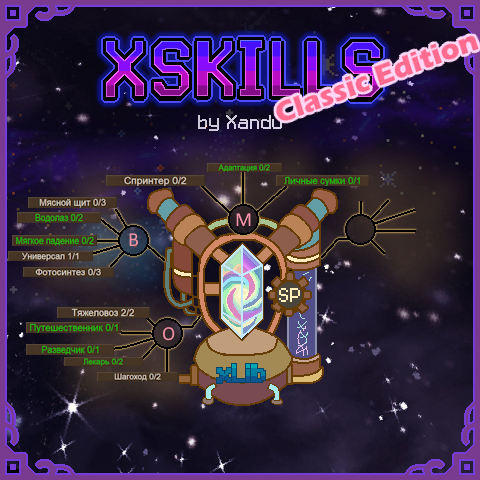
xSkills Fork Classic Edition
This is a lightweight version of regular xskills, without the gilded menu. Experience notifications are disabled, but they can be enabled in the config settings if desired.
Original mod byXandu that adds a skill system with abilities, perks, and progression!
Behold what is perhaps the hardest Vintage Story server yet.
If you're tired of survival that's basically "baby mode," then welcome. A real challenge awaits you:
- Your journey begins in the Far North.
- No map - only a sextant and a compass... if you can find one.
- You start with only 5 HP.
- Monsters are smarter and deadlier. Shivers run faster and can climb walls.
- Boarthorns no longer retreat during combat, and their attacks hit much harder.
But the server isn't just about suffering. It's packed with carefully selected mods that I chose with great care. And if there's a mod you'd love to see, let me know—I might add it.
Most importantly, there's a goal beyond simply surviving. You can travel south, where daytime temperatures average around **15°C (59°F)**. That's where you'll find all the story locations and the rest of the game's content.
No starter resources, no spawn, just you, your clothes, and the freezing cold! Prepare to suffer! Sounds awesome, doesn't it?
Pack your camp, begin your journey south... and see if you can survive.
164.152.123.227:27503
To open xSkills menu press "K"


Features
-
RPG-style progression system
-
Multiple skills with unique ability trees
-
Ability points earned through leveling
-
Configurable experience rates
-
Multiplayer support
-
Highly customizable through config files (XLeveling folder)
- Survival
Improves character survivability, health, mobility and general utility abilities. - Combat
Improves combat effectiveness and provides weapon specializations. - Mining
Improves ore mining efficiency and resource gathering from stone. - Digging
Improves digging of soil resources like clay, peat and saltpeter. - Forestry
Improves woodcutting and tree resource gathering. - Farming
Improves crop growth and agricultural efficiency. - Fishing
Improves fishing efficiency, catch chances, and fishing-related rewards. - Husbandry
Improves animal handling and beekeeping activities. - Metalworking
Improves smelting, smithing and metal crafting. - Pottery
Improves clay forming and ceramic production. - Cooking
Improves food preparation and cooking bonuses. - Temporal Adaptation
Improves survival in temporal instability and related effects.
Configuration & Documentation & Information
🔧 Mod Commands
All commands require admin privileges.
Skill Level Progression Configuration
Skills
/level <add|set|get|reset> <player> <skill> [level] — manages skill levels/exp <add|set|get> <player> <skill> [experience] — manages skill experience/tier <add|set|get> <player> <skill> <ability> <tier> — manages ability tiers/skillset <save|load|delete|default> <SkillSetName> — saves, loads, or deletes a skill set/skillbook <skill> <experience> [color] [knowledge] [quantity] — creates a skill book that grants experienceEffects
/effect clear [player] — clears all effects from a player
/effect add <player> <effect> <intensity> <duration> — adds an effect to a player
/effect remove <player> <effect> — removes an effect from a player
- Do not type the symbols < > [ ] | in the command itself - they are only used to describe the command syntax.
-The nickname in the command must use the same letter case as the original nickname.
Abilities, Effects & Skills Names
Skills
- survival
- farming
- digging
- forestry
- fishing
- mining
- husbandry
- combat
- temporaladaptation
- metalworking
- pottery
- cooking
Abilities
- longlife — Increases your health by X% and additional X% for each level at the survival skill. Maxed out at X%.
- hugestomach — Increases your maximum saturation by X.
- wellrested — Increases your experience gain for every skill up to X% for X seconds depending on how rested you are after sleeping.
- nudist — Clothing is a burden. Increases your movement speed up to X%, your health up to X points, your temperature resistance up to X points and decreases your hunger rate up to X%. Every piece of cloth you wear reduces these effects and can lead into disadvantages.
- meatshield — Absorbs X% of the incoming damage. You lose X times the absorbed damage as saturation.
- diver — Reduces your oxygen consumption by X%.
- featherfall — Reduces your fall damage by X and additional by X%.
- allrounder — You can learn X additional specializations.
- photosynthesis — Increases your health generation in the sunlight up to X% but reduces the health generation in the dark up to X%.
- strongback — Adds an additional inventory with X slots to your character. You can switch the items between this inventory and your hotbar. [default: R]
- ontheroad — Increases your movement speed on paths by X%.
- scout — Increases your movement speed by X%.
- steeplechaser — Increases your step height by X%.
- healer — Healing items you use heal additional X% over X seconds.
- sprinter — Increases your movement speed by X% and your hungerrate by X%.
- abundanceadaptation — Increases your healing effectiveness by X% and your hungerrate by X%.
- soulboundbag — If you die you do not lose the items in your inventory of the Strong Back ability.
- luminiferous — You begin to glow in dark areas, creating a bright area around you with a light level of X.
- cateyes — Your eyes can adjust to dark areas increasing the brightness up to X times, but you may lose some colors. Be careful with bright light sources while your eyes are adapted.
- meteorologist — Every day you will get a forecast for the weather of the next X days.
- laststand — You have a chance to survive a hit that would kill you. The probability of surviving is equivalent to your remaining relative health multiplied by X%.
- greenthumb — Increases the yield of harvested crops by X% and additional X% for each level at the farming skill. Maxed out at X%.
- demetersbless — Increases the yield of gathered seeds by X% and additional X% for every level at the farming skill. Maxed out at X%.
- gatherer — Increases the yield from harvesting grass, berry bushes, reeds and mushrooms by X% and additional X% for every level at the farming skill. Maxed out at X%.
- orchardist — Increases the yield from fruit trees by X% and additional X% for every level at the farming skill. Maxed out at X%.
- repotting — Harvesting non-matured crops drops always the seeds.
- recycler — Breaking farmland now drops soil depending on the remaining fertility. Can improve the soil up to a base fertility of X.
- carefulhands — Allows you to harvest mushrooms and reeds with your bare hands without breaking the roots.
- farmer — You will receive X% more experience for all farming activities. The amount of specializations you can learn is limited.
- brightharvest — Your shears and scythes can break X% more blocks at once.
- cultivatedseeds — If you plant seeds the planted plant has a chance of X% and additional X% for each level at your farming skill to skip a growth stage. If the crop was planted in a greenhouse this ability will always trigger and has a chance to trigger again. The chance is capped at X%.
- beekeeper — Breaking harvestable skeps will give you X more Honeycombs.
- extensivefarming — Enables tool modes for some farming tools to work a larger area. Enables a X times X area tool mode.
- composting — Every time you harvest a full grown crop the farmland will receive some nutrients back.
- crossbreeding — Harvesting a fully grown crop next to a fully grown crop of another type has a base chance of X% to drop a random seed.
- beemaster — You can harvest skeps with right click without breaking them.
- claydigger — Increases clay harvesting yield by X% and additional X% for each level at the digging skill. Maxed out at X%.
- peatcutter — Increases peat harvesting yield by X% and additional X% for each level at the digging skill. Maxed out at X%.
- saltpeterdigger — Increases saltpeter harvesting yield by X% and additional X% for each level at the digging skill. Maxed out at X%.
- shovelexpert — Breaking a block with a shovel increases your digging speed with shovels by X% and additional 0.X% for each level at the digging skill. Maxed out at X%. This effect stacks up to X times and last X seconds.
- carefuldigger — Digging with a shovel has a chance of X% and additional X% for each level at the digging skill to not reduce the durability of the shovel. The chance is capped at X%.
- mixedclay — While you harvest one type of clay you have a chance of X% of getting an extra clay of an other type.
- quickpan — Increases your panning speed by X%.
- golddigger — Increases your yield while panning by X% and additional X% for each level at the digging skill. Maxed out at X%.
- digger — You will receive X% more experience for all digging activities. The amount of specializations you can learn is limited.
- scrapdetector — Every time you break a sand or gravel block there is a chance of X% that the block breaks as if it was sieved with a pan.
- scrapspecialist — Increases the amount of rare items from your Scrap Detector ability by X%.
- strongline – chance to not lose fishing rod durability.
- fisher – increases fishing experience gain (profession).
- fishfilleter – chance to get extra fillets when cleaning fish.
- goodbait – reduces fish bite waiting time.
- autobaiter – automatically attaches bait when casting.
- baitmaster – chance to not consume bait on catch.
- doublehook – chance to catch two fish at once.
- magnetichook – chance to catch items instead of fish.
Effects
- disease — Diseases that can be spread to other players.
- momentum — Increases mining speed with a specific tool by X%.
- dot — Deals X damage every N seconds.
- hot — Restores X health every N seconds.
- heated — Increases body temperature by X every N seconds up to Y.
- receivedDamageMultiplier — Multiplies all incoming damage by X.
- trigger — Triggers another effect for N seconds after this effect ends.
- walkspeed — Increases walking speed by X%.
- exhaustion — Decreases walking speed by X%.
- health — Increases maximum health by X.
- meleeWeaponsDamage — Increases melee weapon damage by X%.
- rangedWeaponsDamage — Increases ranged weapon damage by X%.
- hungry — Increases hunger rate by X%.
- nutrition — Modifies the nutrition value of a specific food category by X every N seconds.
- nutritionFruit — Modifies fruit nutrition by X every N seconds.
- nutritionVegetable — Modifies vegetable nutrition by X every N seconds.
- nutritionProtein — Modifies protein nutrition by X every N seconds.
- nutritionGrain — Modifies grain nutrition by X every N seconds.
- nutritionDairy — Modifies dairy nutrition by X every N seconds.
- attribute — Modifies a player attribute.
- intoxication — Sets intoxication level to X.
- regeneration — Modifies healing effectiveness by X%.
- animation — Can play animations.
- shader — Applies visual effects (shaders).
- blindness — Limits the field of view.
- colorblind — Removes the ability to distinguish colors
- rested — Well Rested
If you're an admin and don't want to drink alcohol to earn learning points, use this method to learn skills instead.
Unfortunately, the XSkills mod does not include the /add unlearn points command.
Therefore, you’ll need to use the following command to reset or change a skill level:
/tier set <player> <skill> <ability> <tier>
Tier values:
• 0 — completely unlearn the skill
• 1, 2, 3 — set the corresponding skill level
- Do not type the symbols < > in the command itself - they are only used to describe the command syntax.
-The nickname in the command must use the same letter case as the original nickname.
The mod features a Knowledge mechanic that allows server administrators and modpack creators to detach specific perks from the standard experience grind. You can gate powerful or specialized abilities so that players must acquire a specific item (like a rare book) to unlock them rather than just leveling up.
1. Creating Knowledge Books (Admin Command)
To generate these books, use the following in-game command:
/skillbook skill experience type knowledge quantity
Parameter Breakdown:
-
skill: The name of the skill tree (e.g.,metalworking,combat). -
experience: The amount of standard experience the book grants. Set this to0if you only want to grant the knowledge point. -
type: The texture type of the book (e.g.,red,blue,gold, aged). -
knowledge: A custom text identifier for the knowledge (e.g.,ancient_automationordragon_lore). Reading the book will increase the player's level for this specific knowledge by exactly 1. -
quantity: The number of books to spawn.
Example Usage:
/skillbook metalworking 100 aged-cherryred ancient_automation 1This spawns 1
aged-cherryredmetalworking book that grants 100 experience, and adds +1 point to theancient_automationknowledge.
2. Gating Abilities Behind Knowledge, Classes, Traits, or Other Abilities (JSON Setup)
To require specific knowledge, a player class, a character trait, or a foundational ability (perk), edit the configuration file for the respective skill (e.g., metalworking.json). Find your target ability within the "abilities" array and add a "requirements" block to it.
Configuration Examples
Example A: Knowledge Requirement
{
  "name": "blacksmith",
  "id": 5,
  "maxTier": 2,
  "minLevel": 3,
  "enabled": true,
  "values": [
    1, 5, 2, 10
  ],
  "requirements": [
    {
      "type": "knowledge",
      "name": "ancient_automation",
      "hideUntilFulfilled": false,
      "level": 3
    }
  ]
}
Example B: Class/Profession Requirement
{
  "name": "metalworker",
  "id": 6,
  "maxTier": 1,
  "minLevel": 5,
  "enabled": true,
  "values": [
    40
  ],
  "requirements": [
    {
      "type": "class",
      "class": "hunter", //or multiple classes, specify them like this:  "classes": ["hunter", "blacksmith"]
       "hideUntilFulfilled": true
    }
  ]
}
Example C: Trait Requirement
{
  "requirements": [
    {
      "type": "trait",
      "trait": "frail",
      "minimumTier": 1,
      "hideUntilFulfilled": true
    }
  ]
}
Example D: Ability Requirement (Skill Tree Branching)
{
  "name": "LongLife",
  "maxTier": 1,
  "minLevel": 5,
  "enabled": true,
  "values": [
    // values here
  ],
  "requirements": [
    {
      "type": "ability",
      "skill": "survival",
      "ability": "safequenching",
      "requiredTier": 1,
      "minimumTier": 1,
      "hideUntilFulfilled": false
    }
  ]
}
Requirement Parameters
-
"type"— Tells the mod what kind of requirement this is. Valid options are"knowledge","class","trait", or"ability". -
"name"(Knowledge only) — The exact identifier used when creating the knowledge entry. -
"class"(Class only) — The specific player class or profession required to unlock this perk (e.g., "hunter"). -
"trait"(Trait only) — The identifier of the required trait. -
"skill"(Ability only) — The internal identifier of the skill tree containing the required prerequisite perk (e.g., "survival"). -
"ability"(Ability only) — The internal identifier of the required prerequisite perk (e.g., "safequenching"). -
"level"(Knowledge only) — The number of books with this knowledge that must be read to satisfy the requirement. -
"requiredTier"(Ability only) — The specific tier level of the prerequisite ability that the player must reach. -
"minimumTier"— The minimum tier of the specified trait, or the minimum tier of the current perk where this requirement begins to apply. -
"hideUntilFulfilled"— Set totrueorfalse. Determines whether the perk remains completely hidden in the UI until the requirement is met. For example, if set totrue, only eligible players will see the perk.
3. In-Game Mechanics
Item Tooltips
When a player hovers over a knowledge book, an additional line appears in the item description showing the knowledge name. This can be localized in your language files using the book-yourname key.
Skill Menu UI
How a locked ability appears in the player's skills menu depends on the hideUntilFulfilled setting:
-
Hidden (
true)The perk is completely invisible in the menu until the player meets the requirement. This is ideal for secret unlockables, class-specific skill branches, trait-exclusive perks, or advanced abilities that logically follow foundational ones.
Examples:
-
A Hunter will not see Blacksmith perks restricted to another class.
-
A character without the required trait will not see trait-exclusive abilities.
-
Advanced skill nodes remain hidden until the prerequisite nodes are purchased.
-
-
Visible (
false)The perk is visible but locked. The specific requirements will be displayed in the tooltip:
-
For Knowledge:
[Knowledge Name]: [Current Level] / [Required Level] -
For Classes:
[Required Class]: [Class Name] -
For Traits:
[Required Trait]: [Trait Name] (Tier [Required Tier]) -
For Abilities:
[Ability Display Name] [Current Tier]/[Required Tier].
-
Practical Applications
This requirement system enables highly flexible progression paths:
-
Knowledge requirements are perfect for distributing unique, learnable rewards through quests, events, boss loot, treasure finds, or custom server shops. Knowledge books can also be added to Vintage Story loot tables using JSON patches.
-
Class requirements allow you to create profession-specific skill trees tailored to different roles on a multiplayer server.
-
Trait requirements make it possible to create unique gameplay paths based on character traits. For example, certain perks may only be available to characters with specific strengths, weaknesses, backgrounds, or mutations.
-
Ability requirements allow you to create deep, interconnected skill trees. You can logically gate advanced, specialized, or powerful mechanics behind the mastery of simpler, foundational perks (e.g., unlocking the Long Life perk only after a player invests in Safe Quenching). After obtaining the required knowledge books, players must read enough copies to reach the required knowledge level and unlock the associated perk.
| Specialization / Class | Commoner | Hunter | Malefactor | Clockmaker | Blackguard | Tailor |
|---|---|---|---|---|---|---|
| Survival | 10% | 20% | 15% | -20% | -5% | 0% |
| Combat | 10% | 0% | -10% | -20% | 20% | 0% |
| Farming | 10% | -15% | 10% | 15% | -15% | 0% |
| Digging | 10% | -15% | 10% | -15% | 10% | 0% |
| Forestry | 10% | 10% | -20% | -15% | -5% | 0% |
| Mining | 10% | -20% | -10% | 15% | 15% | 0% |
| Husbandry | 10% | 20% | 15% | -20% | -10% | 0% |
| Fishing | 10% | 20% | 0% | 0% | -10% | 0% |
| Metalworking | 10% | -15% | -15% | 20% | 15% | 0% |
| Pottery | 10% | 15% | 5% | 20% | -20% | 0% |
| Cooking | 10% | 15% | 5% | 0% | -15% | 0% |
💬 Credits
Huge thanks to the original author of the mod, Xandu!
Please consider supporting them with a coffee ☕ for their great work.
xSkills Gilded by Makham has been integrated into the mod. Huge thanks to you for such a beautiful interface!
Please consider supporting them with a coffee ☕ for their great work.
Compatibility with the Blush and Bins mod by JakeWags, thanks a lot for the code!
- Ancient Mariner - Reduces hunger drain while holding a fishing rod.
- Ice Fisher - Reduces the effects of cold while fishing.
- Moonlit Waters - Increases bite chance at night.
- River Specialist - Increases bite chance in flowing freshwater. Mutually exclusive with Coastal Master.
- Coastal Master - Increases bite chance in saltwater. Mutually exclusive with River Specialist.
Full brunch: Tailoring, Brewing, Sailing, Riding from PandaXskills Rework
-
Improved compatibility with A Culinary Artillery and Expanded Foods liquid recipes.
-
Updated Dilution food detection to support:
-
NutritionProps
-
NutritionPropsPerLitre
-
nutritionPropsWhenInMeal
-
nutritionPropsWhenInMealByType
-
-
Allowed Refined Dilution to affect non-edible liquid processing products, such as Expanded Foods pre-gelatin.
-
Added probabilistic rounding for fractional liquid output bonuses, preventing small Dilution bonuses from always being truncated.
-
Reworked Well Done handling for contained liquid products:
-
Additional cooking-time modifier is calculated before cooking completion.
-
Shelf-life bonus is applied to the actual finished contents instead of the outer container.
-
Missing transition states are initialized before modifying freshHours.
-
Existing product-specific shelf-life values are multiplied instead of replaced with collectible template values.
-
-
Added optional saucepan cooking-time compatibility for Electrical Progressive machines.
-
Fast Food and Well Done time modifiers now affect Expanded Foods simmering recipes.
-
Preserved existing behavior for:
-
Normal meals
-
Pies
-
Non-liquid cooking outputs
-
-
Added Orchardist compatibility for Tree Shaker 1.1.1.
-
Fruits harvested with Tree Shaker now correctly receive the player's Orchardist yield bonus.
Fixed the Effects HUD mode not being preserved after restarting the game.
- The selected Effects HUD state is now saved to xeffects.json.
- Restored the saved Effects HUD state when the client creates the Effects window.
- Changes made through the Effects hotkey are now saved immediately.
- Closing the Effects window from its title bar now correctly persists the updated display mode.
Effects HUD Modes
- Never: the Effects window remains hidden after restarting the game.
- Dynamic: the Effects window automatically opens when active effects are present.
- Always: the Effects window remains visible.
Technical
- Added the persisted effectFrameState setting to XEffectsConfig.
- Added a state-change callback to EffectFrame.
- Centralized Effects HUD state changes through SetForcedState.
- Updated XEffectsSystem to load and save the Effects HUD mode.
- Fixed a crash when loading an Electrical Progressive electric fruit press with a full pomace output or an empty/unresolved input stack.
- A lot of Chinese translation corrections.
-
Fixed a crash when loading an Electrical Progressive electric fruit press with a full pomace output or an empty/unresolved input stack.
-
Fixed the Effects HUD mode not being preserved between game sessions.
-
Fixed the Well Done shelf-life bonus being applied repeatedly to food already present in the output slot.
-
Chinese translation corrections.
-
Updated the Archer perk description to be more accurate.
-
New perks:
-
Cuttings - Reduces the regrowth time before a bush can provide another cutting.
-
Rooting - Planted cuttings grow into mature bushes faster.
-
Careful Shooter - Grants a chance to avoid durability loss on bows, slings, and crossbows. When using a sling, also grants a chance not to consume regular stones.
-
You can also contact me on Discord: DeadSigma:6666, or on Telegram: @El_Neuman.
| Mod Version | Mod Identifier | For Game version | Downloads | Released | Changelog | Download | 1-click mod install* |
|---|---|---|---|---|---|---|---|
| 1.1.8 | xskillsforkclassic | 542 | Oct 4th at 10:42 AM | xSkills Fork Classic v1.1.8.zip | 1-click install | ||
Это мой последний релиз Всем пока | |||||||
| 1.1.7 | xskillsforkclassic | 45 | Sep 26th at 12:34 PM | xSkills Fork Classic v1.1.7.zip | 1-click install | ||
| |||||||
| 1.1.6 | xskillsforkclassic | 113 | Sep 22nd at 7:21 PM | xSkills Fork Classic v1.1.6.zip | 1-click install | ||
| |||||||
| 1.1.5 | xskillsforkclassic | 222 | Sep 13th at 8:34 AM | xSkills Fork Classic v1.1.5.zip | 1-click install | ||
| |||||||
| 1.1.4 | xskillsforkclassic | 76 | Sep 12th at 12:16 PM | xSkills Fork Classic v1.1.4.zip | 1-click install | ||
| |||||||
| 1.1.3 | xskillsforkclassic | 34 | Sep 12th at 11:26 AM | xSkills Fork Classic v1.1.3.zip | 1-click install | ||
| |||||||
| 1.1.2 | xskillsforkclassic | 187 | Sep 7th at 8:54 PM | xSkills Fork Classic v1.1.2.zip | 1-click install | ||
| |||||||
| 1.1.1 | xskillsforkclassic | 25 | Sep 6th at 10:39 PM | Empty | xSkills Fork Classic v1.1.1.zip | 1-click install | |
I changed the key from K to O for the menu, but it doesn't work. Also, the No Exclusive Skills Patch doesn't work either.
You most likely have a keybind conflict. Try going through your hotkeys and make sure none of them overlap. As for compatibility with that mod, you'll need to contact its author.
It is NOT a conflict. I've checked all my keys and there is no overlap.
Ok, i will check it!
How would you use this instead of the xskillsfork, if other mods then depend on that specifically?
Good question. We should contact the authors of those mods and ask them to make their dependency on xSkills more universal, since there are already several versions of XSkills on the ModDB. I think that would be useful for everyone.
Thank you for creating this! I know it's not as popular but it's very nice to have options and I really appreciate it.
Absolute legend. I just want to say thank you again here. This is far more than I had any right to expect from the comment chain, and I just can't say thank you enough.
The link for changes doesn't work for me.
Maybe you should contact the site developers?
Or is it not related to the website and I misunderstood you?
When I click the link for 'changes here' it says I can't connect.
"
This site can’t be reached
telegra.ph refused to connect.
"
I'm not sure if it's something on my end, or if the link is wrong.
I don't understand exactly where you can't see the changes. Could you take some screenshots?
Hmm, must be something on my end.
The website just doesn't load for me.
Probably something blocking the connection along the line.
It opened on another computer, so it's fine.