
Mods / Text Input Enhancements
- Tags:
- Author:
- Genhis
- Side:
- Client
- Created:
- Jul 10th 2025 at 4:57 PM
- Last modified:
- Aug 6th 2025 at 8:28 AM
- Downloads:
- 1123
-
Latest release (for Vintage Story 1.20.10 - 1.20.12, outdated):
TextInputEnhancements_0.2.1.zip 1-click install
Deprecated: This mod was integrated into the base game in 1.21.0-rc.3 (https://github.com/anegostudios/vsapi/pull/50)
Text Input Enhancements
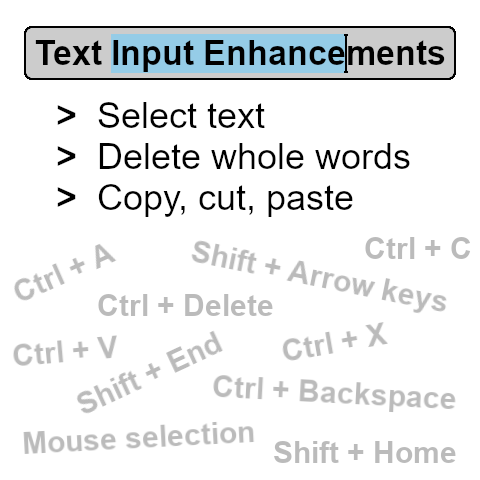
This mod improves text manipulation in input fields and makes them behave like a text editor.
Features
- Text selection with mouse and keyboard.
- Shortcuts to delete whole words (Ctrl+Backspace, Ctrl+Delete).
- Copy (Ctrl+C), cut (Ctrl+X) and paste (Ctrl+V) shortcuts.
- Improved word detection for cursor movement (Ctrl+Left arrow, Ctrl+Right arrow).
| Mod Version | Mod Identifier | For Game version | Downloads | Released | Changelog | Download | 1-click mod install* |
|---|---|---|---|---|---|---|---|
| 0.2.1 | textinputenhancements | 451 | Aug 4th 2025 at 8:33 AM | TextInputEnhancements_0.2.1.zip | 1-click install | ||
Fixed
| |||||||
| 0.2.0 | textinputenhancements | 284 | Jul 23rd 2025 at 5:31 PM | TextInputEnhancements_0.2.0.zip | 1-click install | ||
Added
| |||||||
| 0.1.0 | textinputenhancements | 389 | Jul 10th 2025 at 4:59 PM | TextInputEnhancements_0.1.0.zip | 1-click install | ||
Added
Changed
| |||||||
wildforester It's hard to think of and test every key / selection combination, so sometimes things get through. I opened a PR with the fix: https://github.com/anegostudios/vsapi/pull/53. Thanks for reporting it!
Should've found this before the mod was PR'd into the game. But one thing that I've found doesn't work is doing ctrl+A and pressing the left arrow key to get to the start of a sentence in chat.
(I see there's ctrl+left arrow which does the same as this. But for ppl like me who've always done it this way, I wouldn't know what to do)
Congratulations on the inclusion into the vanilla game!
This mod is being pr'd into the game. See the latest 1.21 announcements
AzuliBluespots And it's already in the new update 1.21.0-rc.3 :D
Impressive, should've been vanilla.
FINALLY. Thank you so much for making this.
This is great. Just wish I could copy text from a book without editing it.
Genhis - Sorry, no go :) Just used the coal in hand on a "Labeled Chest".
FINALLY. I cannot stand that this doesn't exist in vanilla
Jimbo7 Thanks for the report. Can you be more specific? How do I create/edit a crate label? Is the crash reproducible?
Hello & thanks for the mod!
Happened when I alt-entered whilst editing a crate label. First edit on blank label - initially added "Mining/Adventure Items", went back to after the "/", hit alt-enter for a new line, and crash.
Running on 64 bit Windows 10.0.22000.0 with 65309 MB RAMGame Version: v1.20.12 (Stable)
13/07/2025 9:46:27 am: Critical error occurred in the following mod: textinputenhancements@0.1.0
Loaded Mods: chargedjump@1.0.4, freelook@1.0.1, instantpickup@1.0.3, game@1.20.12, commonlib@2.6.1, extrainfo@1.9.9, improvedhandbookrecipes@1.1.3, itempickupnotifier@1.7.0, recipeselector@1.0.1, simplefootstepsredux@1.0.3, spawnhighlight@1.2.0, statushudcont@3.2.7, stepupadvanced@1.0.7, temporalstormtimer@1.1.1, textinputenhancements@0.1.0, creative@1.20.12, survival@1.20.12, playercorpse@1.11.1, xinvtweaks@1.8.0
System.ArgumentOutOfRangeException: Index and length must refer to a location within the string. (Parameter 'length')
at System.String.ThrowSubstringArgumentOutOfRange(Int32 startIndex, Int32 length)
at System.String.Substring(Int32 startIndex, Int32 length)
at Vintagestory.API.Client.GuiElementEditableTextBase.OnKeyEnter() in VintagestoryApi\Client\UI\Elements\Impl\Interactive\Text\GuiElementEditableTextBase.cs:line 537
at Vintagestory.API.Client.GuiElementEditableTextBase.OnKeyDown(ICoreClientAPI api, KeyEvent args) in VintagestoryApi\Client\UI\Elements\Impl\Interactive\Text\GuiElementEditableTextBase.cs:line 432
at TextInputEnhancements.Gui.Enhancements.OnKeyDownInternal(ICoreClientAPI api, KeyEvent e, Action`2 baseFunc) in C:\Programming\C#\VintageStoryMods\TextInputEnhancements\Gui\Enhancements.cs:line 106
at TextInputEnhancements.Gui.GuiElementEnhancedTextArea.OnKeyDown(ICoreClientAPI api, KeyEvent args) in C:\Programming\C#\VintageStoryMods\TextInputEnhancements\Gui\GuiElementEnhancedTextArea.cs:line 25
at Vintagestory.API.Client.GuiComposer.OnKeyDown(KeyEvent args, Boolean haveFocus) in VintagestoryApi\Client\UI\GuiComposer.cs:line 581
at Vintagestory.API.Client.GuiDialog.OnKeyDown(KeyEvent args) in VintagestoryApi\Client\UI\Dialog\GuiDialog.cs:line 435
at Vintagestory.Client.NoObf.GuiManager.OnKeyDown(KeyEvent args) in VintagestoryLib\Client\Systems\Gui\GuiManager.cs:line 333
at Vintagestory.Client.NoObf.ClientMain.OnKeyDown(KeyEvent args) in VintagestoryLib\Client\ClientMain.cs:line 1795
at Vintagestory.Client.NoObf.ClientPlatformWindows.game_KeyDown(KeyboardKeyEventArgs e) in VintagestoryLib\Client\ClientPlatform\Input.cs:line 230
at OpenTK.Windowing.Desktop.NativeWindow.KeyCallback(Window* window, Keys key, Int32 scancode, InputAction action, KeyModifiers mods)
--- End of stack trace from previous location ---
at OpenTK.Windowing.Desktop.NativeWindow.RethrowCallbackExceptionsIfNeeded()
at OpenTK.Windowing.Desktop.GameWindow.Run()
at Vintagestory.Client.ClientProgram.Start(ClientProgramArgs args, String[] rawArgs) in VintagestoryLib\Client\ClientProgram.cs:line 334
at Vintagestory.Client.ClientProgram.<>c__DisplayClass10_0.<.ctor>b__1() in VintagestoryLib\Client\ClientProgram.cs:line 130
at Vintagestory.ClientNative.CrashReporter.Start(ThreadStart start) in VintagestoryLib\Client\ClientPlatform\ClientNative\CrashReporter.cs:line 93
Criminally underrated mod
YESSSS THANK YOU!!!
This is a gift from the heavens! Hope it works with my 70+ other mods óᯅò
DanaCraluminum Yes, Ctrl+A works. You can only copy text from places you can interact with and write into, so not from the handbook.
THANK YOU, i've been looking for this for so so long!
Is there Ctrl + A to select all text? Can you copy text from such places as handbook yet?