
Mods / Item Pickup Notifier
- Tags:
- Author:
- OldManYells
- Side:
- Client
- Created:
- Apr 27th 2025 at 12:23 PM
- Last modified:
- Sep 7th at 12:36 AM
- Downloads:
- 30679
-
Recommended download (for Vintage Story 1.22.0-pre.1 - 1.22.7):
itempickupnotifier_2.3.0.zip 1-click install
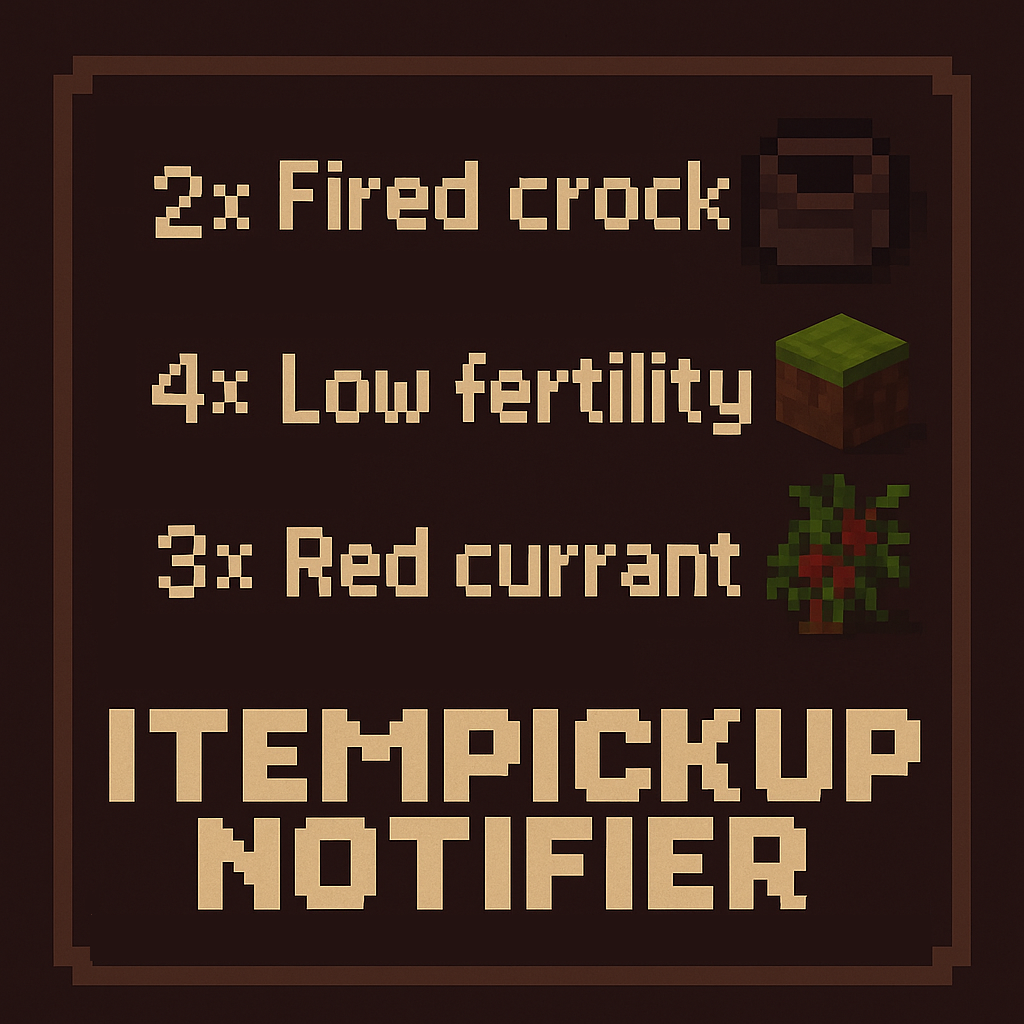
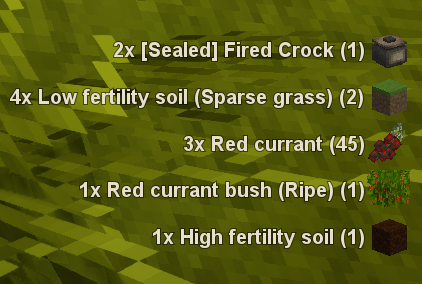
Simple UI overlay that displays items and their amount whenever a player picks them up.
Acknowledgment / Contributions ⚙
- es-es translations by C4BR3R4
Notice: Version 2.3.0 changes the backpack detection in order to attempt compat with other backpack mods
Latest Changes:
- Tweak: Rework backpack detection for compat with other mods
- Fix: Icon only mode
- Fix: Live config preview + Fake data artifacts
Previous Changes:
- Greatly Simplify alignment options
- Offsets now go from 0 to 100 (screen percentage based) and are relative to anchor point.
- Animation Toggle Setting
Features
- Client Side Only - Works on any server
- Dynamic Overlay position on resize.
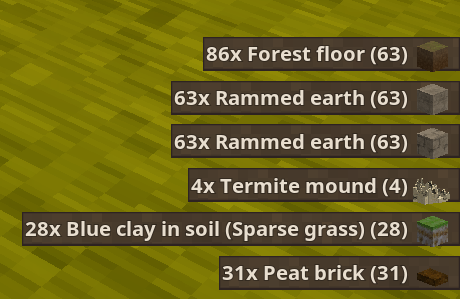
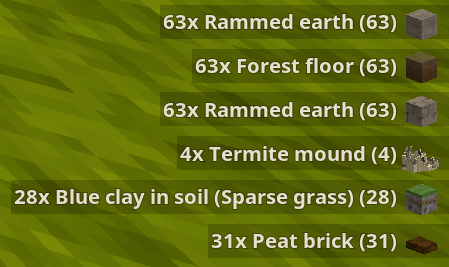
- Displays on screen any item that get picked up into the players bags or hotbar (Pickups, Harvest, Loot, Paning)
- Shows associated icon
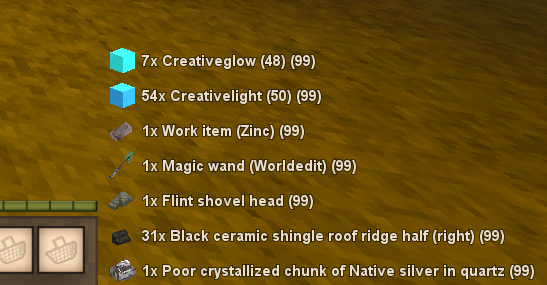
- Allows displaying the total amount present in bags when an item is picked up
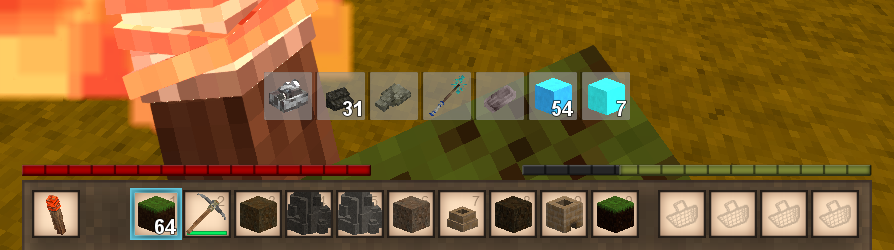
- Icon Mode only (display pickups above hotbar as simple item cards -- inspired by Everwind)
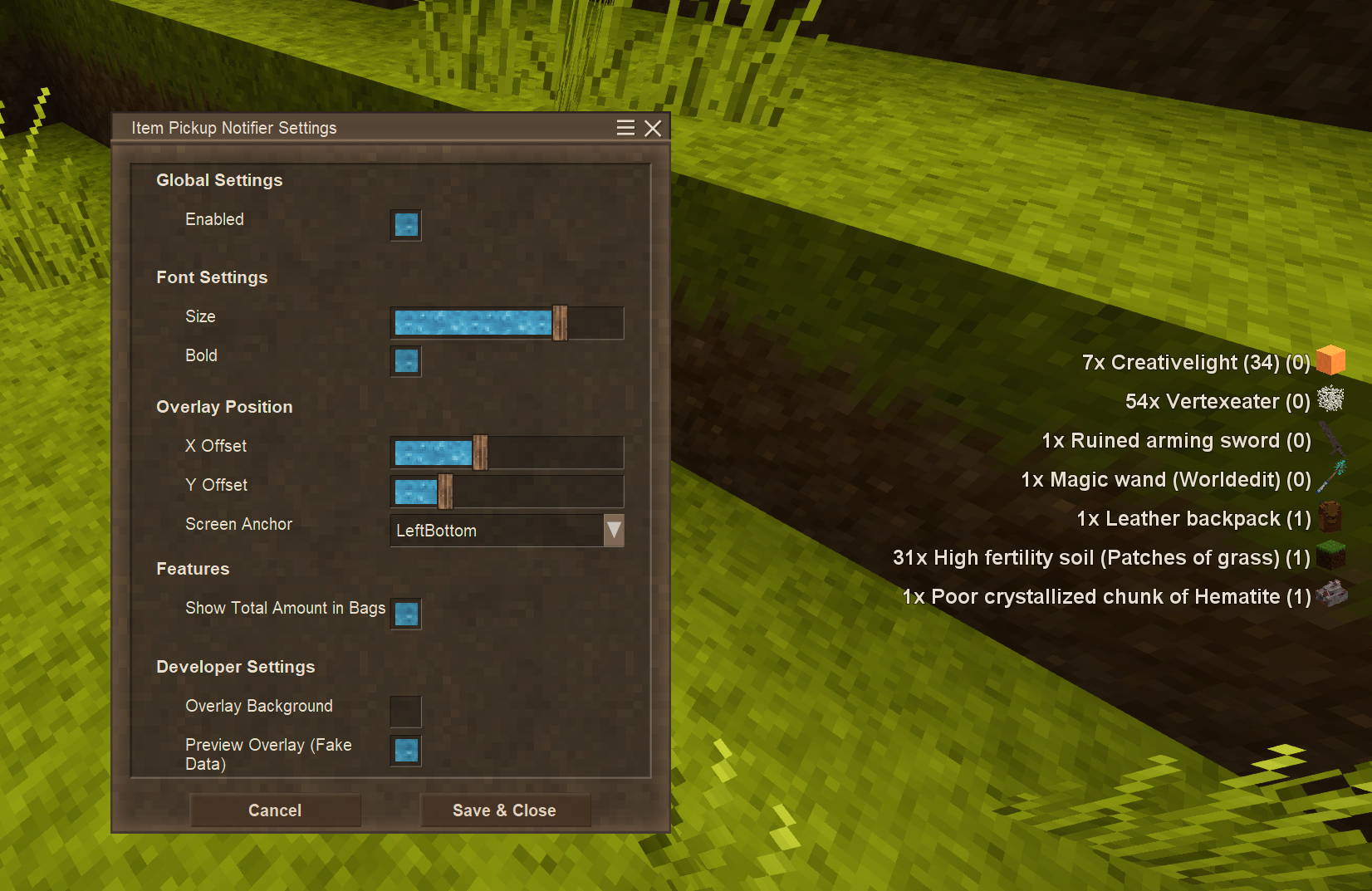
- In game client settings window (CTRL+Z)
Configuration
Mod has a configuration window accessible through CRTL+Z shortcut.
Alternatively you can configure via settings file. After running the mod for the first time the file itempickupnotifier.json should appear on your <VintageStory Data Folder>/ModConfig/.
| Field | Description | Default Value |
| Enabled |
Enables or disables the mod | true |
| Anchor | Base location on screen to display overlay (Based on Vintagestory.API.Client.EnumDialogArea) | "RightBottom" |
| HorizontalOffset | Number of pixels to offset horizontally base location (can be negative) | 0.0 |
| VerticalOffset | Number of pixels to offset vertically base location (can be negative) | 0.0 |
| FontSize | Size of the font | 16.0 |
|
TotalAmountEnabled |
Display the total amount in bags of the picked up item | false |
Other Mods ⚙
Check out my other work
| Mod Version | Mod Identifier | For Game version | Downloads | Released | Changelog | Download | 1-click mod install* |
|---|---|---|---|---|---|---|---|
| 2.3.0 | itempickupnotifier | 1587 | Sep 7th at 12:36 AM | itempickupnotifier_2.3.0.zip | 1-click install | ||
| |||||||
| 2.2.0 | itempickupnotifier | 5510 | Mar 8th at 9:08 PM | itempickupnotifier_2.2.0.zip | 1-click install | ||
|
- Bump net10 (vs1.22) | |||||||
| 2.1.0 | itempickupnotifier | 2600 | Feb 14th at 1:55 PM | itempickupnotifier_2.1.0.zip | 1-click install | ||
| |||||||
| 2.0.0 | itempickupnotifier | 587 | Feb 8th at 4:46 PM | itempickupnotifier_2.0.0.zip | 1-click install | ||
|
- Reworked overlay drawing internals | |||||||
| 1.9.1 | itempickupnotifier | 4504 | Nov 22nd 2025 at 2:16 PM | itempickupnotifier_1.9.1.zip | 1-click install | ||
|
- Attempt to fix crash on rendering empty list | |||||||
| 1.9.0 | itempickupnotifier | 2216 | Oct 18th 2025 at 3:12 PM | itempickupnotifier_1.9.0.zip | 1-click install | ||
|
- Tweak: Rework SettingsUI code and visual aligment | |||||||
| 1.8.0 | itempickupnotifier | 575 | Oct 15th 2025 at 5:15 PM | itempickupnotifier_1.8.0.zip | 1-click install | ||
|
- Improved alignment based on font size and UI scale | |||||||
| 1.7.3 | itempickupnotifier | 4847 | Aug 18th 2025 at 1:48 PM | Empty | itempickupnotifier_1.7.3.zip | 1-click install | |
| 1.7.2 | itempickupnotifier | 1915 | Aug 7th 2025 at 10:01 PM | itempickupnotifier_1.7.2.zip | 1-click install | ||
|
- es-es translations by C4BR3R4 | |||||||
| 1.7.1 | itempickupnotifier | 1067 | Jul 24th 2025 at 12:02 PM | itempickupnotifier_1.7.1.zip | 1-click install | ||
| |||||||
| 1.7.0 | itempickupnotifier | 1981 | May 31st 2025 at 3:20 PM | itempickupnotifier_1.7.0.zip | 1-click install | ||
| |||||||
| 1.6.2 | itempickupnotifier | 727 | May 24th 2025 at 6:29 PM | itempickupnotifier_1.6.2.zip | 1-click install | ||
|
- Fix saving issue | |||||||
| 1.6.1 | itempickupnotifier | 118 | May 24th 2025 at 6:05 PM | itempickupnotifier_1.6.1.zip | 1-click install | ||
|
- Add missing language files | |||||||
| 1.6.0 | itempickupnotifier | 128 | May 24th 2025 at 5:25 PM | itempickupnotifier_1.6.0.zip | 1-click install | ||
| |||||||
| 1.5.0 | itempickupnotifier | 370 | May 18th 2025 at 12:37 AM | itempickupnotifier_1.5.0.zip | 1-click install | ||
|
- Display total amount of item in player inventory | |||||||
| 1.4.3 | itempickupnotifier | 374 | May 10th 2025 at 1:48 PM | itempickupnotifier_1.4.3.zip | 1-click install | ||
| |||||||
| 1.4.1 | itempickupnotifier | 294 | May 7th 2025 at 12:00 AM | itempickupnotifier_1.4.1.zip | 1-click install | ||
|
- Converted Mod to client side only | |||||||
| 1.3.0 | itempickupnotifier | 194 | May 6th 2025 at 11:57 AM | itempickupnotifier_1.3.0.zip | 1-click install | ||
|
- Added support for panning and harvesting | |||||||
| 1.2.0 | itempickupnotifier | 193 | May 5th 2025 at 10:26 PM | itempickupnotifier_1.2.0.zip | 1-click install | ||
|
Breaking changes: Due to layout composition changes you may expect that the position of the overlay changes.
| |||||||
| 1.1.0 | itempickupnotifier | 433 | May 3rd 2025 at 10:39 PM | itempickupnotifier_1.1.0.zip | 1-click install | ||
|
- Added Configuration Support
- Overlay position on screen
- Horizontal and Vertical offset
- Font Size | |||||||
| 1.0.0 | itempickupnotifier | 459 | Apr 27th 2025 at 12:25 PM | Empty | itempickupnotifier_1.0.0.zip | 1-click install | |
I am returned to confirm that the latest update has fixed whatever issue was causing item notifications to not appear for items added to bags. Cheers!
Come here im gonna kiss you
Amazing
I think i've figure out the compat issues with other mods. Will try to release a new version soon (but i'd also like so fix some annoyances along the way -- please be patient) 🙏
OLD MAN IS BACK
On 1.22.5, not having any of the hotbar issues. filled hotbar, equipped four baskets, picked up items, notified fine.
only complaint is that the font is too small/light. a thicker border would be nice, the pickup text is barely bigger than my finger, and im just playing on a normal roughly 20 inch 1080p monitor
Hi, if you press CTRL-Z (given you've not rebound to anything else -- which you can fix in the setting > controls if it's not working) the config window should show and allow you to change font size -- not the font border tho apologies)
Same issue as ManaWei. It only highlights items I collect into my Hotbar. I'm on 1.22.3
It would seem it has stopped counting items you have in the bags, and is only now counting what you have in your hotbar..
This seem ineffective, hope you get time to look at it <3
Bump. Also having this issue.
+1 to this issue. Are you also using xSkills too? Maybe it's somehow incompatible with their new XP gain UI elements or something.
This was an issue with earlier versions of the 1.22 compatible version due to the renaming of the standard backpacks internally. I'm playing with mods latest version an not experience this. Can you try to remove and re install the mod?
OK, so I tried updating several other mods, and deleting this mod, and deleting this mod's cache and config, and re-downloading this mod, and re-installing it, and it still didn't work. So I'm going back to if it doesn't work it must be some kind of obscure mod incompatability, or something.
It may not work with other backpack mods that i won't argue as i've not added any compatibility or tested as i'm not currently using any. but it does work for base game. Are you using other bag mods?
I use Modular Backpacks mod and your mod might not have a compatibility towards it.
I appreciate your work already and I hope we do not put to much pressure on you by asking for a fix.
I have screenshake / fps drops (I think) when I pick many stones up. After disabling the mod everything worked fine again. The server I'm on only has 31 mod's so I don't think there is a conflict as they are the most common ones like carry on / roofing etc.
Thank you. It works extremely well!
I am back again to second these two issues and to add a third. Funnily enough, the old issue with the font scaling seems to have been fixed, but now, with my anchor in the bottom right, setting the Y offset to 100 and reloading the world resets it to 0
OldManYells yes am on v1.22.2 and am on mod version 2.2.0
Huw can you confirm you're using the latest version? that was the case for early experimental versions due to some internal changes in the api
D4ngrs i need to fix that yes, i've noticed but since i haven't had much time it hasn't been a priority. Apologies
it seems its only coming up with the notifier for things in my hotbar, if i pick up an item thats in my backpack then nothing shows
im having the same issue, anyone know a fix?
Changing settings (with the fake popup enabled) completely breaks it. These black bars are permanent until I restart - and it also every now and then hides half of my HUD, including the ESC menu. No error logs due to no crashes, just bugged mod.
Thnx, the mod is very combeninent!!!
Elefsar did you try reading the mod description on this page? it tells you how to change the mod settings at least twice
OMG the text is so small, I cannot see it, and I don't see this mod on mod settings too. I cannot fix it.
Botaxalim setting the font to max (20) and it reverting back does seems like a bug in the mod itself.
i have delve more into the text revert back to the smallest number setting. i think its involved long standing bug which happen to labeled chest too, its innate bug inside the game. it happen to your mods because its using same mechanic as game.
i suggest just make a notifier icon only, and make it big, i guess font size (or resizing bug) f up the aesthetic of the UI mods
Same issue as Botaxalim, if I set the text to 20, it resets to minimum every reload.
everytime i reload save game / reopen the game, the font size setting always keep back to smallest number. tried multiple times changing font to max and saved it, still happen eveytime
Velstadt i appreciate the feedback. It does make total
sense to have a toggle for the animations since you might even not want to have it weight on the graphics themselves. I was hoping that the new way of aligning would feel better, I personally also thought it was just too much, too confusing .
OldManYells I like the update, thanks. The positive-only alignment values make more sense to me now.
About the animations, I find the "slide out" too distracting at times. It's a minor thing, really, maybe I could get used to it, but I believe that with things like this (ie. UI "juiciness") it's probably better that they come with an on/off toggle, which is why I suggested it. Thanks for adding it as well
Velstadt Did some big simplification of the alignment options with what i hope is a more intuitive constumization and behaviour that will be relative to the chosen anchor point (1 of the four corners of the screen). I haven't tested or dealt with the preview tho.
ah yes, that amazing glitch. Believe it or not the ui structure is way better but it seems that i've broken several "features". I'll fix them. For the sake of transparency the position issues is because now all overlays are independent while before they had a parent container and where aligned inside. I don think the whole set of anchor are actually useful given the offset. i'll probably remove and leave the four corners and have the offset be all positive (instead of the confusing negative and positive) and be in relation to the corner you choose, that should make it all simpler. I'll add the disable animation option too. Do you suggested the animation disable for what reason? is it weird? you don't actually enjoy it or is it degrading performance?
OldManYells it was CenterBottom, but now that you asked I realized I could rearrange the RightBottom one. I guess it was actually weird before and now you corrected it. Not an issue anymore for me.
Just noticed, though, the preview option glitches out, maybe due to the animation. I was just looking for the right X and Y offsets and this is what happens every time I toggle preview:

As you can see, it persists even after leaving the mod settings.
Velstadt what option are you using for the Anchor?
You just said you'll be iterating over alignment, so I guess you noticed that it's weird at the moment?
In case you didn't, here's a screenshot running on 1.9.1 and another one under the same settings on 2.0.0.
As a request, could you please make the animations optional as well?
Thanks for the mod.
Well i did it again 😅 Go derailed and remade the code for drawing the notifications. Now it has animations and optional background (per row). Can't garantee it won't crash somewhere else but it's not going to be in the same place. Should already be working with 1.22 from small tests i did.
I'll probably will be iterating over the animations and aligment of stuff.
Also got the same crash error when I tried to place (not shift-click) a stack of dirt into my backpack. Shame cause it's a nice mod. I'll toss you a follow I guess and hope for a fix.
>2/2/2026 8:52:11 PM: Critical error occurred in the following mod: itempickupnotifier@1.9.1
>System.Exception: Couldn't build bounds from children, there were probably no child elements using fixed sizing! (or they were size 0)
>at Vintagestory.API.Client.ElementBounds.buildBoundsFromChildren() in VintagestoryApi\Client\UI\ElementBounds.cs:line 394
Apologies to everyone whos been having crash issues. Been a bit away on other projects, ill probably be able to get back to this and fix it this month. Thank you for your patience :) (And for all crash reports, surely they'll be very helpful)
I'm also getting same error as Rabblerouser, trying to play on a server and keep crashing. Sad cause I love this mod.
Edit 1: Also the font got really small, haven't changed anything. Will try to redownload mod and random stuff to see and edit this again.
Edit 2: Added my crash report, I do have mods installed, so let me know if there's anything conflicting. Otherwise, reinstalling hasn't helped... Will disable for now until a patch or something comes :[
Can we have an option to toggle showing it when clicking an item or item stack into the inventory? Since I am actively clicking the item in it isn't needed, and if you rapidly click an item in your inventory to pick it up and place it back in, for example, it tends to count all the clicks as cumulative on the notification (so clicking 12 times with 3 rope will say x36 rope on the notification). Thanks for the mod overall tho!
Crash report when I tried to shift-click rot from a container.
Common denominator between this and other reports is the "System.Exception: Couldn't build bounds from children, there were probably no child elements using fixed sizing! (or they were size 0)"
Running on 64 bit Windows 10.0.19045.0 with 5596 MB RAM
Game Version: v1.21.6 (Stable)
12/17/2025 8:29:27 AM: Critical error occurred in the following mod: itempickupnotifier@1.9.1
Loaded Mods: beamium@1.2.2, hangingoillamps@1.0.5, nowastebloomery@1.0.0, trashbinned@0.3.0, game@1.21.6, zoombuttonreborn@2.0.0, egocaribautomapmarkers@4.0.3, beararmorrepair@1.0.3, betterfirepit@1.2.0, bloodtrail@1.1.8, carryon@1.12.1, damagenumbers@1.0.0, freedomunits@1.1.5, fsr1r@1.9.0, gimap@1.5.0, healthbar@1.3.0, highfert@1.20.12, hudclockpatch@1.1.2, itempickupnotifier@1.9.1, mobsradar@2.1.12, optitime@1.3.11, regenores@2.3.0, showcraftable@1.2.6, spawnhighlightcustom@1.1.2, statushudcont@4.0.2, stepupadvanced@1.2.4, cookie12000stickbeam@1.2.2, creative@1.21.6, vsquest@3.0.0, vsroofing@1.0.13, survival@1.21.6, vsvillage@3.0.1, beamtools@1.0.2
System.Exception: Couldn't build bounds from children, there were probably no child elements using fixed sizing! (or they were size 0)
at Vintagestory.API.Client.ElementBounds.buildBoundsFromChildren() in VintagestoryApi\Client\UI\ElementBounds.cs:line 394
at Vintagestory.API.Client.ElementBounds.CalcWorldBounds() in VintagestoryApi\Client\UI\ElementBounds.cs:line 258
at Vintagestory.API.Client.GuiElementGameOverlay.ComposeElements(Context ctx, ImageSurface surface) in VintagestoryApi\Client\UI\Elements\Impl\Static\GuiElementGameOverlay.cs:line 24
at Vintagestory.API.Client.GuiComposer.Compose(Boolean focusFirstElement) in VintagestoryApi\Client\UI\GuiComposer.cs:line 362
at ItemPickupNotifier.GUI.NotifierOverlay.BuildStandardMode() in C:\Users\tacf\code\vintagestory\vs-itempickupnotifier\itempickupnotifier\GUI\NotifierOverlay.cs:line 217
at ItemPickupNotifier.GUI.NotifierOverlay.BuildDialog() in C:\Users\tacf\code\vintagestory\vs-itempickupnotifier\itempickupnotifier\GUI\NotifierOverlay.cs:line 80
at ItemPickupNotifier.GUI.NotifierOverlay.ShowNotification() in C:\Users\tacf\code\vintagestory\vs-itempickupnotifier\itempickupnotifier\GUI\NotifierOverlay.cs:line 46
at ItemPickupNotifier.ItempickupnotifierModSystem.NotifyItemPickup(ItemStack newStack, Int32 currentSize) in C:\Users\tacf\code\vintagestory\vs-itempickupnotifier\itempickupnotifier\ItempickupnotifierModSystem.cs:line 262
at ItemPickupNotifier.ItempickupnotifierModSystem.SlotModified(String invKey, Int32 slotId) in C:\Users\tacf\code\vintagestory\vs-itempickupnotifier\itempickupnotifier\ItempickupnotifierModSystem.cs:line 249
at ItemPickupNotifier.ItempickupnotifierModSystem.<>c__DisplayClass27_0.<CheckPlayerReady>b__0(Int32 slotId) in C:\Users\tacf\code\vintagestory\vs-itempickupnotifier\itempickupnotifier\ItempickupnotifierModSystem.cs:line 205
at Vintagestory.API.Common.InventoryBase.DidModifyItemSlot(ItemSlot slot, ItemStack extractedStack) in VintagestoryApi\Common\Inventory\InventoryBase.cs:line 493
at Vintagestory.API.Common.ItemSlot.OnItemSlotModified(ItemStack sinkStack) in VintagestoryApi\Common\Inventory\ItemSlot.cs:line 427
at Vintagestory.API.Common.ItemSlot.TryPutInto(ItemSlot sinkSlot, ItemStackMoveOperation& op) in VintagestoryApi\Common\Inventory\ItemSlot.cs:line 211
at Vintagestory.Common.PlayerInventoryManager.TryTransferAway(ItemSlot sourceSlot, ItemStackMoveOperation& op, Boolean onlyPlayerInventory, StringBuilder shiftClickDebugText, Boolean slotNotifyEffect) in VintagestoryLib\Common\GameContent\Inventory\PlayerInventoryManager.cs:line 273
at Vintagestory.API.Common.InventoryBase.ActivateSlot(Int32 slotId, ItemSlot sourceSlot, ItemStackMoveOperation& op) in VintagestoryApi\Common\Inventory\InventoryBase.cs:line 455
at Vintagestory.API.Client.GuiElementItemSlotGridBase.SlotClick(ICoreClientAPI api, Int32 slotId, EnumMouseButton mouseButton, Boolean shiftPressed, Boolean ctrlPressed, Boolean altPressed) in VintagestoryApi\Client\UI\Elements\Impl\Interactive\Inventory\GuiElementItemSlotGridBase.cs:line 988
at Vintagestory.API.Client.GuiElementItemSlotGridBase.OnMouseDownOnElement(ICoreClientAPI api, MouseEvent args) in VintagestoryApi\Client\UI\Elements\Impl\Interactive\Inventory\GuiElementItemSlotGridBase.cs:line 794
at Vintagestory.API.Client.GuiElement.OnMouseDown(ICoreClientAPI api, MouseEvent mouse) in VintagestoryApi\Client\UI\Elements\Impl\GuiElement.cs:line 712
at Vintagestory.API.Client.GuiElementItemSlotGridBase.OnMouseDown(ICoreClientAPI api, MouseEvent mouse) in VintagestoryApi\Client\UI\Elements\Impl\Interactive\Inventory\GuiElementItemSlotGridBase.cs:line 762
at Vintagestory.API.Client.GuiComposer.OnMouseDown(MouseEvent mouseArgs) in VintagestoryApi\Client\UI\GuiComposer.cs:line 470
at Vintagestory.API.Client.GuiDialog.OnMouseDown(MouseEvent args) in VintagestoryApi\Client\UI\Dialog\GuiDialog.cs:line 564
at Vintagestory.Client.NoObf.GuiManager.OnMouseDown(MouseEvent args) in VintagestoryLib\Client\Systems\Gui\GuiManager.cs:line 401
at Vintagestory.Client.NoObf.ClientMain.UpdateMouseButtonState(EnumMouseButton button, Boolean down) in VintagestoryLib\Client\ClientMain.cs:line 1969
at Vintagestory.Client.SystemHotkeys.OnPrimaryMouseButton(KeyCombination mb) in VintagestoryLib\Client\Systems\Player\Hotkeys.cs:line 52
at Vintagestory.Client.HotkeyManager.TriggerHotKey(KeyEvent keyEventargs, IWorldAccessor world, IPlayer player, Boolean allowCharacterControls, Boolean isGlobal, Boolean fallBack, Boolean keyup) in VintagestoryLib\Client\HotkeyManager.cs:line 424
at Vintagestory.Client.HotkeyManager.TriggerHotKey(KeyEvent keyEventargs, IWorldAccessor world, IPlayer player, Boolean allowCharacterControls, Boolean keyUp) in VintagestoryLib\Client\HotkeyManager.cs:line 394
at Vintagestory.Client.HotkeyManager.OnMouseButton(ClientMain game, EnumMouseButton button, Int32 modifiers, Boolean buttonDown) in VintagestoryLib\Client\HotkeyManager.cs:line 574
at Vintagestory.Client.NoObf.ClientMain.OnMouseDownRaw(MouseEvent args) in VintagestoryLib\Client\ClientMain.cs:line 1939
at Vintagestory.Client.GuiScreenRunningGame.OnMouseDown(MouseEvent args) in VintagestoryLib\Client\MainMenu\Screens\GuiScreenRunningGame.cs:line 339
at Vintagestory.Client.ScreenManager.OnMouseDown(MouseEvent e) in VintagestoryLib\Client\ScreenManager.cs:line 913
at Vintagestory.Client.NoObf.ClientPlatformWindows.Mouse_ButtonDown(MouseButtonEventArgs e) in VintagestoryLib\Client\ClientPlatform\Input.cs:line 203
at OpenTK.Windowing.Desktop.NativeWindow.OnMouseDown(MouseButtonEventArgs e)
at OpenTK.Windowing.Desktop.NativeWindow.MouseButtonCallback(Window* window, MouseButton button, InputAction action, KeyModifiers mods)
--- End of stack trace from previous location ---
at OpenTK.Windowing.Desktop.NativeWindow.RethrowCallbackExceptionsIfNeeded()
at OpenTK.Windowing.Desktop.GameWindow.Run()
at Vintagestory.Client.ClientProgram.Start(ClientProgramArgs args, String[] rawArgs) in VintagestoryLib\Client\ClientProgram.cs:line 347
at Vintagestory.Client.ClientProgram.<>c__DisplayClass10_0.<.ctor>b__1() in VintagestoryLib\Client\ClientProgram.cs:line 131
at Vintagestory.ClientNative.CrashReporter.Start(ThreadStart start) in VintagestoryLib\Client\ClientPlatform\ClientNative\CrashReporter.cs:line 95
Event Log entries for Vintagestory.exe, the latest 3
==================================
{ TimeGenerated = 12/16/2025 12:20:44 PM, Site = , Source = Application Error, Message = Faulting application name: Vintagestory.exe, version: 1.21.6.0, time stamp: 0x67fe0000
Faulting module name: glfw3.dll, version: 3.4.0.0, time stamp: 0x65d8b392
Exception code: 0xc000041d
Fault offset: 0x0000000000005a30
Faulting process id: 0x195c
Faulting application start time: 0x01dc6e897fce5738
Faulting application path: C:\Users\rabbl\AppData\Roaming\Vintagestory\Vintagestory.exe
Faulting module path: C:\Users\rabbl\AppData\Roaming\Vintagestory\Lib\glfw3.dll
Report Id: 8ef84aa5-4534-4943-b7a9-2241ba6699d4
Faulting package full name:
Faulting package-relative application ID: }
--------------
{ TimeGenerated = 12/16/2025 12:20:25 PM, Site = , Source = Application Error, Message = Faulting application name: Vintagestory.exe, version: 1.21.6.0, time stamp: 0x67fe0000
Faulting module name: glfw3.dll, version: 3.4.0.0, time stamp: 0x65d8b392
Exception code: 0xc0000005
Fault offset: 0x0000000000005a30
Faulting process id: 0x195c
Faulting application start time: 0x01dc6e897fce5738
Faulting application path: C:\Users\rabbl\AppData\Roaming\Vintagestory\Vintagestory.exe
Faulting module path: C:\Users\rabbl\AppData\Roaming\Vintagestory\Lib\glfw3.dll
Report Id: e19df37f-e959-4bde-9818-ab9706dd2c23
Faulting package full name:
Faulting package-relative application ID: }
--------------
{ TimeGenerated = 12/15/2025 8:02:10 AM, Site = , Source = Application Error, Message = Faulting application name: Vintagestory.exe, version: 1.21.6.0, time stamp: 0x67fe0000
Faulting module name: coreclr.dll, version: 8.0.1925.36514, time stamp: 0x68769299
Exception code: 0xc0000005
Fault offset: 0x00000000001d9e2d
Faulting process id: 0x20e8
Faulting application start time: 0x01dc6db95b2c802c
Faulting application path: C:\Users\rabbl\AppData\Roaming\Vintagestory\Vintagestory.exe
Faulting module path: C:\Program Files\dotnet\shared\Microsoft.NETCore.App\8.0.19\coreclr.dll
Report Id: cbdb91cf-6bab-4a4d-bc2b-6eb9fc0e78d9
Faulting package full name:
Faulting package-relative application ID: }
Works better now it seems..
I'd appreciate it if you could .. it makes it easier for me to read (I'm an old fart lol)
crash report when i try to pickup a chisel from a tool rack..
BlueSteelAU technically yes. I had it in manly for debugging the sizing didn't really though anyone was using it (that's why it was under developer options). It also not working properly with the new alignment. I'll see if i can re-add it.
what about my issue ? has the dark overlay background option been dropped?
MrFastZombie you probably meant the same as ManaWei (not sure if they can report on the new version). I've attempted to reproduce the issue with no success. The only common pattern i see is the use of combat overhaul that unless there's some weird patching i would have to look deeper into it.
I just had the same issue as BlueSteelAU, happened when I tried to shift-click a stack of rope into my inventory from the creative menu.
OldManYells updated to the latest version again and deleted the config file (so it has to rebuild it) and no change.it no longer even displays an option to toggle or turn on the overlay background on CTL Z or in config.lib
ManaWei attempted a quick fix for it. Let me know if it solved.
I'm have been crashing constantly and it's always this mod.. even when it works..
It was crashing other mods, so i had cascading fauilures that led to timeout and crash..
Hope this helps.. I will unfortunately have to deal without this mod for now..
BlueSteelAU have you tried resetting the settings?
EchoHuntsman will have to take a look, that's a weird one.
TheFifthRider i haven't had the time to back an rewrite the tracking algorithm but it's on the list for sure.
Fantastic mod! It'd be great to see an optional feature that factors in items lost as well -- I could see some niche applications of it and it has the side effect of not allowing you to spam add and remove things from your inventory to make number go up to infinity 😂
I'm surprised to see that nobody's mentioned this yet, but I've used this for a while (since a few versions ago) and if you set the text size to 20, save and close the popup, save and exit the world, (optionally close the game) and rejoin, then it resets to the smallest font size. So I've just had to deal with it being set to 19. Otherwise, works great!
Why is this not vanilla????? Thank you for making it <3
just updated to the latest version.. so theres no more overlay background :( i can't see it anywhere
OldManYells Very cool! Thanks 😀
DracsFantastic Phantom72 1.9.0 allows you to specify the on screen time. I spent yet again too much time (i was gonna just add the setting and got carried away) fixing the UI backend stuff (or at least trying) so it's a simple slider for now. I'll probably come around implemeting other types of controls and change that one in the future.
Wonderful mod, thank you very much - I'm still on 1.20 but hoping that we'll see the hangtime property exposed in the future versions.
DigitalHare Added the option to align to the left (Inverted alignment)
BlueSteelAU for some reason the save issues stopped happening. Let me know on your end.
DracsFantastic I'll add to the list for next release.
I'll be honest, this may be a skill issue, but the UI handling really confuses me at times. I spent too much time on "improving" the alignment and cleaning up some stuff in the background. Mostly stuff you won't notice but it was enough to drain most of the time i had/wanted t work on it. Luckily i got the itch to implement the new "mode" as i was seen some Everwind gameplay and had to do it :D If anyone has strong feeling about it just let me know. Hopefully i didn't break anything 😅
Love the mod! Thank you for this one. Might be cool to adjust the time on screen?
BlueSteelAU thank you. I've also realized it this week on my server. Will try to get a fix for it soon enough.
overlay settings not being applied or saved v1.73 vs 1.21.1
DigitalHare totally valid suggestions. This was the first mod i worked on and i had very little experience with the UI system i may be able now (and actually wanted to take care of those particular things).
Random request/suggestion on trying the mod: When using a different anchor point (Like left side of screen, etc) is it possible to change the text alignment? Or just allow people to choose that? What side the item icon is on and left/center/right aligned text?
Edit so I don't have two messages in a row: Having an issue where the text size keeps reverting to size 5 when I set it to 20.
Maybe I should have read this before typing out the last message....
I greatly appecriate the work you put into this. It is an amazing mod.
Don't know if this "bug" existed before, but now, if you take something from a toolbelt and put it back - the mod shows this as a new picked item. Repeat multiple times, and the mod will keep adding to the counter. Not a problem really, but kind of weird.
Works great on latest stable release, the custom UI formatting from my 1.20 install was retained as well. Thank you for updating the mod so quickly!
MableZ i got the same issue and couldn't really figure it out. I remove the mod from the folder, loaded the world and then and to reboot my machine before being able to install the mod back again.
I'm on 1.21.0-rc3, getting an error where the game seems to think I'm loading two different versions of this mod
In server-main log:
7.8.2025 20:10:16 [Notification] Mods, sorted by dependency: game, itempickupnotifier, creative, survival
7.8.2025 20:10:17 [Error] [itempickupnotifier] The mod's .dll was already loaded and cannot be reloaded. Most likely cause is switching mod versions after already playing one world. Other rare causes include two mods with .dlls with the same name
SoulReaperz honestly the overlap issue had already come up before but related with blocking the world map, so i had already spent a bit of time digging stuff up, probably helped figure out this one easier.
Thank you for the feedback, glad you find it uselful.
OldManYells
that was fast
testing it right now...
it appears to be fixed now, thanks, was weird, first didnt know what was going on since im a returning player and i did the update download to go from 1.19.8 to 1.20.12 and thought the game itself had an overall break delay added into the game after picking stuff up
reseted all my settings by deleting their files and it fixed itself then i readjusted this mod back to center center and it happened again, it had me thrown in a loop there for a bit lol
but its all fixed now, being able to have the pickups right there in the middle of the screen for me helps to identify all im picking up and how much ive already collected, especially when your on the constant lookout for hostiles lol
on another note, i am using your other mod aswell the item highlighter and it is working perfectly, i have it set to always on lol
SoulReaperz should be fixed in 1.7.1, let me know if it worked.
Fishs version issue should also be fixed.
want to point out, sure its a unknown bug, or maybe known
if you set the notifer to center center, when you pick something up/collectsomething
you are un able to do any fresh action until that notification popup has cleared from the screen
the notification when center center seems to just up and block all crosshair actions until it clears takes about 4 seconds to clear so you can do more actions
this causes issues when in combat and you pick something up and now you cant attack until it clears
this causes issues when gathering resources and you pick something up and now you cant break the next resource to continue gathering
OldManYells it seems to be fixed
Rythillian do you have any additional mods installed? I'm not being able to replicate the issue.
Fishs i'll look into it, the dependency setting was/is not very intuitive to me. As a side note, you could've framed your feedback very differently.
your mod say 1.20.0-1.20.12 but thats wrong on 1.20.7 and it says its for 1.20.10.
would love an option to scale the icons since we can scale the text (also there appears to be a bug atm where shift clicking an item from your hotbar to your inventory IF you have a sturdy mining bag will display a popup).
brayanluc thank you. I've been using it in MP so hopefully is working on most servers (unless banned/block for some reason)
Confirmed: Works fine with 1.20.11 (only tested in singleplayer)
Thanks!
Mollycoddle v1.4.3 should greatly reduce additional notifications (not quite satisfied yet, but that's all i can do for now, will circle back on this later), think i also removed the Vtml showing up on notifications (for, for example, sealed crock).
Mollycoddle i'm aware, it was a side effect from moving to the new approach for client side only. I'm currently thinking of a strategy to fix that and the overall behaviour of extra unwanted notifications. Additionally there's also the fact that it's not properly rendering the tags and just writting them in plain text which is visually weird, will also take a shot at that.
Hey, I'm using Xandu's Inventory Tweaks and this mod is interpreting sorting my inventory as picking up all the items in it again. It's understandably causing a lot of lag whenever I do so. Any chance you might be able to fix that?
Just wanna report, that v1.4.1 is working on game version 1.20.09 as well (edited modinfo.json) and it is indeed working without being on the server ;)
OldManYells like LootGoblin78 said, you and unicorn_ares would make an incredible team. Have you two talked about combining both mods to make it easier for players to choose a mod? It was not too long ago that the mod db also added the ability for multiple ppl to contribute to a mod after all...
😅I swear that i'm not event paying attention to that fact, but it is indeed quite amusing. The intention was to provide something that was lacking and particularly that i could use to fix an issue i had. It seems that we both did the mod with the same intention and a i just wanted to make sure that what i built suited my needs which it now does.
The code is also published and with a higly permissive license -- i quite intend for anyone to just copy it, contribute, or do whatever they want. For mods i tipically don't use non open source ones -- personal choices basically (which is probably the reason i haven't just moved to just using the other mod). That said, thank you all for the awsome feedback 🙏
Somehow i have the feel, if they both work together they could also transfer their own knowledge to each other. To be honest, both are on the level now, where I CANT CHOOSE anymore which mod i wanna use because both are working hard and have made a fantastic mod
I swear, you OldManYells and unicorn ares are competing on making the best item pick up notifier mod, and you two keep publishing updates at similar times. Almost like you two are the same person...
Mod should now be totally client side only 😀
Kasel this should help remove your issue.
Kasel thank you for the detailed info, i'll try to reproduce it on my end.
It's not an error that happens constantly, just on server start/restart. It appears to function perfectly fine ingame and isnt spamming errors. I'm using 1.20.10 on a Dedicated Server.
Here is the entire error as it appears in my console.
Kasel could you double check on your end. I just did a "clean install" with the uploaded version and im not actually seeing any issues. What game version are you using?
Kasel yes, taking a look. I might have done something weird with the changes as they were working and now i was cleaning up some stuff and it's also failling for me.
Error in server console with latest version
icehorse 1.3.0 should now support "all" types of pickups (including the mentioned panning and harvesting)
OldManYells well thank you for your work on this mod, this one still has some standout features, like allowing you to reposition your hud, so I think that's pretty neat
icehorse It seems to be correct. Although i will say that's mostly due to me missing that lack of interaction. That mod has cool stuff. It allows you to configure it through a dedicated UI which i haven't been able to add and does a cool fade effect, thats two things that are also different. The awsome thing about modding comunity and diversity is that you can add your own twist to things. I would advise you to try both and just go with the one that you feel it's more adequate to you and your playstyle.
Partexedd thank you, glad you liked it.
eerino i see, thx for the info. The author of the other mod ( unicorn_ares ) says that this mod focuses more on only item pickups, while the other one also detects panning, grabbing by hand, and other types of item interactions. Is that accurate?
icehorse
difference between ur mod and https://mods.vintagestory.at/infinitumpickuphud ?
This is an amazing mod, thank you so much :)
Roidgy Think that the new version should do it in terms of the icon preview.
Roidgy that was actually the initial intention (that mod is actually the inspiration for this one) but i lacked the experience so i decided to reduce the scope for the initial version. I'll most definitely try to incorporate that.
That said i'll add a small disclaimer on the mod description as i expect that as i update it i'll probably break some of your personal configs for positioning. Apologies in advance.
Love this!! Been wanting this for a while and I appreciate it, and I'm sorry to make a request but do you think it would be feasible to add a little icon of the item you've picked up, like in the Pick Up Notifier mod for mc?
virtualpolecat Version 1.1.0 should allow you to reposition the overlay. Also decided to change the font a bit (It's now actually in line with StatusHud overlays but the font size is also configurable). Let me know if you have any issue.
virtualpolecat I can definitely try. This was the first contact i had with the API/Modding VS so i tried to do it as simple as possible. I'll see what i can do. Tbf, i use a widescreen so adjusting it to be even useful to me :)
This is really cool; Any thoughts about expanding the scope of the mod and allowing us to configure where the text is at on the screen? An option for centered right above the toolbar would be preferred for me!